User Manual
Code: DS-2CD2386G2-ISU/SL(2.8MM)
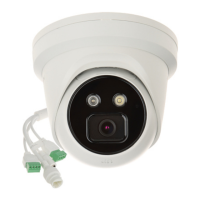
IP CAMERA DS-2CD2386G2-ISU/SL(2.8MM) ACUSENSE - 8.3 Mpx Hikvision
DELTA-OPTI Monika Matysiak; https://www.delta.poznan.pl
POL; 60-713 Poznań; Graniczna 10
e-mail: delta-opti@delta.poznan.pl; tel: +(48) 61 864 69 60
2021-11-04 DS-2CD2386G2-ISU/SL(2.8MM) 3/6
Audio:
• 1 Input
• 1 Output
• Microphone built-in
• Speaker built-in
• Bi-directional audio streaming support
Main stream frame rate: 25 fps @ 8.3 Mpx
Network interface: 10/100 Base-T (RJ-45)
Network protocols:
TCP/IP, ICMP, HTTP, HTTPS, FTP, DHCP, DNS, DDNS, RTP, RTSP, NTP, UPnP,
SMTP, IGMP, IEEE 802.1x, QoS, IPv4/IPv6, UDP, Bonjour, SSL / TLS, PPPoE, SNMP,
ARP
WEB Server: Built-in
Max. number of on-line users: 6
ONVIF: 18.12
Main features:
• Camera from AcuSense series
• WDR - 120 dB - Wide Dynamic Range
• 3D-DNR - Digital Noise Reduction
• BLC/HLC - Back Light / High Light Compensation
• ROI - improve the quality of selected parts of image
• Anti-Flicker - The technology eliminates the tiring eyes flickering image effect
• ANR - Automatic Network Replenishment allows to save image to the card when the
network connection with DVR is break (network failure) and next synchronize its
• Day/night mode
• ICR - Movable InfraRed filter
• WB - White Balance
• AGC - Automatic Gain Control
• Possibility to change the resolution, quality and bit rate
• Sharpness - sharper image outlines
• Mirror - Mirror image
• Configurable Privacy Zones
• Motion Detection
• Filtering of false alarms based on the recognition of persons and vehicles
• Light and sound alarm,
• Intelligent Image Analysis : intrusion, crossing the line (tripwire), detection of entry
into the area / exit from the area, scene changing, face detection, advanced face
capture features
Mobile phones support:
Port no.: 8000 or access by a cloud (P2P)
• Android: Free application iVMS-4500 or Hik-Connect
• iOS (iPhone): Free application iVMS-4500 or Hik-Connect
Default IP address: 192.168.1.64
Default admin user / password:
admin / -
The administrator password should be set at the first start
Web browser access ports: 80
PC client access ports: Port no.: 8000 or access by a cloud (P2P) - iVMS-4200 application
Mobile client access ports: 8000
Port ONVIF: 80
RTSP URL:
• Main stream
rtsp://user:password@192.168.1.64:554/Streaming/Channels/101/ - with
authorization
• Sub stream
rtsp://user:password@192.168.1.64:554/Streaming/Channels/102/ - with
authorization


 To Next Page
 Loading...