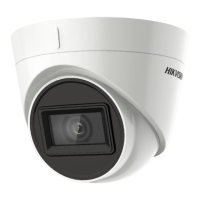
This document describes the Hikvision TURBO HD U1T Series Turret & Dome Camera, a high-performance surveillance device designed for various monitoring environments.
Function Description:
The Hikvision TURBO HD U1T Series camera is a versatile surveillance solution offering high-quality image capture with advanced features for optimal performance in diverse lighting conditions. It supports multiple video output formats, allowing for flexible integration into existing surveillance systems. The camera is designed for both wall and ceiling mounting, providing adaptability for different installation scenarios.
Important Technical Specifications:
The camera is equipped with a high-performance CMOS sensor, ensuring clear and detailed image capture. It features an IR cut filter with auto switch, enabling seamless transition between day and night modes for continuous monitoring. The camera supports an OSD menu with configurable parameters, allowing users to customize settings to suit specific needs. Internal synchronization ensures stable operation, while the SMART IR mode intelligently adjusts infrared light intensity to prevent overexposure. The 3-axis adjustment feature provides flexibility in positioning the camera for optimal viewing angles.
The camera offers various video formats, including:
- 8MP@12.5 fps
- 8MP@15fps
- 5MP@20fps
- 4MP@25fps
- 4MP@30fps
- 2MP@25fps
- 2MP@30fps
When switching video output to CVBS, users can select PAL or NTSC formats. For AHD output, only 5MP@20fps is supported. When using CVI output, the camera supports 8MP@12.5 fps or 8MP@15fps.
The input voltage should comply with SELV (Safety Extra Low Voltage) and Limited Power Source with 12 VDC, according to the IEC60950-1 standard.
Usage Features:
The camera offers a user-friendly interface accessible via an OSD menu. This menu can be called by clicking a button on the PTZ Control interface or by calling preset No. 95.
Exposure Settings:
- EXPOSURE MODE: Options include GLOBAL, BLC (Backlight Compensation), and DWDR (Digital Wide Dynamic Range).
- GLOBAL: Normal exposure mode based on overall image brightness.
- BLC: Compensates for light on the front object, making it clearer, but may overexpose the background.
- DWDR: Provides clear images in backlight conditions by balancing brightness levels across very bright and very dark areas.
- AGC (Automatic Gain Control): Optimizes image clarity in poor light conditions. Levels can be set to HIGH, MEDIUM, or LOW. Note that higher AGC levels may amplify noise.
Day/Night Switch:
Users can select COLOR, BW (Black White), or AUTO modes for day/night switching.
- COLOR: Image remains colored in day mode.
- BW: Image is black and white, with IR LIGHT turning on in poor light conditions.
- AUTO: Automatically switches between Color and BW based on scene brightness.
- IR LIGHT: Can be turned on/off to meet different requirements.
- SMART IR: Adjusts IR light intensity to prevent overexposure. Values from 0 to 3 are available, with higher values yielding more obvious effects.
- D→N Threshold (Day to Night Threshold): Controls sensitivity for switching from day to night mode (values 1-9). Higher values mean greater sensitivity.
- N→D Threshold (Night to Day Threshold): Controls sensitivity for switching from night to day mode (values 1-9). Higher values mean greater sensitivity.
Video Settings:
The VIDEO SETTINGS submenu allows adjustment of:
- IMAGE MODE: Sets image saturation to STD (Standard) or HIGH-SAT (High Saturation).
- WHITE BALANCE: Adjusts color temperature to remove unrealistic color casts. Modes include AUTO and MANUAL.
- AUTO: Automatically adjusts white balance based on scene illumination.
- MANUAL: Allows setting R-GAIN/B-GAIN values (1-255) to adjust red/blue color shades.
- BRIGHTNESS: Adjusts image brightness (values 1-9). Higher values result in brighter images.
- CONTRAST: Enhances color and light differences (values 1-9).
- SHARPNESS: Determines image detail (values 1-9).
- SATURATION: Adjusts color saturation (values 1-9).
- DNR (Digital Noise Reduction): Decreases noise, especially in poor light conditions or with moving images (values 1-9).
- MIRROR: Options include OFF, H (horizontal flip), V (vertical flip), and HV (horizontal and vertical flip).
Installation Features:
The manual outlines detailed installation steps for different camera types (Type I, II, III Turret, and Type IV Dome). Key steps include:
- Disassembly: Rotating the camera body or losing screws to separate the mounting base.
- Drill Template: Using a supplied template to mark screw holes and an optional cable hole on the ceiling/wall.
- Mounting Base Attachment: Securing the mounting base with supplied self-tapping screws (for wooden surfaces) or expansion bolts (for cement surfaces).
- Cable Routing: Routing cables through the cable hole or side opening.
- Camera Attachment: Aligning and securing the camera body to the mounting base.
- Adjustment: Using 3-axis adjustment (pan, tilt, rotation) to achieve the optimum viewing angle. For Type IV Dome cameras, this involves loosening screws, adjusting the tilt, pan, and rotation, and then reinstalling the bubble.
Maintenance Features:
- FACTORY DEFAULT: Resets all camera settings to their factory default values.
- EXIT: Exits the menu without saving changes.
- SAVE & EXIT: Saves all current settings and exits the menu.
Safety Instructions:
The manual emphasizes several safety precautions:
- Compliance with electrical safety regulations.
- Ensuring input voltage meets SELV and Limited Power Source standards (12 VDC, IEC60950-1).
- Avoiding connecting multiple devices to one power adapter to prevent overload.
- Ensuring firm plug connection and secure device fixation for wall/ceiling mounting.
- Discontinuing use and contacting service if smoke, odor, or noise occurs.
- Prohibiting unauthorized disassembly.
- Avoiding physical shock, extreme temperatures (-40°C to 60°C), dusty/damp locations, and high electromagnetic radiation.
- Not touching sensor modules with fingers; using a clean cloth with ethanol for cleaning.
- Avoiding aiming the camera at the sun or bright places.
- Ensuring the sensor is not exposed to laser beams.
- Requiring good ventilation to prevent heat accumulation.
- Keeping non-waterproof devices away from liquids.
Regulatory Compliance:
The device complies with FCC regulations (Part 15 for Class A digital device) and EU conformity standards (Low Voltage Directive 2014/35/EU, EMC Directive 2014/30/EU). It also adheres to WEEE directive 2012/19/EU and battery directive 2006/66/EC, indicating proper disposal and recycling procedures. Industry Canada ICES-003 compliance (CAN ICES-3 (A)/NMB-3(A)) is also stated.

 Need help?
 General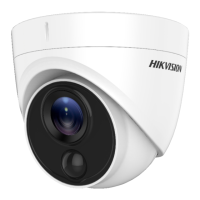



 To Next Page