Need help?
Do you have a question about the HIKVISION DS-PK1-LRT-HWB and is the answer not in the manual?
Provides overview, purpose, and update information for the manual.
Lists Hikvision and third-party trademarks and logos.
Outlines limitations of liability, warranties, and user responsibilities.
Covers arming the system in away, stay, and specific area modes.
Covers disarming the system and specific areas, including duress.
Operations for silencing alarms and managing system relays.
Details on how to trigger or respond to fire, panic, and medical alarms.
Accessing and setting keypad parameters.
Adding, editing, and managing user accounts and permissions.
Managing RFID tags and keyfobs for system access.
Customizing display text and locking/unlocking the control panel.
Enabling or disabling bypass for specific system zones.
Configuring network connectivity and parameters.
Checking system status, faults, and device information.
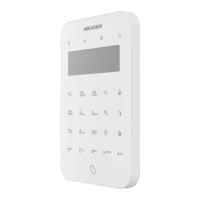
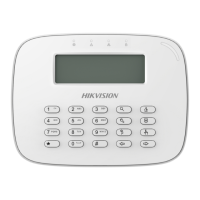
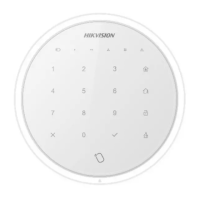
This document outlines the operation commands for a Hikvision Wired Keypad, providing a comprehensive guide for users to interact with their security system. The keypad serves as a primary interface for arming, disarming, and managing various aspects of the connected control panel, offering both basic security functions and advanced configuration options.
The Wired Keypad is designed to facilitate the control and monitoring of a security system. Its core functions revolve around arming and disarming the system, with different modes available to suit various security needs. Users can perform an "Away arm" when leaving the premises, securing all zones, or a "Stay arm" when remaining inside, typically arming perimeter zones while allowing free movement within. For multi-area installations, "Area away arm" and "Area stay arm" commands allow for selective arming of specific zones or areas. Disarming the system is straightforward, either for the entire system or for specific areas. A crucial safety feature is the "Duress password disarm," which allows users to disarm the system under duress while silently alerting authorities, provided it has been configured on the control panel's web client.
Beyond basic arming and disarming, the keypad offers additional functionalities. The "Silence" command allows users to quiet alarms, which is particularly useful in situations where an alarm has been triggered but the immediate threat is contained or identified as a false alarm. The "Relay" function enables control over connected relays, which can be used to operate external devices like lights, gates, or other automated systems. This feature requires navigating a relay selection page, allowing users to choose and activate specific relays.
The keypad also provides access to "Settings," a comprehensive menu for configuring various system parameters. This includes "User Management," where administrators can add, modify, or delete user accounts, set passwords, and assign specific permissions. "Tag Management" allows for the enrollment and linking of RFID tags to users, simplifying arming and disarming with a quick swipe. Similarly, "Keyfob Management" enables the addition and removal of wireless keyfobs, providing another convenient method for system control. "OSD Text" allows for customization of the on-screen display, enabling personalized messages or information to be shown on the keypad. The "Control Panel Lock/Unlock" feature provides an additional layer of security, preventing unauthorized access to the control panel's settings.
The "Query" function is a vital diagnostic and informational tool. It allows users to check the status of various components of the security system, including the "Control Panel Status," "Zone Status," "Peripheral Status," and "Area Status," providing insights into any faults or operational issues. Furthermore, users can retrieve detailed information about the control panel and the keypad itself, such as model, serial number, version, bus address, and bus status, which is useful for maintenance and troubleshooting.
Alarm functions are also integrated, allowing for manual triggering of specific alarms. Users can initiate a "Fire alarm," "Panic alarm," or "Medical alarm" by holding down designated keys for more than three seconds. These immediate alarm triggers are critical for emergency situations, ensuring a rapid response when needed.
The keypad's operation is designed for clarity and efficiency, primarily relying on a combination of passwords, RFID tags, and specific key presses. Many commands require a password or a tag swipe for authentication, ensuring that only authorized individuals can control the system. The use of a password followed by a specific function key (e.g., 【Password】/【Tag】+【L】 for Away arm) is a common pattern across various operations. For commands involving specific areas or relays, users are guided through selection menus using directional keys (←↑, ↓→) and the # key for confirmation.
A notable usage feature is the "one-push arming" capability, which simplifies the arming process by eliminating the need to enter a password or select an area number for certain arming modes. This provides quick and convenient arming when time is of the essence.
The system incorporates a robust fault handling mechanism. Before executing many commands, the keypad will first display any system faults or zone faults. Users are required to confirm these faults using the # key before proceeding with the intended command. This ensures that users are aware of any underlying issues that might affect system performance or security.
The arming process itself is structured into three distinct stages: "Arming waiting," "Fault confirmation," and "Exit delay." During the "Arming waiting" stage, the keypad indicates that the system is preparing to arm. The "Fault confirmation" stage, as mentioned, prompts the user to acknowledge any detected faults. The "Exit delay" stage provides a countdown, allowing users time to leave the armed premises before the system fully engages. This delay can be skipped by pressing the arm key again, or the entire arming process can be canceled using the disarm key. Successful arming is indicated by a brief illumination of the corresponding arming indicator and a voice prompt, while a failed operation results in no indicator light and a voice prompt indicating failure.
For advanced settings, the keypad provides a structured menu system. Accessing the settings page typically requires a password. Within settings, navigation is intuitive, allowing users to select options like "Add User," "Keypad Password," or "User Permission" to manage system access and configurations. Linking RFID tags or keyfobs to users is also a streamlined process, enhancing the convenience of system operation.
Network management features allow for configuration of connectivity options, including LAN, Wi-Fi, Cloud, or Cellular Network settings. Users can enable or disable DHCP and manually configure network parameters, providing flexibility in how the keypad connects to the broader security network.
The keypad incorporates several features that aid in system maintenance and troubleshooting. The "Query" function is central to this, allowing users to quickly assess the health and status of the entire security system. By checking "Control Panel Status," "Zone Status," "Peripheral Status," and "Area Status," technicians or advanced users can identify specific components that may be experiencing issues, such as open zones, offline peripherals, or general system malfunctions. This detailed status reporting helps in pinpointing problems efficiently.
Furthermore, the "Query" function provides access to critical identification information for both the control panel and the keypad itself. Details such as model numbers, serial numbers, firmware versions, bus addresses, and bus status are invaluable for support and maintenance activities. This information helps in verifying hardware compatibility, tracking inventory, and ensuring that all components are operating on the correct firmware versions.
The "Settings" menu also plays a role in maintenance, particularly through "User Management" and "Tag/Keyfob Management." Regularly reviewing and updating user permissions, adding new users, or removing old ones is a key aspect of security system maintenance. Similarly, managing RFID tags and keyfobs ensures that only authorized access methods are active and that lost or compromised credentials can be quickly revoked.
The "Control Panel Lock/Unlock" feature, which is typically restricted to installers, is a maintenance-related security measure. When the control panel is locked, access to its settings is restricted, preventing unauthorized changes during maintenance or normal operation. This ensures system integrity and prevents accidental misconfigurations. Only authorized installers have the permissions to lock and unlock the control panel, highlighting the importance of this feature for system security and stability.
The "Bypass/Restore Bypass" function is another maintenance-oriented feature. It allows users to temporarily disable specific zones, for example, during maintenance work on a sensor or when a zone is intentionally left open. After the work is complete, the bypass can be restored, bringing the zone back into the armed state. This prevents false alarms during maintenance and ensures that the system can be fully secured once work is finished.
The keypad's ability to display all system and zone faults before command execution is also a proactive maintenance feature. It forces users to acknowledge potential issues, prompting them to address them before proceeding with operations that might be compromised by existing faults. This helps in maintaining a healthy and reliable security system by ensuring that problems are not overlooked.
In summary, the Hikvision Wired Keypad is a versatile and user-friendly interface that provides comprehensive control over a security system. Its design emphasizes ease of use for daily operations while offering robust features for configuration, troubleshooting, and maintenance, ensuring a secure and reliable environment.
 General
| Product color | White |
|---|---|
| Device interface | RS-485 |
| Serial ports quantity | 1 |
| Connectivity technology | Wired |
| Device type | Security alarm system |
| Product type | Keypad |
| Mounting type | Wall |
| LED indicators | Yes |
| Brand compatibility | Hikvision Digital Technology |
| Operating frequency | 433 MHz |
 Weight and Dimensions
| Depth | 28 mm |
|---|---|
| Width | 150 mm |
| Height | 115 mm |
| Dimensions (WxDxH) | 150 x 28 x 115 mm |


 To Next Page