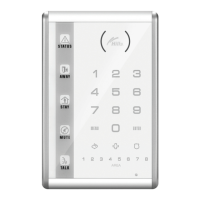
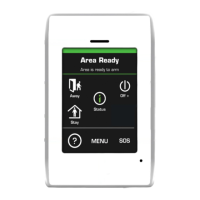
This document describes the Hills Wireless DIY Security Alarm Starter Kit, a comprehensive wireless alarm system designed for easy installation and remote control.
Function Description
The Hills Wireless DIY Security Alarm Starter Kit is a wireless security alarm system that allows users to arm, disarm, and monitor their premises remotely via a smartphone app or phone calls. It supports up to 50 wireless sensors and accessories, featuring a built-in 120dB siren to deter intruders. The system can store up to 5 phone numbers for call alerts and 5 SMS numbers for text notifications. In the event of an intrusion, the siren will activate, and the alarm panel will send alert SMS messages and dial the pre-stored phone numbers. Users can manage the system remotely by phone, even without typing a password when receiving a call from the alarm system. The system offers various modes: Arm, Disarm, Home, Mute, and Emergency. In Home mode, sensors configured for this zone are disarmed, allowing movement within the home while other zones remain armed. Mute mode allows arming or disarming the system without the alarm panel beeping. Emergency mode triggers an alarm regardless of the system's status, sending SMS notifications and calling pre-stored numbers. The alarm panel also supports making phone calls and speed dialing the first stored phone number.
Important Technical Specifications
Alarm Panel:
- Power Supply: Input AC 110~240V-50~60Hz / Output DC 12V-800mA
- Internal Battery Backup: 3.7V / 800 mAh battery pack x 2 (8 hours in standby mode)
- Internal Siren: 120dB
- Accessories Supported: 60 (including 10 Remote Controls)
- Radio Frequency: 433MHz (±75 KHz)
- 2G & 3G Frequency: 2G-850/900/1800/1900MHz, 3G-850/2100MHz
- Housing Material: ABS plastic
- Operating Conditions: Temperature: -10°C~55°C, Humidity: ≤ 80% (non-condensing)
- Panel Size (L x W x H): 200mm x 125mm x 26mm
- SIM Card: Requires a user-supplied SIM card (2G or 3G network, 850/2100Mhz) with SIMLOCK deactivated.
- LED Indicators:
- Arm / Disarm (Blue): On when armed, blinks once per second in Home Mode.
- Setup / Connection (White): On in Connection and Setup modes.
- Power / Low Power (Green): On when properly powered, blinks when power is low (<7V).
- GSM Signal: Flashes once per second with no signal/SIM card, flashes once every 3 seconds when signal is retrieved.
Wireless Remote Control:
- Power Supply: DC 3V (CR2025 button battery x1)
- Static Current: 10 uA
- Operating Current: ≤7 mA
- Transmission Distance: ≤ 80 m (in open area)
- Radio-frequency: 433MHz (±75KHz)
- Housing Material: ABS plastic
- Operating Conditions: Temperature: -10°C ~ +55°C, Relative Humidity: ≤80% (non-condensing)
- Dimensions: 57 x 31 x 11 mm
Wireless Motion Sensor:
- Power Supply: DC 3V (AA 1.5V LR6 Batteries x 2)
- Static Current: ≤ 30 uA
- Alarm Current: ≤ 15 mA
- Detection Scope: 8m / 110°
- Transmission Distance: ≤ 80m (in open area)
- Radio-frequency: 433 MHz (±75 KHz)
- Housing Material: ABS plastic
- Operating Conditions: Temperature: -10°C~55°C, Relative Humidity: ≤ 80% (non-condensing)
- Sensor Dimensions (L x W x H): 107 x 53 x 32 mm
- Bracket Dimensions (L x W x H): 52 x 30 x 26.5 mm
- Features: Digital dual-core fuzzy logic infrared control chip, intelligent analysis, automatic temperature compensation, anti-air turbulence technology, tamper switch.
- LED Indications:
- Continuously blinks: Self-testing.
- Blinks once: Intruder detected.
- Blinks twice: Self-testing complete, entering working mode.
- Blinks once every 3 seconds: Under-voltage indication (batteries need replacement).
Wireless Door/Window Sensor:
- Features: Detects when a magnet is separated from the transmitter (door/window opening), tamper switch triggers alarm if cover is removed.
Usage Features
Installation:
- Insert a SIM card (user-supplied, SIMLOCK deactivated) into the alarm panel.
- Install the alarm panel in the desired location.
- Plug the AC adaptor into a power socket.
- Switch the alarm panel on.
- Register accessories (remote controls, motion sensors, door/window sensors, RFID tags, additional sirens) by entering Registration Mode (#1) on the alarm panel and triggering each accessory. Exit Registration Mode by pressing the Disarm key.
- Download the "Hills DIY Wireless Security App" from the Apple App Store or Google Play, register an account, and connect to the alarm system using the SIM card's mobile number.
- Program a phone number for SMS notifications via the App or directly on the panel.
Alarm Settings (via Alarm Panel):
- Enter Setup Mode: Press #2.
- Exit Setup Mode: Press Disarm key.
- Store Phone Numbers: Enter #[ID]#[your number]# (IDs 1-5 for calls, 6-10 for SMS).
- Delete Phone Numbers: Enter #[ID]## (specific ID) or #*## (all numbers).
- Change Password: Enter 9[new password]* (default is 1234).
- Set Siren Volume: Enter 23[volume]* (1 for high, 0 for mute).
- Set Siren Ring Time: Enter 1[minutes]* (1-9 minutes).
- Set Entry/Exit Delay: Enter [ID][seconds]* (ID 3 for entry, ID 2 for exit; 0-300 seconds).
- Clear Connected Sensors: Enter 22[password]*.
Controlling the Alarm:
- Arm System: Press Arm button (on panel, remote, or App).
- Disarm System: Press Disarm button (on panel, remote, or App).
- Home Mode: Press Home Mode button (on panel, remote, or App).
- Mute Mode (Remote Control): Press Home Mode button immediately followed by Arm or Disarm button.
- Emergency Mode (SOS): Press SOS button on remote control or hold SOS button on panel for 3 seconds.
- Make Phone Call (Disarmed Status): Type number and press Call key on panel.
- Speed Dial (Disarmed Status): Press and hold Call button on panel for 3 seconds to dial the first stored number.
- Remote Control via Phone: Dial SIM card number, enter password#, then select commands (e.g., "1" to arm, "0" to disarm, "*" for audio monitoring, "3" for phone call with panel, "6" to turn siren off, "9" to turn siren on, "#" to exit control).
Motion Sensor Installation:
- Mount 2.2m from the ground, avoiding windows, air conditioners, heaters, refrigerators, ovens, direct sunshine, or areas with rapid temperature changes/air flow.
- Fix the bracket with screws and attach the sensor. Adjust the bracket to change detection distance and angle.
- Test by turning on, waiting 1 minute for self-testing, then walking in detection scope to ensure LED blinks.
Maintenance Features
- Battery Replacement: Motion sensor LED blinks once every 3 seconds for under-voltage, indicating battery replacement is needed. SMS notification will also be sent if registered.
- Cleaning: Keep the surface of the infrared sensor clean. Do not use detergent or flammable materials to clean the unit.
- Long-term Storage: Remove batteries if the product will not be used for a long time to optimize their lifespan.
- Troubleshooting: If issues arise, contact your supplier or an authorized technician. Do not open the case of the alarm panel or attempt self-repair.
- SIM Card Deactivation: Deactivate SIMLOCK on the SIM card using a mobile phone before installing it in the alarm panel.
- Sensor Power Saving: Motion sensor switches to standby mode if triggered more than twice within 3 minutes, returning to working mode after 3 minutes of no movement.

 Need help?
 General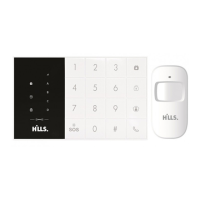

 To Next Page