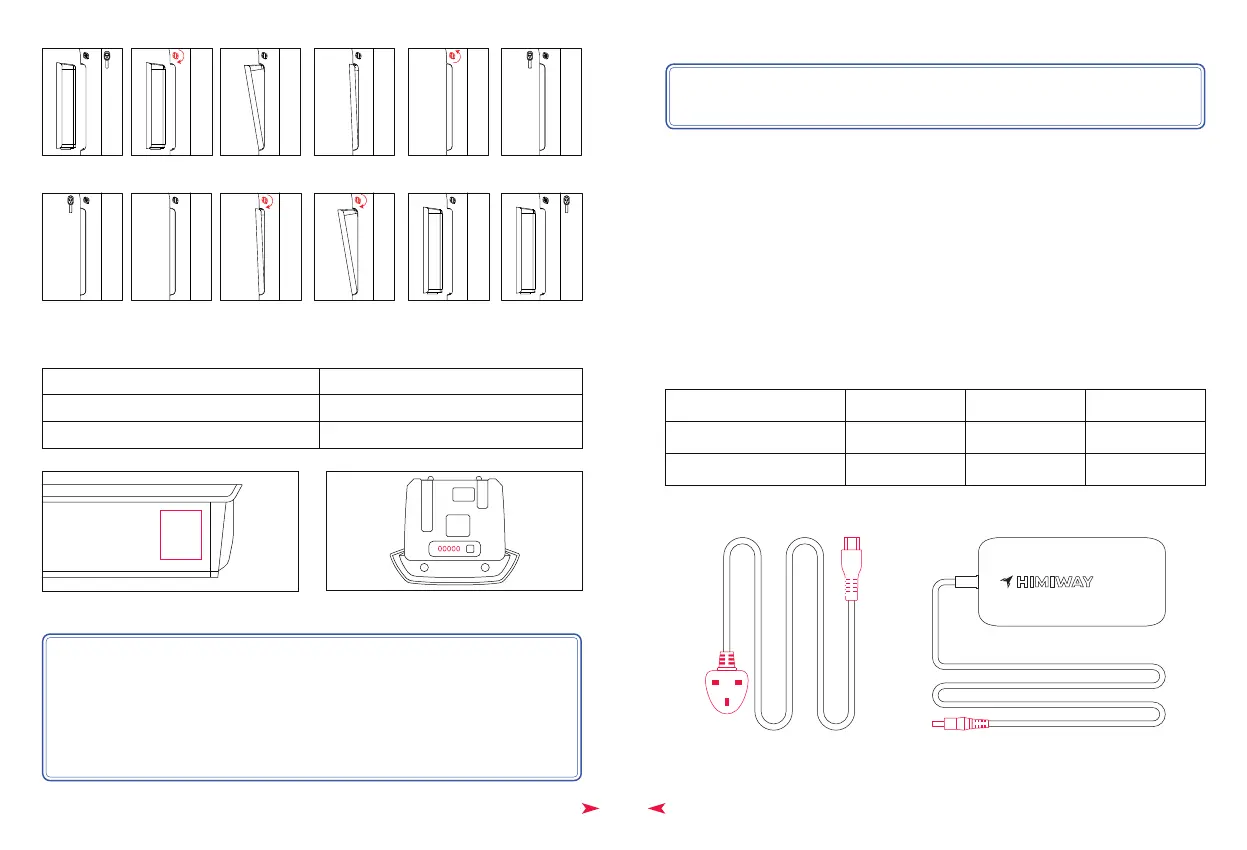
Safest way to charge your battery-
First, assemble the charger by inserting the plug (Plug 1) into the transformer.
Then insert the DC plug (Plug 2) into the battery charging socket.
Last, insert the power plug (Plug 3: 110V-240V plug) to the power socket. This
order helps extend the battery life and effectively reduces battery damage
caused by improper charging.
The charger works on 110V-240V 60 Hz standard home AC power outlets. Do
not open the charger to select voltage input as the charger can automatically
detect and account for incoming voltage.
Step 4:
Project
Battery Input Voltage
Standby current
Unit
V
mA
Minimum
28
Max
55
0.1
15
Plug 3
Plug 2
Plug 1
NOTICE: Hold the battery while doing the operation, and prevent dropping it during
installation and handling.
Light Status
Red (on charger)
Green(on charger)
Charging Status
Charging
Fully charged
Figure 7 Figure 8
Step 3: Check the battery status (fig. 8):
NOTICE:
1. There are 5 bars on the battery power indicator. Each bar contains 20% battery.
2. Please write down the serial number found on the battery beneath the barcode
(fig.7) on the inside front cover of this manual to facilitate failure reporting.
Products that have the serial number and/or barcode removed, defaced,
damaged, altered, or made illegible will not be covered by the warranty.
Figure 5
Figure 6



 To Next Page