10
Getting started - Installation
Note: To ensure the best possible operation of the Noahlink Wire-
less always make sure it is placed out in the open with a clear
line-of-sight between the Noahlink Wireless and the hearing in-
struments to be fitted.
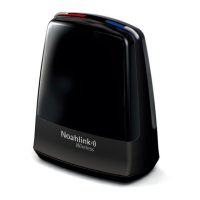
Noahlink Wireless is a USB plug-and-play programming interface
enabling you to wirelessly fit hearing Instruments from licensed
manufacturers. For a complete list of hearing instrument manu-
facturers who use Noahlink Wireless, visit www.himsa.com.
1. Before you connect Noahlink Wireless make sure that you
have the approriate fitting software installed. The Noahlink
Wireless driver is installed during fitting software installation.
2. After successful fitting software installation attach Noahlink
Wireless to any USB port on the PC using the supplied USB
cable. A 2-3 second solid green light indication will confirm
that Noahlink Wireless is powered.


 To Next Page