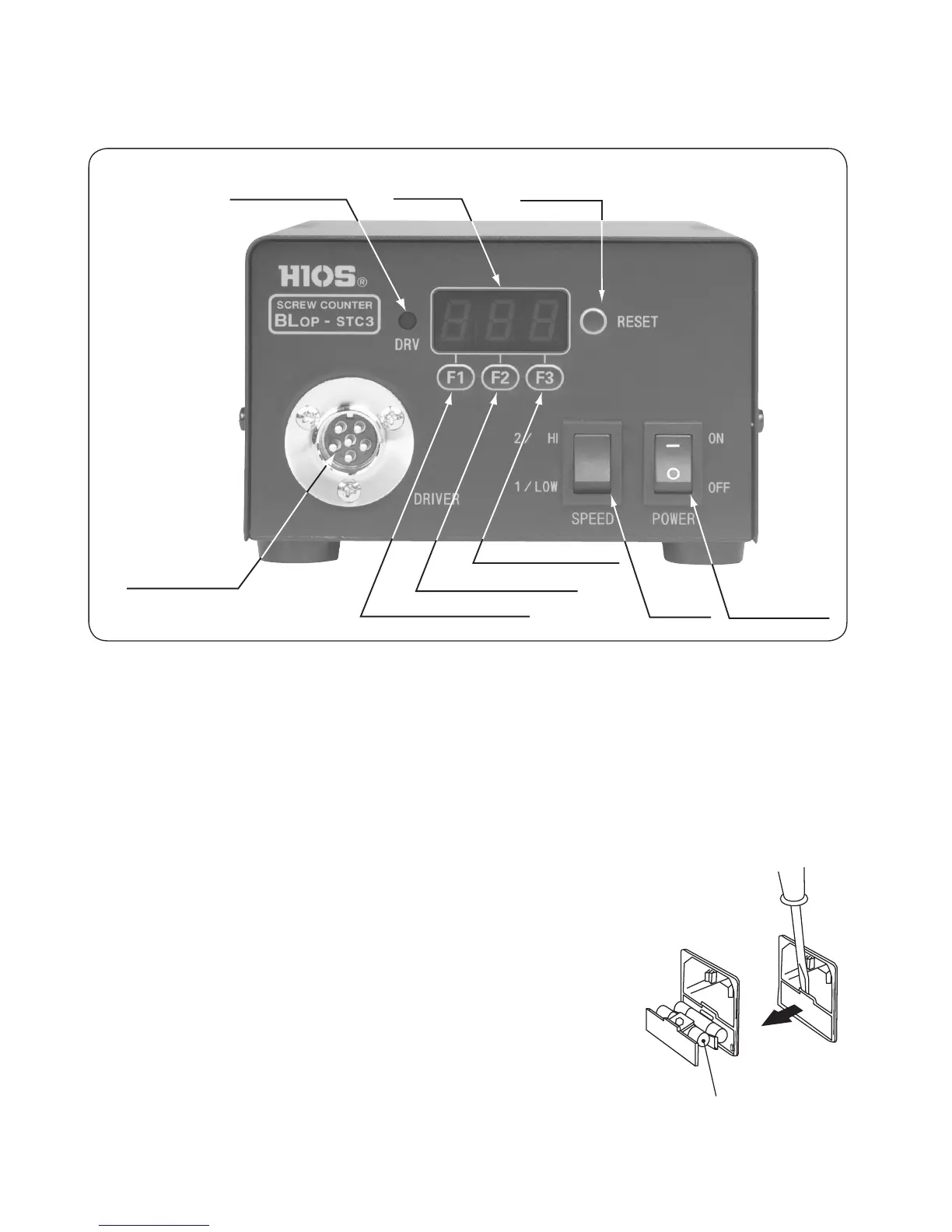
<Description of front panel>
●
Main power switch (POWER)
•
Turns the power supply on and off.
•
When the power supply is “on”, the LED inside the switch lights.
•
The protection circuit automatically operates and turns off the power supply if the elec-
tric screwdriver locks and causes an overload.
In this case, turn off the main power switch and turn it back on after one minute.
If this measure fails, please check the fuse.
Ifthefusehasfailed,tareplacementfuse.
Spare fuses are stored inside the AC inlet (rear panel).
●
HI/LOW switch (switching of rotational speed) (HI/LOW)
•
Sets the output voltage to high or low.
•
This switch changes the rotational speed of the electric
screwdriver.
●
Metal connector (DRIVER)
•
Connects the driver cord.
•
BLOP-STC 3 uses a 6P (pin) connector type and CLT-70STC 3 uses a 5P (pin).
<Front Panel>
Spare fuses
Operating
display LED
Number of screws
display
* Metal connector
HI/LOW
switch
Power supply
main switch
Reset switch
Function switch (F3)
Function switch (F2)
Function switch (F1)
■
Description of name and function for each section
(Rear panel)
- 7 -


 To Next Page