Measurement of average torque
Objective
Use for routine checks of loosening and tightening
torque.
Measurement procedure
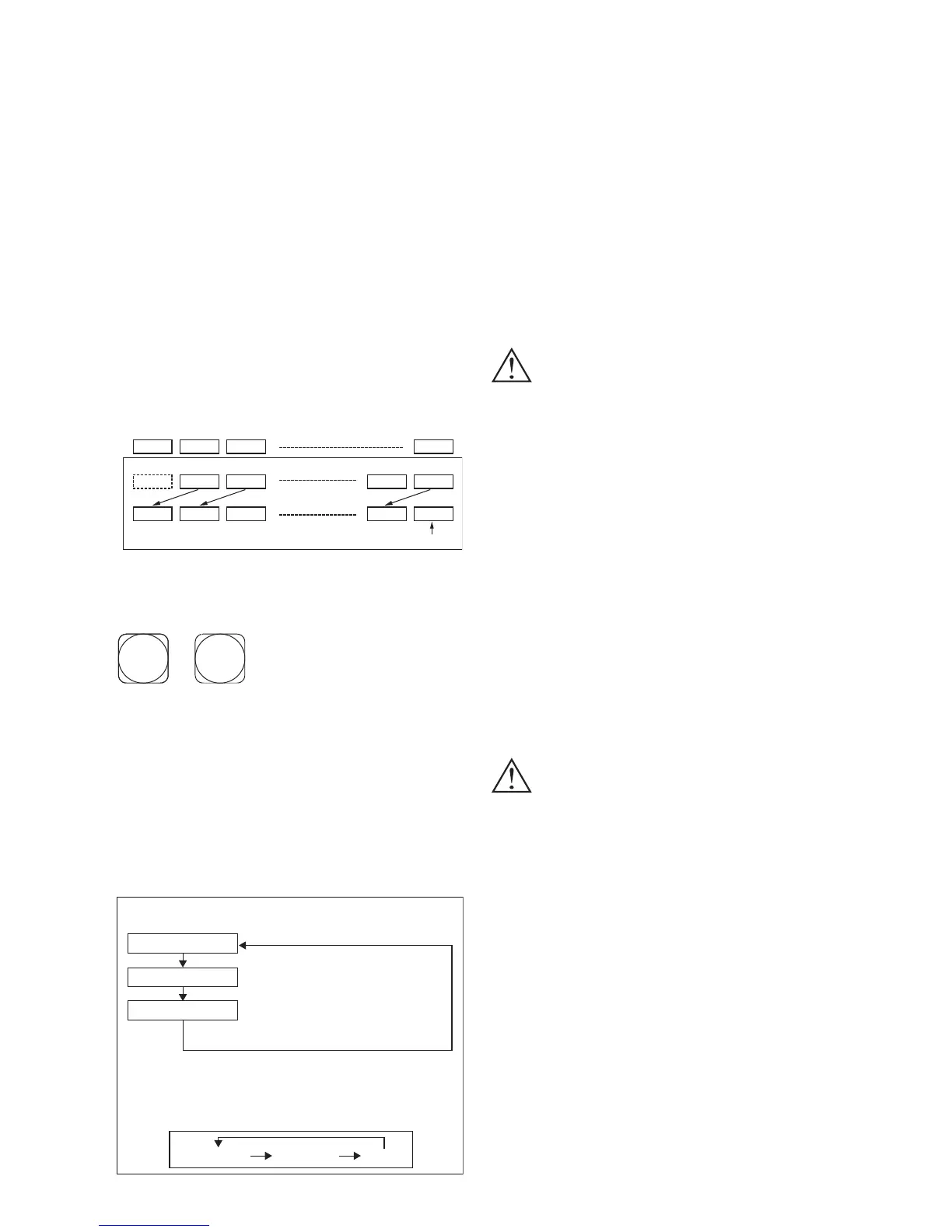
Makes possible measurement of the minimum,
average and maximum values among sets of mea-
surements, each set consisting of up to ten measure-
ments.
1. The measurement results are automatically num-
bered, from 0001 to 0010. Negative displays are
not recorded. Measurements in average mode are
automatically deleted when the meter exits aver-
age mode.
2. If less than 10 measurements are made, the dis-
play shows only those measurements.
Switch functions in average measurement mode
Switches used
③ ⑥
③
【
RESET
】
switch
Puts the instrument into a state of readiness to
begin measurement when in average measure-
ment mode. Press to end measurement or dis-
play of measurement sets.
⑥
【
AV E
】
switch
Press for 2 seconds to enter or exit average mea-
surement mode. The LED lights when in aver-
age measurement mode. The figure show the
average measurement and display cycles.
Max
Example of average measurement
(Average measurement mode, LED on.)
Ready for measurement
Setting screw torque
③【RESET】switch
Sensor unit bit exerts torque on screw.
Press once. "0001" flickers.
(Same for auto-reset.)
Repeat measurements until sufficient data is
obtained.
Display of average measurement data
(Data is displayed while in average measurement mode and is deleted
when the mode is terminated.)
⑥ Each time the【AVE】switch is pressed minimum, average and maxi-
mum values are displayed flickering.
Fig. 1
Min Ave
1st measurement deleted
11th measurement recorded
0001 0002 0003 0010
0001 0002 0003 0009 0010
0001 0002 0003 0009 0010
Notes
1. Be sure to set
【
MODE
】
switch to "PEAK" or
"F.PEAK" before entering average measurement mode.
2. The
【
UNIT
】
switch does not function in average
measurement mode.
■
Battery charger
To charge batteries for the HIOS torque meter use
only the battery charger provided with the meter.
Always turn the power off when charging. The rst
time will require 6 hours for a full charge.
Caution
•
Do not recharge the battery for longer than 6
hours.
•
Use only NiMH batteries, never any other kind,
even if obtained from HIOS Corporation.
•
Do not use the meter while charging the battery.
•
When the letters "LOBAT" appear in the display,
stop measurement and recharge the battery.
•
Do not use the battery charger for any purpose
other than charging batteries for this instrument.
•
Do not place objects on top of the battery char-
ger's cord. Do not subject the cord to extreme
bending or tie it in knots.
•
Be sure the power to the instrument is off when
attaching or detaching the battery charger.
•
Do not attempt to remove the battery from the
instrument.
Danger!
•
Leaving the battery charger on for the maximum
recharge time of 6 hours could lead to overheat-
ing, damage to the instrument or res.
■
How to recharge
1. Turn off the power to the torque meter and insert
the battery charger cord into a power source.
2. When recharging is complete, unplug the cord,
turn the torque meter power switch on and check
that the display goes on.
3. Wait for the battery charger to cool, and store it
in an appropriate location.
- 8 -


 To Next Page