11
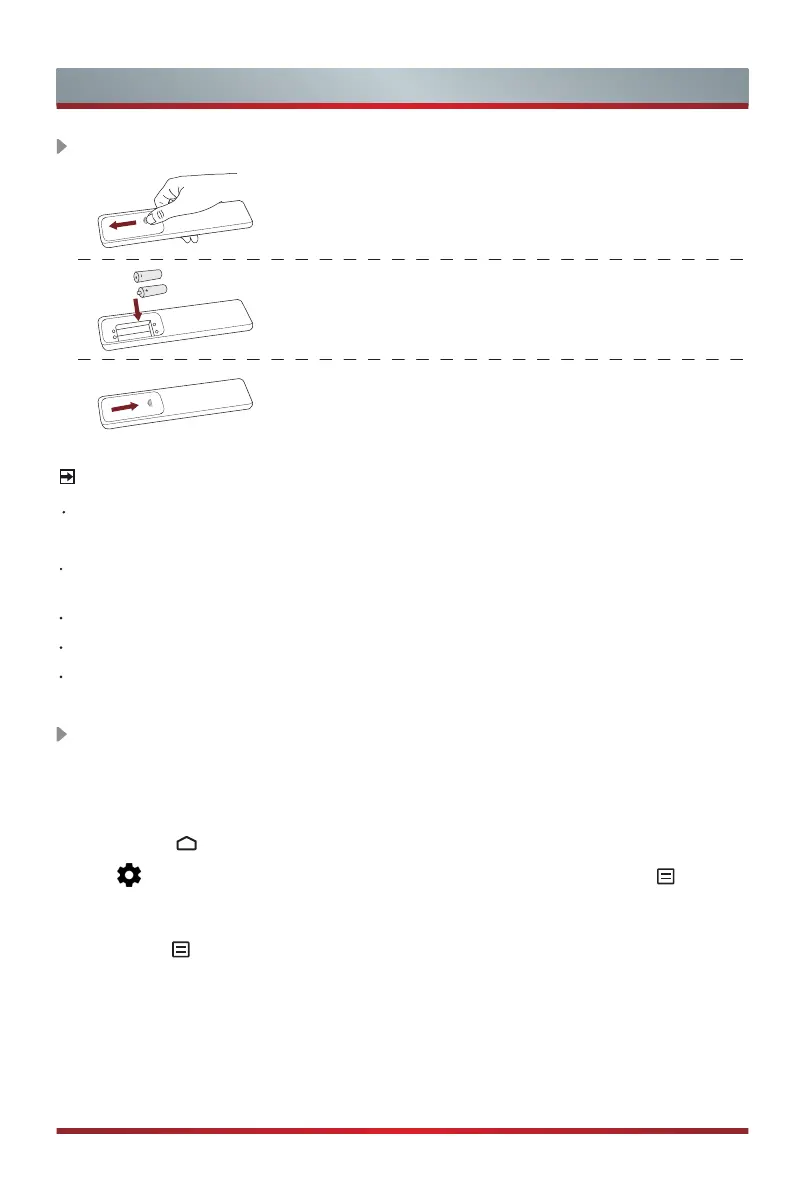
1. Slide the back cover to open the battery compartment
of the remote control.
2. Insert two AAA size batteries. Make sure to match
the (+) and ( - ) ends of the batteries with the (+)
and ( - ) ends indicated in the battery compartment.
3. Close the battery compartment with the cover.
Installing Batteries in the Remote Control
Remote Control
NOTES
Product image is only for reference, actual product may vary in appearance.
Handling the Batteries
Incorrect use of batteries may cause corrosion or battery leakage, which could
cause fire, personal injury or damage to property.
Only use the battery type indicated in this manual
.
Do not mix old and new batteries or different types of batteries.
Do not dispose of used batteries as domestic waste. Dispose of them in
accordance with local regulations.
Pairing the Remote Control
(Only available on certain models and bluetooth
remote control.)
1. Pair the remote to the TV after you power it on. Keep the remote control within 10
feet from the TV.
2. Press the
[ ]
button on your remote to enter the Home screen, and then select
the icon to
access the Settings menu
.
You can also press the
[
]
button
on your remote to enter the
Menu
in TV mode and then select
Remotes &
Accessories
.
3. Press the
[
]
button on your remote at least 3 seconds. The remote indicator light
is red to start pairing.
4. Select the corresponding remote model then a "pairing-connecting-paired"
information will display on the screen.
5. Paired successfully. If it did not pair successfully, repeat step 1.


 To Next Page