20
Advanced Features
Network Function
NOTICE
To access Internet streaming video services, please note
the follow requirements.
1.
Use of Internet services requires a working broadband
Internet connection (1 to 2 Mbps for SD video, 2.25 to 4.5
Mbps for HD video and 4.5 to 9 Mbps for 1080p and 3D
video.).
2.
Internet-based services are not provided by Hisense,
may change or be discontinued at any time and may be
subject to restrictions imposed by your Internet service
provider. The quality, functionality, or availability of such
services may be affected by the capacity of your Internet
connection. Use of video-on-demand and other Internet
services may require the creation of a separate account
through a computer with internet access.
3.
Certain services may not be available for this TV model.
4.
Video-on-demand and other Internet services may require
payment of one-time and/or recurring charges.
5.
You are solely responsible for any charges incurred as a
result of using Internet-based content, including, without
limitation, communications charges for the provision of
Internet or network services and any charges incurred
for third-party Internet content services, such as video on
demand or subscription services. All third-party services
are provided in accordance with whatever terms and
co
nditions are established between such third-party
providers and you.
6.
HI SEN SE MAKE S N O RE PRE SEN TATIO NS O R
WARRANTIES ABOUT THE CONTENT, AVAILABILITY
OR FUNCTIONALITY OF THE VUDU SERVICE OR
OT HER I NTERN ET DELI VERE D T HIRD- PA RT Y
SERVICES AND DOES NOT WARRANT THAT ANY
OF THEM WILL BE UNINTERRUPTED, ERROR FREE
OR SATISFACTORY. ANY IMPLIED WARRANTY,
INCLUDING BUT NOT LIMITED TO ANY IMPLIED
WARRANTY OF MERCHANTABILITY OR FITNES
S
FOR A PARTICULAR PURPOSE OF ANY THIRD PARTY
CONTENT OR SERVICE, IS EXPRESSLY EXCLUDED
AND DISCLAIMED. UNDER NO CIRCUMSTANCES
WILL HISENSE BE LIABLE IN CONTRACT, TORT OR
UNDER ANY OTHER THEORY FOR ANY DAMAGES
ARISING OUT OF OR IN CONNECTION WITH YOUR
USE OF ANY CONTENT OR SERVICE PROVIDED
BY ANY THIRD PARTY, EVEN IF ADVISED OF THE
POSSIBILITY OF SUCH DAMAGES.
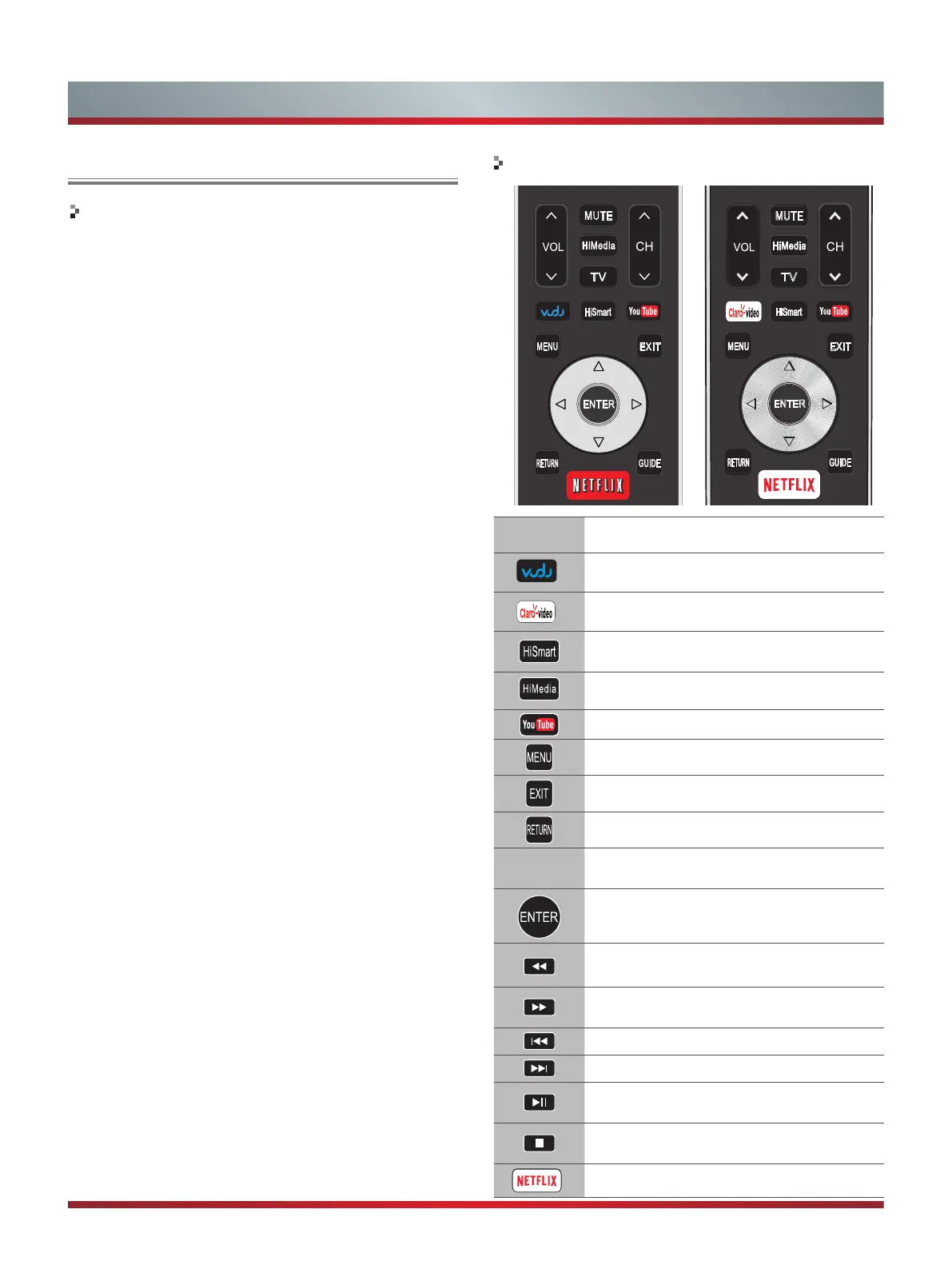
Remote control buttons
Button Description
Open the HiSmart Hub with links to various
Internet Services.
Open the digital multimedia player.
Press to launch YouTube App directly.
Open the menu.
Close the menu.
Return to the previous menu.
▲/▼/◄/►
Navigate Up / Down / Left / Right or adjust
OSD settings.
Confirm selections.
Press to launch Clarovideo
(Only for Mexico)
App directly.
Display the TrickPlay screen and fast
reverses playback.
Display the TrickPlay screen and fast
forwards playback.
Play the previous one.
Play the next one.
Pause playback. Press the button to return
to playback.
Stop playback and display the file title
screen.
Press to launch NETFLIX App directly.
(Only for USA)
Press to launch VUDU MOVIES & TV App
directly.
MUTE
EXIT
RETURN
GUIDE
MENU
HiMedia
HiSmart
ENTER
TV



 To Next Page