- 19 -
LCD TV Service Manual
Hisense Confidential
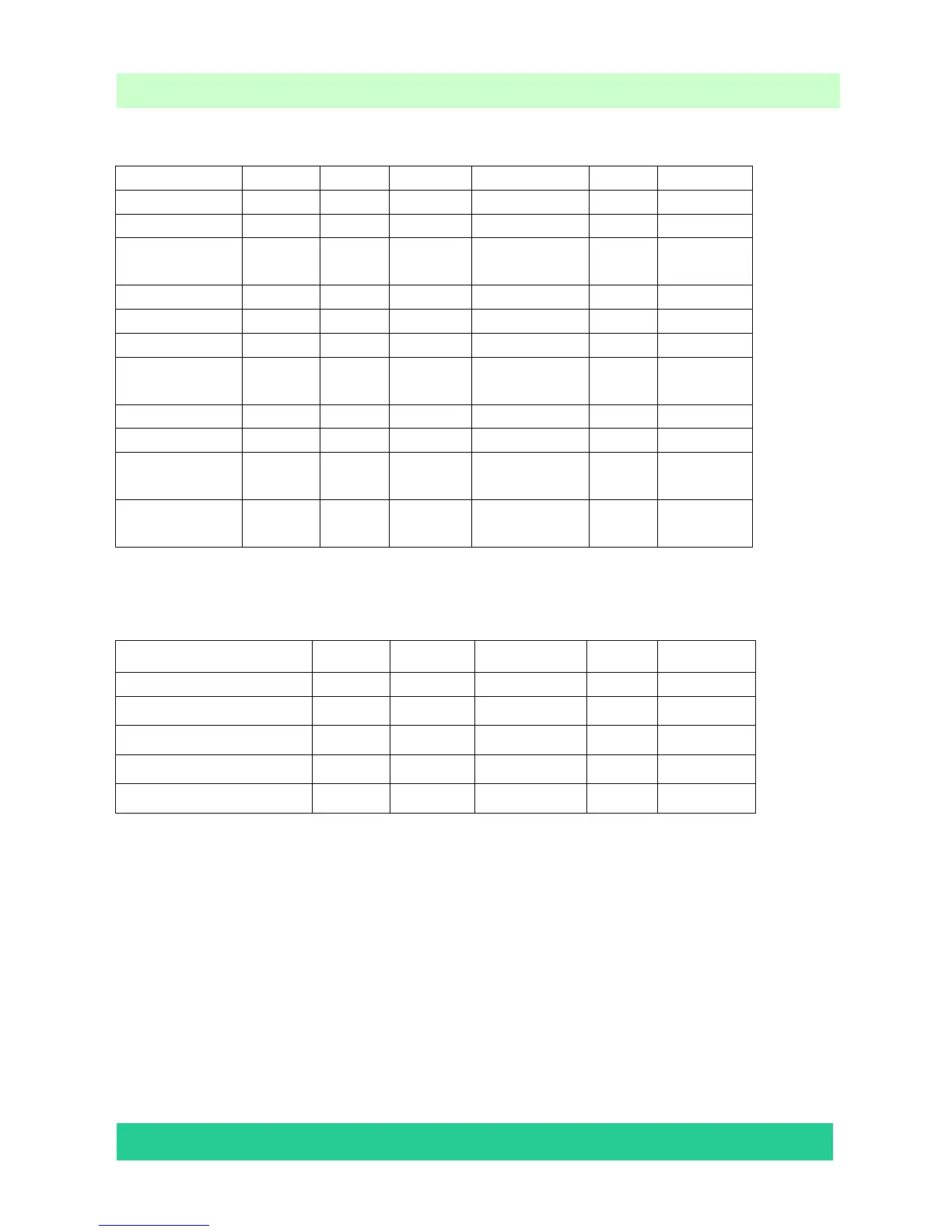
5.3.3 Picture Mode
TV AV S-Video Component VGA HDMI
Vivid Bright 55 55 55 55 55 55
Vivid Contrast 55 55 55 55 55 55
Vivid
Saturation
55 55 55 55 55 55
Std Bright 50 50 50 50 50 50
Std Contrast 50 50 50 50 50 50
Std
Saturation
50 50 50 50 50 50
Movie Bright 45 45 45 45 45 45
Movie
Contrast
45 45 45 45 45 45
Movie
Saturation
45 45 45 45 45 45
5.3.4 Volume Curve:
Min 20 Mid 80 Max
TV 0 24 34 49 80
AV/ S-Video 0 23 30 47 67
component 0 23 30 47 67
HDMI 0 19 24 35 52
VGA 0 23 30 47 67
Note:Set Downmix to “Lt/Rt”.
5.4 To Exit the Aging Mode
If There is a red “M” moving on the screen, it means the TV is in Aging mode. To exit the
Aging mode, use your user RC, and enter 8->0->8 ->7 in sequence.
The above “Factory/Service OSD Menu” are reference only, please refer to the actual units
to determine the appearances.


 To Next Page