7
Making Connections
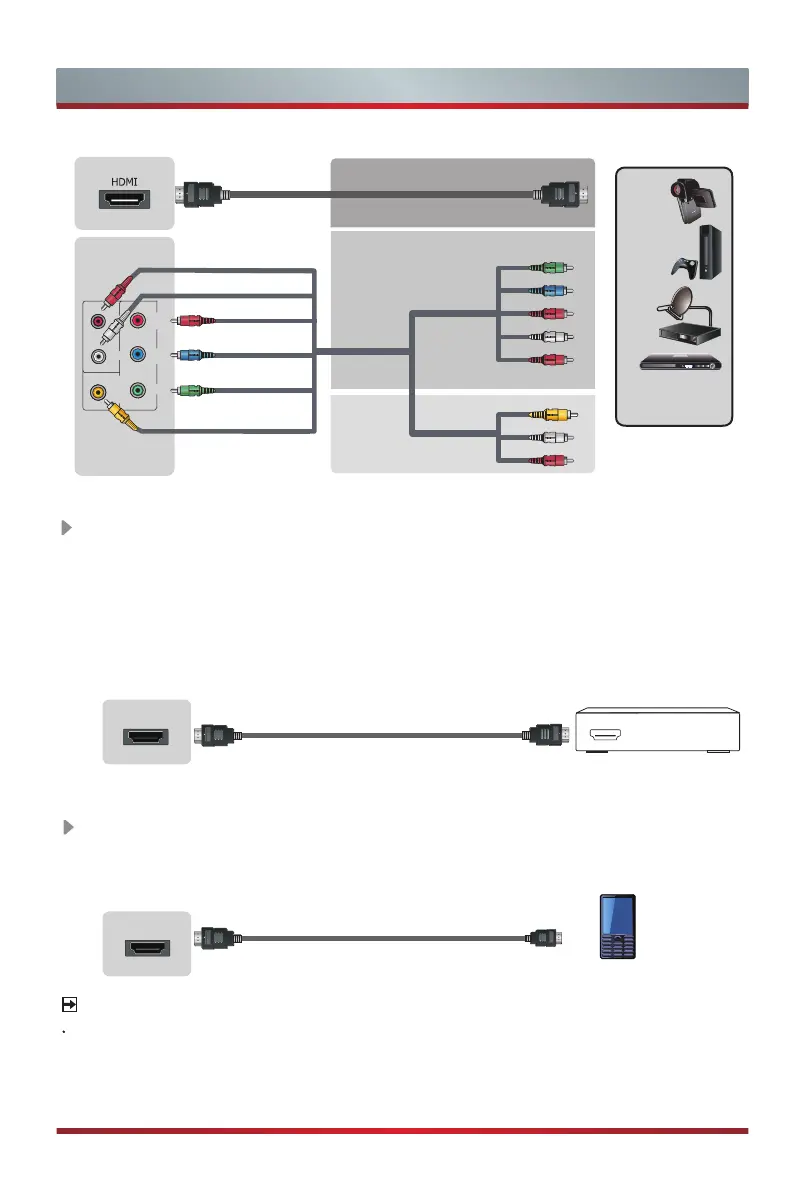
ARC Connect an HDMI cable from an external digital audio system.
ARC enables the TV to directly output the digital sound through an HDMI cable.
Please note that it works only when the TV is connected to the audio receiver that
supports the ARC (Audio Return Channel) function.
When this port is used as the ARC function, it can't be used as signal input at the
same time.
TV JACK
TV JACK
HDMI cable (not included)
MHL cable (not included)
HDMI
Audio Amplier/Speaker
MHL-enabled Device
MHL Connect an MHL cable from your MHL-enabled device, such as a cell
phone.
BEST(HDMI)
Video Effect:
BETTER
(COMP)
GOOD
(AV)
Video Camera/
Set-top Box/
Satellite Receiver
AV
Y
P
b
Pr
Component
L
R
Video
L
R
VIDEO
L R
P
R
P
B
Y
COMPONENT IN
NOTE
MHL is only available through HDMI 1(MHL) and only when the TV is connected to
compatible MHL devices. Please note that not all MHL devices are supported.
TV JACK
ARC
HDMI 2(4K@60Hz)
MHL(DC 5V 900mA)
HDMI 1(4K@60Hz)


 To Next Page