EasyManua.ls Logo

Hisense BRCB0006 - User Manual

Hisense BRCB0006
8 pages
Print Icon
To Next Page IconTo Next Page
Loading...
Remote Control
FCC Notice
This device complies with Part 15 of the FCC Rules. Operation is subject to the follow
two conditions: (1)this device may not cause harmful interference, and (2) this
device must accept any interference received, including interference that may cause
undesired operation.
The manufacturer is not responsible for any radio or TV interference caused by
unauthorized modifications to this equipment. Such modifications could void the
users authority to operate the equipment.
Industry Canada Notice
This device complies with industry Canada licenseexempt RSS standards(s).
Operation is subject to the following two conditions:(1)this device may not cause
interference, and (2)this device must accept any interference, including interference
that may cause undesired operation of the device.
Question and Answer IconNeed help?

Do you have a question about the Hisense BRCB0006 and is the answer not in the manual?

Overview

This document describes a remote control, likely for a television, providing details on its functionality, technical compliance, usage, and maintenance.

Function Description

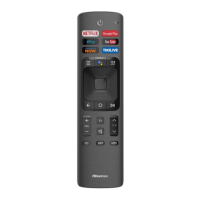
The remote control serves as an interface for operating a television. It features a variety of buttons for common TV functions such as power on/off, volume control, channel selection, and navigation. Additionally, it includes dedicated buttons for specific applications and features, such as Netflix, Google Play, Sling, YouTube, Fandango Now, Tikilive, and a virtual keyboard. Voice control is also supported. The remote allows users to access the TV's menu, display the home screen, and control media playback. It also provides options for Closed Captioning (CC), setting audio language (MTS), and enabling/disabling video description (NRT).

Important Technical Specifications

The device complies with FCC Rules Part 15 for digital devices, indicating it has been tested and found to meet limits for a Class B digital device. This means it is designed to provide reasonable protection against harmful interference in a residential installation and can radiate radio frequency energy. Operation is subject to two conditions: it must not cause harmful interference, and it must accept any interference received, including interference that may cause undesired operation. The manufacturer is not responsible for radio or TV interference caused by unauthorized modifications to the equipment, as such modifications could void the user's authority to operate the equipment.

For Industry Canada, the device complies with license-exempt RSS standards. Its operation is also subject to two conditions: it must not cause interference, and it must accept any interference, including interference that may cause undesired operation.

Regarding RF safety, the equipment complies with FCC RF radiation exposure limits for an uncontrolled environment. It must be installed and operated according to provided instructions and should not be co-located or operating in conjunction with any other antenna or transmitter. End-users and installers must receive antenna installation instructions and transmitter operating conditions to satisfy RF exposure requirements. For Canada, the radiated output power of the Wireless Device is below Industry Canada (IC) radio frequency exposure limits, and it should be used in a manner that minimizes potential human contact during normal operation.

The remote control operates using infrared (IR) technology in an unpaired state. It has a working range of up to 26 feet in front of the TV set and can operate within a 30-degree horizontal or vertical angle.

Usage Features

The remote control is designed for ease of use with clearly labeled buttons.

  • Power On/Off: Turns the TV on or off.
  • 123 (Virtual Keyboard): Activates an on-screen virtual keyboard for text input.
  • Voice Control: Enables voice commands for TV operation.
  • CC (Closed Caption): Toggles Closed Captioning on or off.
  • TV: Switches to Live TV.
  • Menu Button: Accesses the TV's main menu.
  • D-pad (A/V/</>): Used for up, down, left, and right navigation within menus and apps.
  • OK: Confirms selections.
  • Back Button (←): Returns to the previous screen or app.
  • Home Button (O): Displays the Home screen.
  • VOL (+/-): Adjusts volume up or down.
  • CH (∧/∨): Changes channels up or down.
  • Mute Button (Mute): Mutes and restores sound.
  • MTS (Multi-channel Television Sound): Sets the audio language.
  • Media Control Buttons (||, ▷II): Controls media playback (e.g., play, pause, fast forward, rewind).
  • NRT (Narrative/Video Description): Chooses to leave the Video description feature on or off.
  • APP: Provides quick access to applications.

Pairing the Remote Control:

To use the remote control, it must be paired with the TV.

  1. Power on the TV.
  2. Keep the remote control within 20 feet of the TV.
  3. Press and hold the [MENU] button for at least 3 seconds to initiate pairing.
  4. A confirmation message will display on the screen if pairing is successful. If not, an "unsuccessful" message will appear, and the user should repeat the pairing process. The remote cannot be paired while the TV is in standby mode. If an unknown error occurs during pairing, it might be due to interference; users should try to remove the source of interference and attempt pairing again. If the remote malfunctions despite normal battery power, removing the batteries and pressing any key for 1-2 seconds can reset it.

Maintenance Features

The remote control requires two AAA size batteries.

  • Battery Installation:
    1. Slide open the back cover to access the battery compartment.
    2. Insert two AAA batteries, ensuring the (+) and (-) ends match the indicators in the compartment.
    3. Replace the battery compartment cover.
  • Battery Safety and Disposal:
    • Discard batteries in a designated disposal area; do not throw them into a fire.
    • Remove old batteries immediately to prevent leakage.
    • If the remote will not be used for an extended period, remove the batteries to prevent chemical leakage, which can cause a rash. If chemicals leak, clean the battery compartment with a cloth, and if chemicals touch skin, wash immediately.
    • Do not mix old and new batteries.
    • Do not mix alkaline, standard (carbon-zinc), or rechargeable (NiCd, NiMH, etc.) batteries.
    • Discontinue use if the remote gets warm or hot, and contact support.

Hisense BRCB0006 Specifications

General IconGeneral
BrandHisense
ModelBRCB0006
CategoryRemote Control
LanguageEnglish

Related product manuals