EasyManua.ls Logo

Hisense ERF2A60 - User Manual

Hisense ERF2A60
6 pages
Print Icon
To Next Page IconTo Next Page
Loading...
Remote Control
FCC Notice
This device complies with Part 15 of the FCC Rules. Operation is subject to the follow
two conditions: (1)this device may not cause harmful interference, and (2) this
device must accept any interference received, including interference that may cause
undesired operation.
The manufacturer is not responsible for any radio or TV interference caused by
unauthorized modifications to this equipment. Such modifications could void the
users authority to operate the equipment.
Industry Canada Notice
This device complies with industry Canada licenseexempt RSS standards(s).
Operation is subject to the following two conditions:(1)this device may not cause
interference, and (2)this device must accept any interference, including interference
that may cause undesired operation of the device.
Question and Answer IconNeed help?

Do you have a question about the Hisense ERF2A60 and is the answer not in the manual?

Summary

FCC Notice

Industry Canada Notice

FCC RF Safety Caution Statement

RF Exposure Statement for Canada

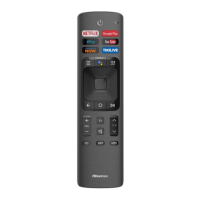
Buttons on your TV remote

Remote control range information

Begin using your remote

Pairing the Remote Control

Overview

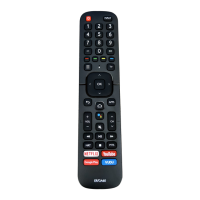
This document describes the Hisense Remote Control, model ERF2A60 (1001), with BCID: 10680/WHBRC80010 and FCC ID: WSHBRCB0010. The remote control is designed to operate a compatible TV, providing various functions for navigation, input selection, volume control, channel changing, and access to smart TV features.

Function Description:

The remote control serves as the primary interface for interacting with a Hisense TV. It allows users to power the TV on and off, select input sources, adjust volume, change channels, and access various smart TV applications and settings. Key functions include:

  • Power On/Off: Controls the TV's power state.
  • Input Source Selection: Changes the active input source (e.g., HDMI, AV).
  • Number Buttons (0-9): Used to enter channel numbers or other numerical inputs.
  • CC (Closed Caption) Source: Toggles or changes the closed caption source.
  • Dash Button: Selects digital sub-channels.
  • Special Function Buttons (Red, Green, Yellow, Blue): These buttons typically correspond to specific functions within menus or applications, often indicated on-screen.
  • TV Button: Returns to the previous source.
  • Quick Setup Menu Button: Accesses the quick setup menu for common settings.
  • D-pad (Up/Down/Left/Right): Navigates through menus, lists, and options.
  • OK Button: Confirms selections or enters menus.
  • Return Button: Returns to the previous place in the menu or application.
  • Sleep Button: Adjusts the sleep timer setting.
  • Home Screen Button: Displays the TV's home screen.
  • Google Assistant Button: Activates Google Assistant for voice commands and search.
  • Volume Control (+VOL-): Increases or decreases the TV's volume.
  • Channel Control (+CH-): Changes channels up or down.
  • Mute Button: Mutes and restores the TV's audio.
  • MTS Button: In DTV mode, chooses the audio language. In ATV mode, sets MTS for Mono, Stereo, or SAP.
  • Media Content Control Buttons: Standard playback controls such as play, pause, fast forward, rewind, stop, and skip.
  • NRT (Accessibility Menu) Button: Provides quick access to the Accessibility menu.
  • APPS Button: Opens the list of all installed applications.
  • Power Indicator and Microphone Button: Likely indicates power status and activates the microphone for voice input.
  • Text Search Button: Provides quick access to text search functionality.
  • Dedicated App Buttons: Direct access buttons for popular streaming services like NETFLIX, YouTube, Google Play, and VUDU.

Important Technical Specifications:

  • FCC Compliance: The device complies with Part 15 of the FCC Rules, meaning it is designed to operate without causing harmful interference and must accept any interference received.
  • Industry Canada Compliance: The device complies with Industry Canada license-exempt RSS standards, operating without causing interference and accepting received interference.
  • RF Exposure Limits: The device complies with FCC and Industry Canada RF radiation exposure limits for uncontrolled environments. It must be installed and operated to ensure a minimum distance for human contact during normal operation.
  • Operating Distance: The remote control can operate at a distance of up to 26 feet (approximately 7.9 meters) in front of the TV when using infrared (IR) means in an unpaired state.
  • Operating Angle: It can function within a 30-degree horizontal angle and a 15-degree vertical angle, also when using IR in an unpaired state.
  • Battery Type: Requires two AAA size batteries.

Usage Features:

  • Battery Installation: To begin using the remote, slide open the back cover, insert two AAA batteries, ensuring the correct polarity (+ and - ends match the indications in the compartment), and then replace the cover.
  • Pairing: The remote control needs to be paired with the TV after power-on. To pair, keep the remote within 10 feet of the TV and press the [MENU] button for at least 3 seconds. A confirmation message will appear on the screen upon successful pairing. If pairing fails, an 'unsuccessful' message will display, and the process should be repeated.
  • Interference Handling: If an unknown error occurs due to interference, users should try to remove the source of interference and re-pair the remote.
  • Troubleshooting (Battery-related): If an unknown error occurs while battery power is normal, removing the batteries and pressing any key for 1-2 seconds can reset the remote to normal operation.
  • Standby Mode Limitation: The remote cannot be paired to the TV while the TV is in standby mode.

Maintenance Features:

  • Battery Removal for Long-term Storage: If the remote control will not be used for an extended period, the batteries should be removed to prevent chemical leakage and potential damage to the remote or skin irritation.
  • Battery Leakage Protocol: In case of battery leakage, clean the battery compartment with a cloth. If chemicals come into contact with skin, wash immediately.
  • Battery Mixing Restrictions: Do not mix old and new batteries. Do not mix alkaline, standard (carbon-zinc), or rechargeable (NiCd, NiMH) batteries.
  • Overheating Precaution: Discontinue using the remote if it becomes warm or hot, and contact customer support.
  • Battery Disposal: Discard used batteries in a designated disposal area. Do not dispose of them in fire.
  • Prompt Battery Replacement: Remove old batteries immediately to prevent leakage into the battery compartment.

Hisense ERF2A60 Specifications

General IconGeneral
BrandHisense
ModelERF2A60
CategoryRemote Control
LanguageEnglish

Related product manuals