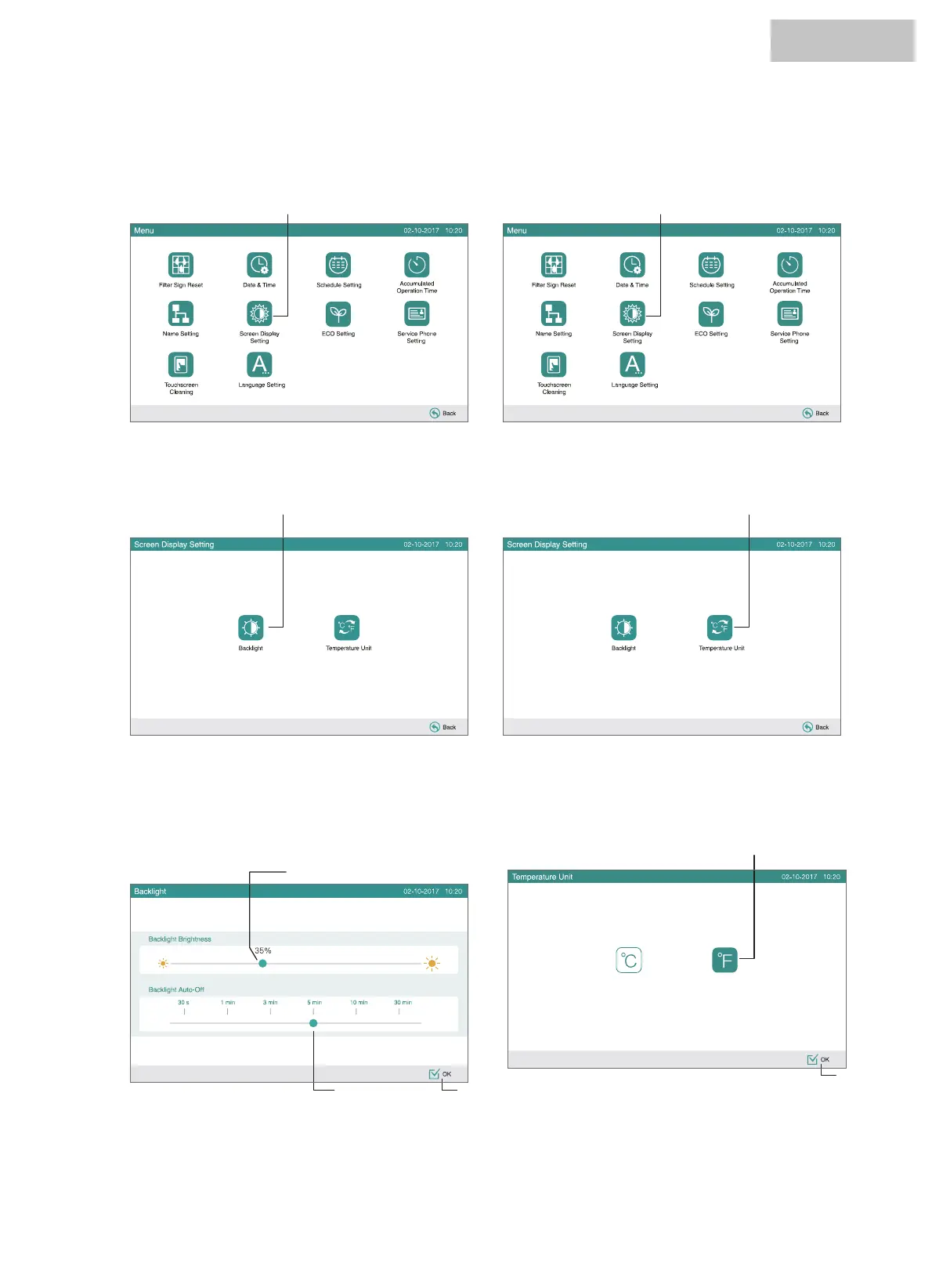
7.7.1 Adjusting backlight of touchscreen display
1 Select “Screen Dis
play Setting” from the screen of “Menu”.
2 Select “Backlight” from the screen of “Screen Display
Setting”.
3 Select “ȭ” or “ȯ” for the operating button indication. The
selected button color is changed.
4 Touch “OK” to return to the screen of “Screen Display
Setting”.
3 Slide to adjust the brightness of the backlight.
4 Slide to adjust the backlight auto-off.
5 Touch “OK” to return to the screen of “Screen Display
Setting”.
1 Select “Screen Display Setting” from the screen of “Menu”.
7.7.2 Temperature unit setting
(1) (1)
(2)
2 Select “Temperature Unit” from the screen of “Screen Display
Setting”.
(2)
(3)
(3)
(5)(4)
(4)
7.7 SCREEN DISPLAY SETTING
HYJM-S01H



 To Next Page
 Loading...