Controlling the System
System
System
OSD Setting
Transparency
Low
1MinTimeout
Auto Turn-Off
Mode Daily
Setting of Auto Turn-Off Time:
12 : 00 PM
System
:Move : Chan ge : Back : E xit AllMENU EXIT
:Move : Chan ge : Back : E xit AllMENU EXIT
Bluescreen On
OffSetupWizard
OSD Settings
Time
Factory Reset
System
System
Auto Turn-On
Mode Off
Date Time Settings:
Mode Manual
Input Date/Time:
2005 / 01 / 01
08 09 AM
System
Time:
Date/Time
Auto Turn-On
Auto Turn-Off
Time Zone WA
System
:Move OK : Sel ect MENU: Back EXIT: Exit All
Factory
Reset
If YES is selected , all parameters will be reset.
No
YES
21
[Fig. 7]
[Fig. 5]
[Fig. 3]
[Fig. 4]
[Fig. 6]
[Fig. 2]
[Fig. 1]
:Move : Chan ge : Back : E xit AllMENU EXIT
:Move : Chan ge : Back : E xit AllMENU EXIT
:Move : Chan ge : Back : E xit AllMENU EXIT
:Move : Chan ge : Back : E xit AllMENU EXIT
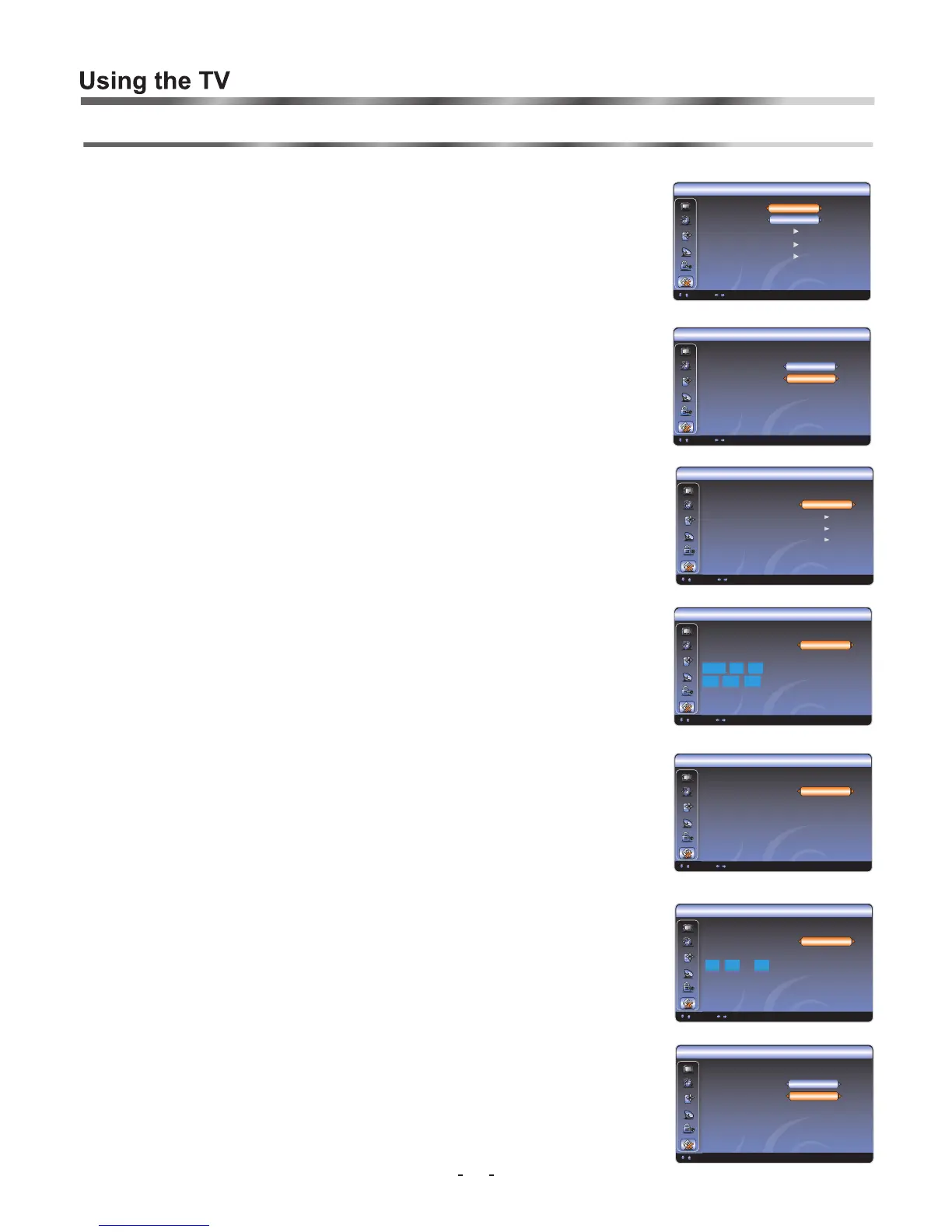
The System [Menu, System,...] submenu contains: Bluescreen, SetupWizard,
OSD Settings, Time and Factory reset. You can adjust them to your liking.
Bluescreen setting [Menu, System, Bluescreen]
If you prefer a Bluescreen, please set the Bluescreen option to 'On' in the System OSD.
Otherwise , please set the Bluescreen option to 'Off' in the System OSD. [Fig. 1]
SetupWizard setting [Menu, System, SetupWizard ]
By selecting 'Setup Wizard' and changing to 'ON', at next start up of your TV, you will be
given initial set-up options. You will be asked to select the Time Zone, Local time settings,
Auto Tune set-up for Digital and Analogue broadcasts. If the password option has been set,
you will be asked to input a password. [Fig. 1]
OSD Settings [Menu, System, OSD Settings ]
You can also adjust the OSD display time, time for which the menu will remain visible and
active for your adjustment.
available times are; 1 minute, 30 seconds and 10 seconds. Adjust to your preference .[Fig.2]
You can also adjust the OSD transparency options: Low ,Medium, and High .
Time Settings [Menu, System, Time ]
There are four items in the Time settings:
1, [Fig. 3]
[Fig. 4]
[Fig. 5]
: [Fig. 6]
Factory reset [Menu, System, Factory reset ]
When you wish to reset the TV back to it's 'factory setting' you can do so by setting the
'Factory Reset' mode to YES. [Fig. 7]
This function is used to restore all parameter settings back to the factory or original levels. A
function which you might use if children have adjusted settings where you cannot return to
your normal preference.
Time Zone: First, set the Time Zone based on your local area.
2, Date/Time: Please set current time and date.
3, Auto Turn-On: auto turn on the TV in your set time.
4, Auto Turn-Off auto turn off the TV in your set time.






 To Next Page