2
3
1
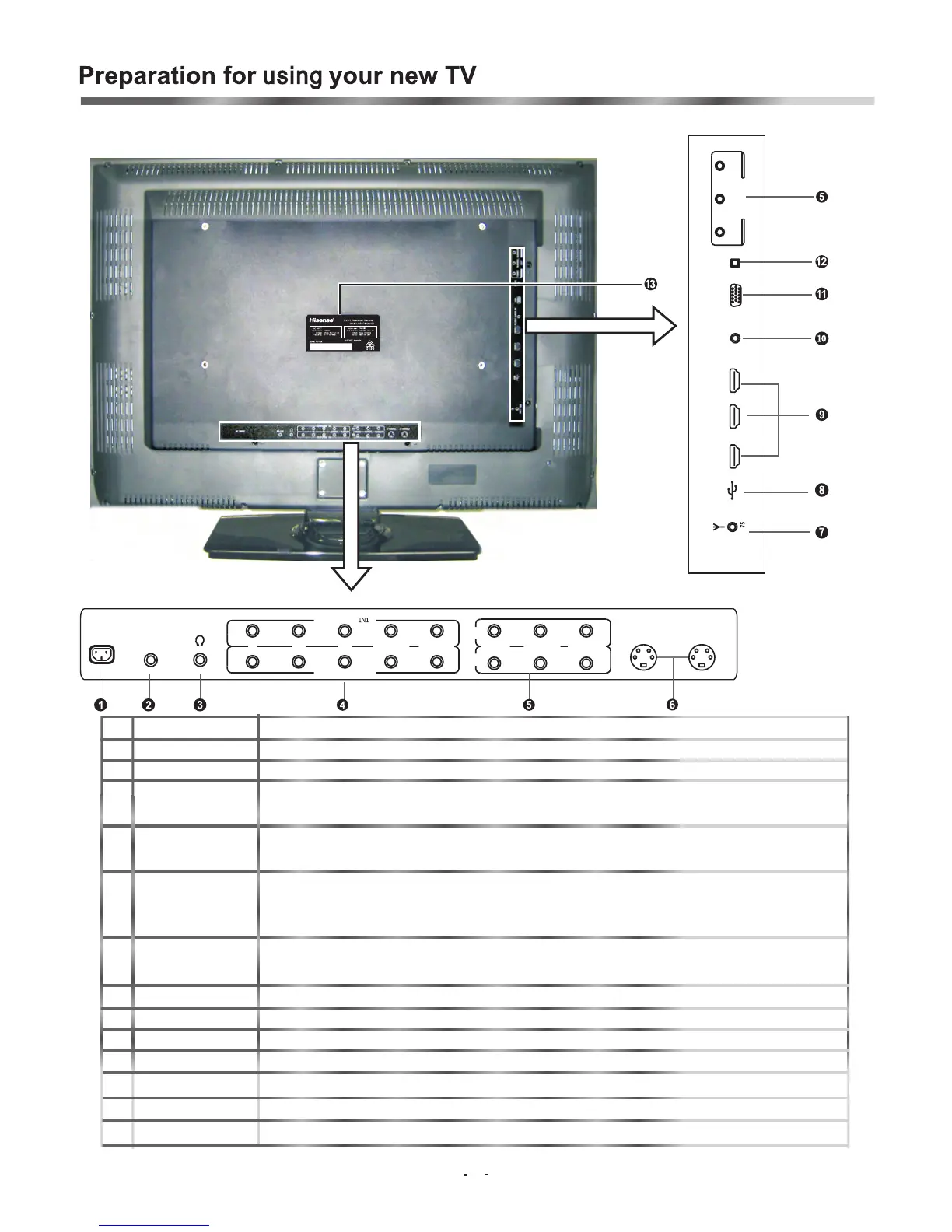
Back Connections
NOTE:
The above picture is for reference only, please refer to the actual TV to determine their appearance.
AUDIO/L
AUDIO/R
R
S-232
S-
S-
VIDE
VIDE
O2
IN1
IN2
AUDIO/L
AUDIO/R
VIDE
O
PP
Y
COMPONENT
COMPONENTIN2
O1
ACINPUT
SPDIF
USB
HDM
I HDMIHDMI
V
GA
AUDIO/L
AUDIO/R
VIDE
O
OUT
PC/DVI
AUDIO IN
A
NT
B
R
8
HI7600501-L3205
8
NO. Connector Description
1 AC INPUT Connect the power cord to this connector.
2 RS-232 For service purposes ONLY (will not support consumer products)
Plug headphone into this jack. When headphones are plugged in, no sound
3 Headphone jack
comes from the headphones.
4 Component Video Connect Component video devices, such as a DVD player / PVR / HDDVD
input (2) /BluRay to these jacks. (Recommended for superior picture quality)
Connect standard video/audio cables to these jacks.
5
A
/
V
i n
p
u
t
(
2
)
/
o
u
t
p
u
t
(
1
)
The row of jacks under the unit are inputs (Video/Audio In)The row of jacks on the side of
TV are output jacks (Video/Audio Out)
6 S-Video (2) Connect an S-Video device to this jack, inserting the left and right audio leads
into S-VIDEO/L and S-VIDEO/R
7 Antenna input Connection for the Aerial/Antenna.
8 USB Connector For service purposes ONLY. (Will not support consumer products)
9 HDMI(3) Connect an HDMI device to this jack.
10 PC/DVI AUDIO input Connect an audio from a computer to this jack.
11 VGA video input Connect the video from a computer to this jack.
12 Optical audio output Connect an optical audio device to this jack.(only available in Digital TV or HDMI modes)
13 Rating Label Model number and serial number found here




 To Next Page