Holiday
Child Lock
Display controls
8
All functions and controls of the unit are accessible from a control panel conveniently located
on the door of the refrigerator. A keypad of touch buttons and a digital display allow easy
configuration of features and settings in a simple and intuitive manner.
Important! Touch buttons require only a short press on a button to operate. The operation
occurs when releasing your finger from the button, not while the button is pressed. There is no
need for applying pressure on the keypad. Child Lock function related to the "Alarm" button
requires a long touch of a least 3 sec. Please refer to those related sections of this Manual for
detailed instructions.
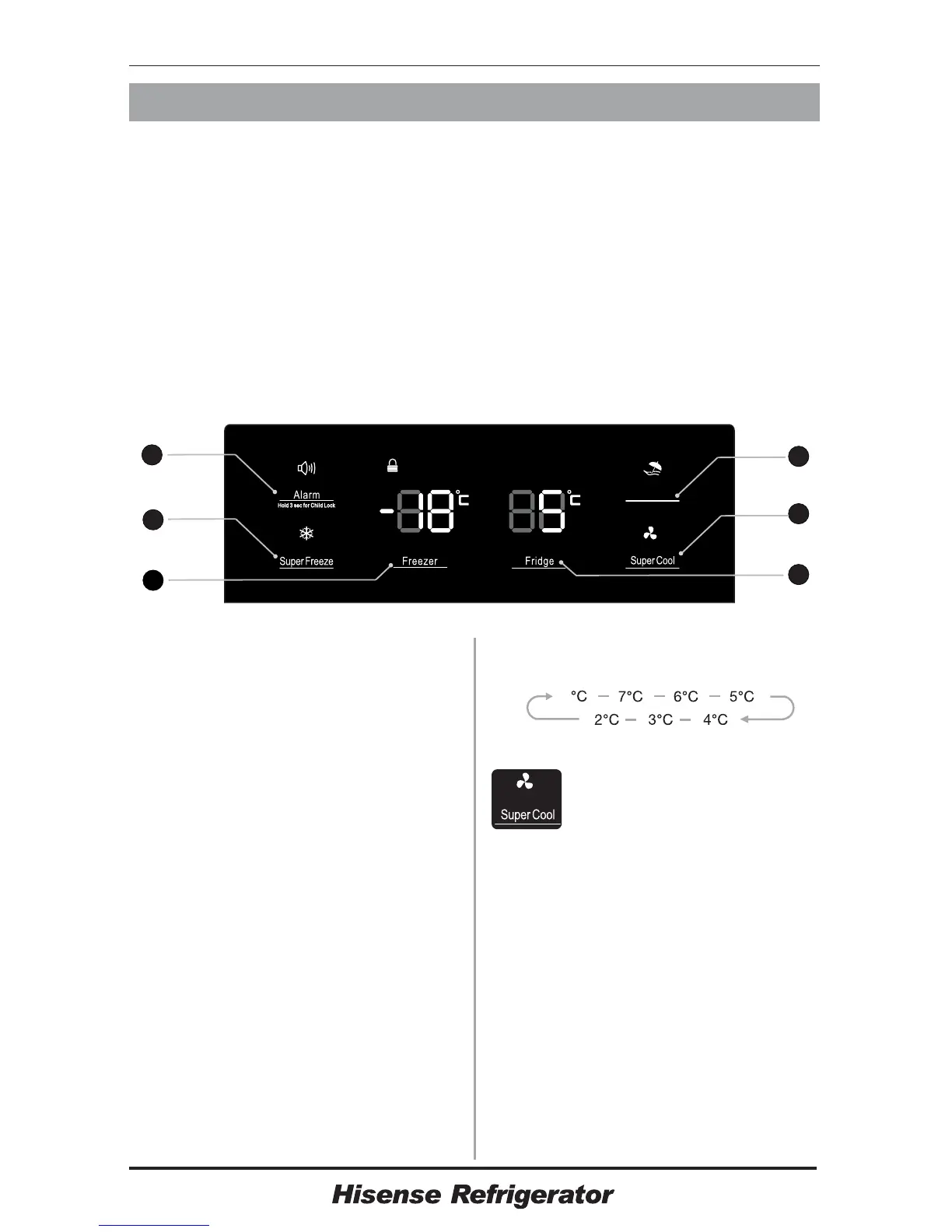
The control panel consists of two indicating temperature areas, five icons representing
different modes and six touch buttons. When the appliance is powered on for the first time,
the backlight of the icons on display panel turns on. If no buttons have been pressed and the
doors remains closed, the backlight will turn off after 60 sec.
Controlling the temperature
We recommend that when you start your
refrigerator for the first time, the temperature
for the refrigerator is set to and
the freezer to . If you want to
change the temperature, follow the
instructions below.
Caution!
When you set a temperature, you set an
average temperature for the whole
refrigerator cabinet.Temperatures inside
each compartment may vary from the
temperature values displayed on the panel,
depending on how much food you store and
where you place them. Ambient temperature
may also affect the actual temperature
5°C(41℉ )
-18°C(-0.4℉ )
1. Fridge
Press "Fridge" button repeatedly to set
your desired fridge temperature between
and , the
temperature will decrease
degrees with each press and the fridge
temperature
indicator will display
8°C(46.4℉ ) 2°C(35.6℉ )
1°C(32℉ )
corresponding value according to the
following sequence.
8
2. Super Cool
Super Cool can refrigerate the
food quicker and keep food fresh
for a longer period.
●
●
Press "Super Cool" button to activate this
function. The Super Cool icon will light up
and the Fridge temperature indicator will
display .
Super cool automatically switches off after 6
hours.
Press "Super Cool" or "Fridge” to cancel
super cool mode and revert to previous
temperature settings.
2°C(35.6℉)
3. Freeze
Press "Freezer" button to set the freezer
temperature between and
to suit your desired
temperature, and the
-14
-24°C(-11.2℉ )
°C(6.8℉ )
6
5
4
2
3
1




 To Next Page