11
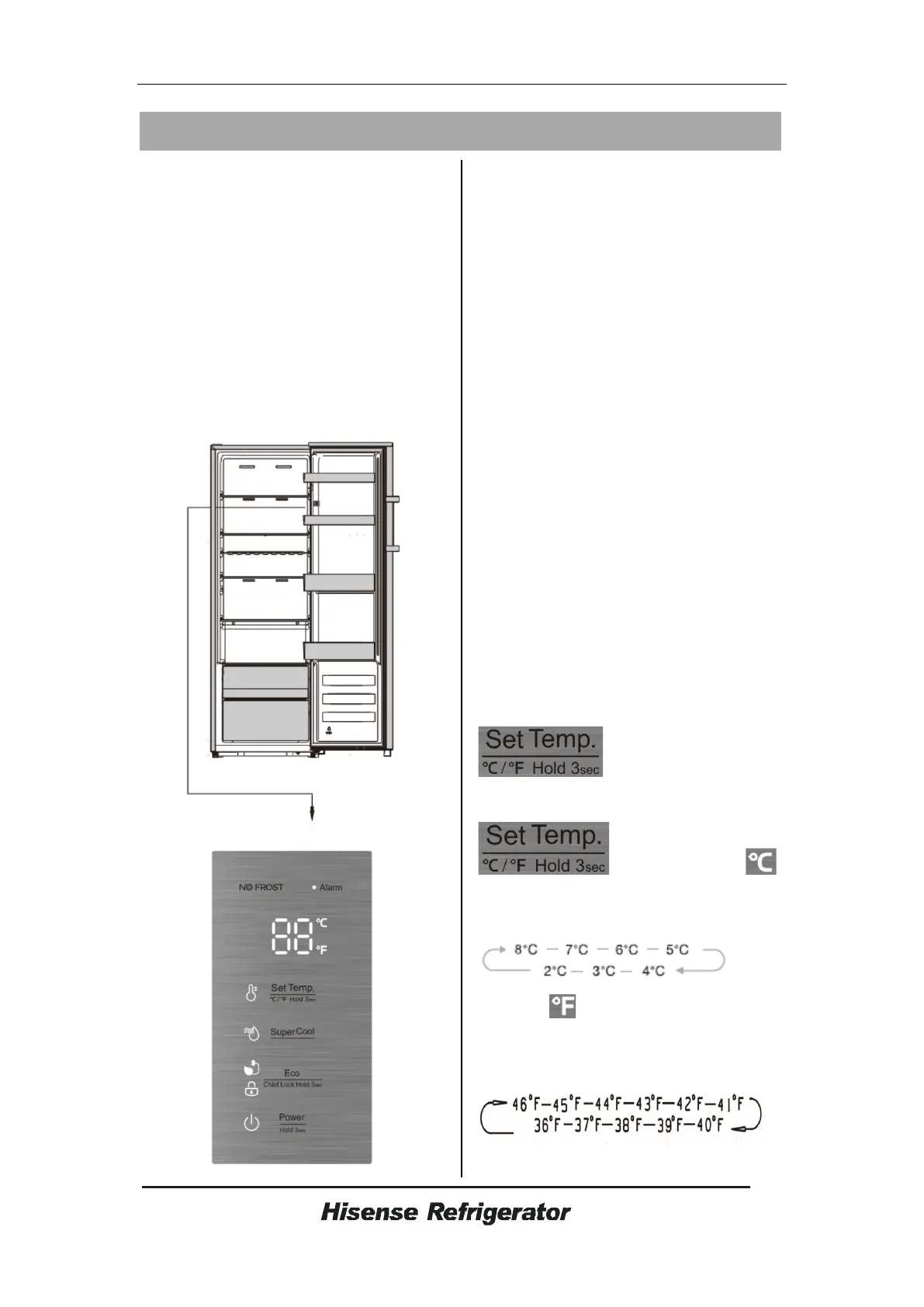
Display controls
Use your appliance according to the
following control regulations, your
appliance has the corresponding functions
and modes as the control panels showed
in the pictures below. When the appliance
is powered on for the first time, the
backlighting of the icons on display panel
starts working. If no buttons have been
pressed and the doors are closed, the
backlighting will turn off.
Display panel inside
Controlling the temperature
For optimum food preservation,
We recommend that when you start your
refrigerator for the first time,the
temperature for the refrigerator is set to
4°C (39°F),if you want to change the
temperature,follow the instructions
below
Caution
!
When you set temperature,you set an
average temperature for the whole
refrigerator cabinet. Temperature inside
each compartment may vary from the
temperature values displayed on the
panel,depending on how much food you
store and where you place them. Ambient
temperature may also affect the actual
temperature inside the appliance.
Note
:High temperature setting will
accelerate food waste.
1. Temp
In the unlocked state, you can switch the
display mode from °C to °F by press the
button for 3 seconds.
In the unlocked state, press
button, when the
light is on,the fridge set temperature is
cyclically adjusted between 8°C and 2°C.
when the light is on, the fridge set
temperature is cyclically adjusted between
46°F and 36°F.



 To Next Page