EasyManua.ls Logo

Hisense RQ560N4WC1 - User Manual

Hisense RQ560N4WC1
22 pages
Print Icon
To Next Page IconTo Next Page
Loading...
RQ560N4WC1
FMN431W20C
All manuals and user guides at all-guides.com
all-guides.com

Other manuals for Hisense RQ560N4WC1

Question and Answer IconNeed help?

Do you have a question about the Hisense RQ560N4WC1 and is the answer not in the manual?

Summary

Safety and warning information

Safety for children and others who are vulnerable people

Guidance on safe use for children and vulnerable individuals.

Installing your new appliance

Ventilation of appliance

Ensuring proper airflow around the appliance for efficient cooling and heat dissipation.

Service

Information on authorized service, qualified personnel, and genuine spare parts.

Leveling of appliance

Adjusting bottom feet for proper leveling and door self-closing.

Description of the appliance

Display controls

Controlling the temperature

Instructions for setting desired temperatures for fridge, My Fresh Choice, and freezer compartments.

Super Cool

Function to rapidly cool food and maintain freshness.

Super Freeze

Function to rapidly freeze food and preserve vitamins and nutrition.

Artificial intelligence

Automatic adjustment of refrigerator and freezer temperatures.

Energy Saving

Mode that optimizes temperature settings for reduced energy consumption.

Holiday

Energy-saving mode for when the appliance is not in use for an extended period.

Mode;Unlock

Selecting and confirming different operating modes.

LOCK

Mechanism to lock or unlock the control panel to prevent unintended changes.

Using your appliance

Door rack

Guidance on using removable door racks for storing various food items.

Shelf

Instructions for adjusting and using the adjustable glass shelves.

Crispers

Using telescopic extension slides for storing vegetables and fruits.

Crisper cover

Adjusting humidity in crispers to preserve vegetable moisture.

Crisper and humidity control

How humidity control adjusts airflow for optimal fruit and vegetable preservation.

Using your freezer drawer

Proper storage of frozen foods like meat, ice cream, and other items.

Using the refrigerator chamber

Storing vegetables and fruits, avoiding moisture loss and flavor permeation.

Twistable ice tray

Instructions for making and storing ice cubes using the twistable ice tray.

Water Dispenser

Tips for using the water dispenser for chilled drinking water.

Filling water

Procedure for filling the water tank safely and correctly.

Dispensing water

Ensuring the lock is unlocked before dispensing water.

Receiving Water

Using correct cups and suggested position to receive water from the dispenser.

Cleaning

Instructions for cleaning the water tank, lid, and head.

Helpful hints and tips

Energy saving tips

Recommendations for efficient energy usage of the appliance.

Hints for fresh food refrigeration

Tips for optimal storage of fresh food to maintain quality and save energy.

Hints for refrigeration

Guidance on storing meat, cooked food, and fruit/vegetables.

Hints for freezing

Best practices for freezing food, including portioning and wrapping.

Hints for the storage of frozen food

Ensuring correct storage and avoiding refreezing of frozen food.

Switching off your appliance

Steps to prevent mould when switching off the appliance for extended periods.

Cleaning and care

Exterior cleaning

Instructions for cleaning the appliance's exterior surfaces and digital panel.

Interior cleaning

Steps for cleaning the interior, including frost removal.

Door seals cleaning

Proper cleaning and maintenance of door seals to prevent tearing.

Replacing the LED light

Instructions for replacing the LED light, noting user replacement is not advised.

Defrosting

Explanation of the automatic defrosting process and frost formation.

Troubleshooting

Disposal of the appliance

Summary

Safety and warning information

Safety for children and others who are vulnerable people

Guidance on safe use for children and vulnerable individuals.

Installing your new appliance

Ventilation of appliance

Ensuring proper airflow around the appliance for efficient cooling and heat dissipation.

Service

Information on authorized service, qualified personnel, and genuine spare parts.

Leveling of appliance

Adjusting bottom feet for proper leveling and door self-closing.

Description of the appliance

Display controls

Controlling the temperature

Instructions for setting desired temperatures for fridge, My Fresh Choice, and freezer compartments.

Super Cool

Function to rapidly cool food and maintain freshness.

Super Freeze

Function to rapidly freeze food and preserve vitamins and nutrition.

Artificial intelligence

Automatic adjustment of refrigerator and freezer temperatures.

Energy Saving

Mode that optimizes temperature settings for reduced energy consumption.

Holiday

Energy-saving mode for when the appliance is not in use for an extended period.

Mode;Unlock

Selecting and confirming different operating modes.

LOCK

Mechanism to lock or unlock the control panel to prevent unintended changes.

Using your appliance

Door rack

Guidance on using removable door racks for storing various food items.

Shelf

Instructions for adjusting and using the adjustable glass shelves.

Crispers

Using telescopic extension slides for storing vegetables and fruits.

Crisper cover

Adjusting humidity in crispers to preserve vegetable moisture.

Crisper and humidity control

How humidity control adjusts airflow for optimal fruit and vegetable preservation.

Using your freezer drawer

Proper storage of frozen foods like meat, ice cream, and other items.

Using the refrigerator chamber

Storing vegetables and fruits, avoiding moisture loss and flavor permeation.

Twistable ice tray

Instructions for making and storing ice cubes using the twistable ice tray.

Water Dispenser

Tips for using the water dispenser for chilled drinking water.

Filling water

Procedure for filling the water tank safely and correctly.

Dispensing water

Ensuring the lock is unlocked before dispensing water.

Receiving Water

Using correct cups and suggested position to receive water from the dispenser.

Cleaning

Instructions for cleaning the water tank, lid, and head.

Helpful hints and tips

Energy saving tips

Recommendations for efficient energy usage of the appliance.

Hints for fresh food refrigeration

Tips for optimal storage of fresh food to maintain quality and save energy.

Hints for refrigeration

Guidance on storing meat, cooked food, and fruit/vegetables.

Hints for freezing

Best practices for freezing food, including portioning and wrapping.

Hints for the storage of frozen food

Ensuring correct storage and avoiding refreezing of frozen food.

Switching off your appliance

Steps to prevent mould when switching off the appliance for extended periods.

Cleaning and care

Exterior cleaning

Instructions for cleaning the appliance's exterior surfaces and digital panel.

Interior cleaning

Steps for cleaning the interior, including frost removal.

Door seals cleaning

Proper cleaning and maintenance of door seals to prevent tearing.

Replacing the LED light

Instructions for replacing the LED light, noting user replacement is not advised.

Defrosting

Explanation of the automatic defrosting process and frost formation.

Troubleshooting

Disposal of the appliance

Overview

This document outlines the operation and maintenance of a Hisense Refrigerator, designed to keep food and beverages fresh in a normal household setting. It emphasizes safety, proper installation, and efficient usage to maximize the appliance's lifespan and performance.

Function Description

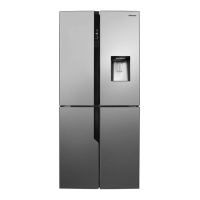
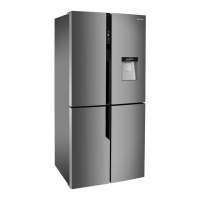
The Hisense Refrigerator is a multi-compartment cooling appliance, featuring a fridge chamber, a freezer compartment, and a "My Fresh Choice" two-star compartment. It utilizes a refrigerant (R600a) for cooling and includes an automatic defrost system to prevent frost buildup. The appliance is controlled via a digital display panel that allows users to adjust temperatures for each compartment and activate various operational modes.

The fridge chamber is designed for storing fresh vegetables, fruits, and other perishable items, with adjustable glass shelves and door racks for flexible organization. It includes crisper drawers with humidity control to maintain optimal conditions for produce. The freezer compartment is for freezing and long-term storage of foods like meat and ice cream, equipped with twistable ice trays for easy ice cube production. The "My Fresh Choice" compartment offers flexible temperature settings, allowing it to function as an additional freezer or a chiller depending on user needs.

A water dispenser is integrated into the fridge door, providing chilled drinking water without needing to open the main door. This feature includes a removable water tank for easy filling and cleaning, and a child lock mechanism for safety.

Usage Features

The refrigerator offers several user-friendly features and modes accessible via the display panel:

  • Temperature Control: Users can set desired temperatures for the fridge (2°C to 8°C), "My Fresh Choice" (-5°C to -18°C), and freezer (-15°C to -25°C) compartments. The display shows the current settings, and adjustments are made by pressing dedicated buttons.
  • Super Cool: This mode rapidly cools the fridge compartment to 2°C, ideal for quickly chilling newly added food and preserving freshness for longer periods. It automatically deactivates after 6 hours.
  • Super Freeze: Designed for rapid freezing, this mode lowers the freezer temperature to -25°C, helping to preserve vitamins and nutrients in fresh food. It automatically switches off after 26 hours. Users are advised not to store bottled or canned carbonated drinks in the freezer during this mode to prevent explosions.
  • Artificial Intelligence (AI) Mode: When activated, the appliance automatically sets the fridge to 5°C and the freezer to -18°C, optimizing performance based on internal conditions.
  • Energy Saving Mode: This mode adjusts the fridge temperature to 6°C and the freezer to -17°C to minimize energy consumption.
  • Holiday Mode: Intended for periods of absence, this mode sets the fridge to 15°C (with no food stored) and the freezer to -18°C, reducing energy use while maintaining freezer function.
  • Lock Function: The display panel can be locked to prevent accidental changes to settings, particularly useful in households with children.
  • Door Alarm: An audible alarm and a visual indicator on the control panel activate if any door is left open for more than 2 minutes, reminding users to close it and conserve energy.
  • Adjustable Shelves and Racks: The glass shelves in the fridge and door racks can be repositioned to accommodate items of various sizes.
  • Crisper Drawers with Humidity Control: These drawers are specifically designed for fruits and vegetables, with a sliding block that allows users to adjust humidity levels to suit different types of produce.
  • Twistable Ice Tray: Located in the freezer, this tray simplifies ice cube production and storage.
  • Water Dispenser: Provides convenient access to chilled water. The lock device on the dispenser ensures controlled usage, especially as a "child lock."

Maintenance Features

Regular cleaning and proper care are crucial for the appliance's hygiene and longevity:

  • General Cleaning: The appliance, including its exterior and interior accessories, should be cleaned regularly (at least every two months). Before cleaning, the appliance must be switched off and unplugged from the mains socket to prevent electrical shock.
  • Exterior Cleaning: The digital and display panels should be wiped with a clean, soft cloth. Doors, handles, and cabinet surfaces can be cleaned with a mild detergent and then dried with a soft cloth. Users are warned against using sharp objects, thinners, car detergents, bleach, ethereal oils, abrasive cleansers, or organic solvents, as these can damage the surface or cause fire.
  • Interior Cleaning: The interior should be cleaned regularly, ideally when food stocks are low. A weak solution of bicarbonate of soda and warm water can be used, followed by thorough rinsing and drying before replacing shelves and baskets.
  • Defrosting: The appliance features an automatic frost-free system, eliminating the need for manual defrosting. Water from defrosting is drained into a drip tray and evaporated. If frost accumulates due to frequent or prolonged door openings, users should remove food, unplug the appliance, leave doors open to accelerate thawing, and then clean the freezer interior. Sharp objects should not be used to remove frost.
  • Door Seals Cleaning: Door seals should be kept clean to prevent stickiness and tearing. They can be washed with mild detergent and warm water, then thoroughly dried before powering on the appliance.
  • LED Light Replacement: If the LED light is damaged, users should contact customer service for assistance. The manual provides steps for removing the light cover and replacing the LED light, but emphasizes that this should not be done by the user.
  • Water Dispenser Cleaning: The water tank, lid, and head of the dispenser should be removed carefully and washed lightly with water. After cleaning, all parts should be dried naturally or with a dryer. The receiving tank at the bottom of the dispenser should be cleaned regularly with a dry towel to prevent overflow.

The manual also provides helpful hints for energy saving, fresh food refrigeration, freezing, and storage of frozen food, as well as troubleshooting tips for common issues like unusual noises, temperature problems, and door sealing.

Hisense RQ560N4WC1 Specifications

General IconGeneral
CategoryRefrigerator
Energy Efficiency ClassE
Climate ClassSN-T
Freezing Capacity12 kg/24h
Control TypeElectronic
No Frost SystemYes
RefrigerantR600a
Number of Doors4
Ice MakerYes
Water DispenserYes
Defrost SystemAutomatic
ColorStainless Steel
Total Net Capacity560 L
Total Capacity560 L

Related product manuals