Slibgnij*t
Hs223 uHF Duarwireress
Microphone
Mixerwith Btuetooth connection
User's
Manual
Schematic Diagram
Chapter 2.
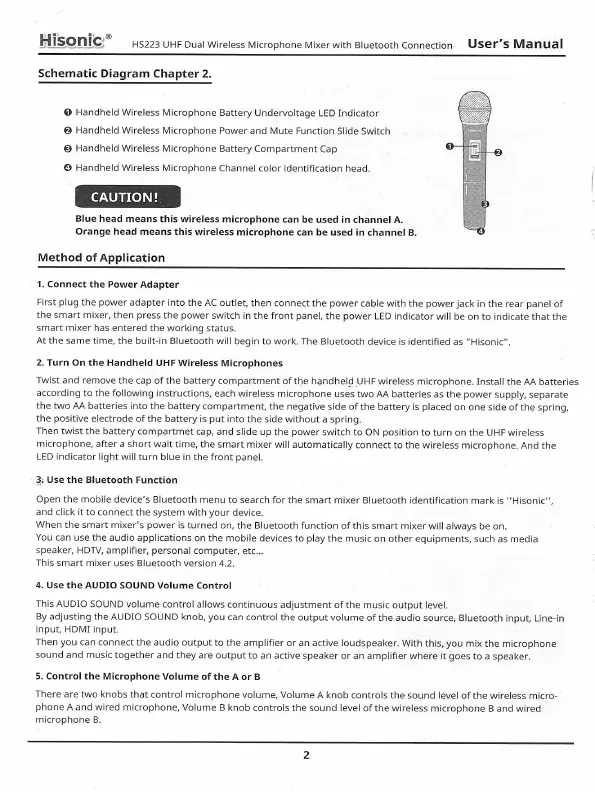
O
Handheld Wireless Microphone
Battery
Underuoltage LED Indicator
O
Handheld
Wireless Microphone
Power and Mute Function
Slide Switch
g
Handheld
Wireless Microphone
Battery Compartment
Cap
@ HandheldWireless Microphone
Channel color identification
head.
G@
BIue head
means this wireless microphone
can be used
in channel A.
Orange
head means this
wireless microphone can
be used in channel
B.
Method of Application
1. Connect the Power
Adapter
First
plug
the
power
adapter into the AC outlet,
then connect the power
cable with the
powerjack
in the rear panel
of
the smart mixer,
then
press
the
power
switch in the front
panel,
the
power
LED
indicator will be on
to indicate that the
smart mixer has entered
the
working
status.
At the same time,
the built-in Bluetooth will
begin to work.
The
Bluetooth
device is identified
as "Hisonic".
2. Turn On the
Handheld UHF Wireless
Microphones
Twist and remove
the cap ofthe battery
compartment ofthe
handhelg_UHF wireless
microphone. Install
the AA batteries
according
to the following instructions,
each wireless
microphone uses
two AA batteries as the
power
supply,
separate
the
two AA batteries into the
battery compartment,
the negative side of
the battery is
placed
on one side of
the spri ng,
the
positive
electrode
ofthe battery is
put
into
the side without
a spring.
Then twist
the battery compartmet
cap, and slide up the
power
switch to
ON
position
to turn on the UHF
wireless
microphone,
after a short wait
time, the smart
mixer will automatically
connect to the wireless
microphone.
And the
LED indicator Iight
will turn blue in the
front
panel.
+
Use the
Bluetooth Function
Open the
mobile device's Bluetooth
menu to search
for the smart mixer Bluetooth identification
mark
is "Hisonic".
and click
it to connect
the system with
your
device.
When the smart mixer's power
is turned
on, the Bluetooth function
of this smart
mixer will always be
on.
You can
use the audio applications
ofr the mobile devices
to
play
the music on other
equipments, such
as media
speaker, HDTV, amplifier,
personal
computer,
etc...
This smart mixer
uses Bluetooth version
4.2.
4. Use the AUDIO SOUND
Volume Control
This
AUDlO SOUND volume control
allows continuous
adjustment
of the music output
level.
By
adjusting the AUDIo
SOUND knob,
you
can
control the output volume
ofthe audio
source, Bluetooth
input, Line-in
input, HDMI input.
Then
you
can connect
the audio output to the
amplifier or an active loudspeaker.
With
this,
you
mix the microphone
sound
and music together
and they are output
to an active
speaker or an amplifier where
it
goes
to
a speaker.
5. Control the
Microphone Volume
of the A or B
There are two
knobs that control microphone
volume, Volume
A knob controls
the sound level of the
wireless micro-
phone
A and wired
microphone, Volume B
knob controls the sound level
of the wireless
microphone B and wired
microphone
B.



 To Next Page