- 2 -
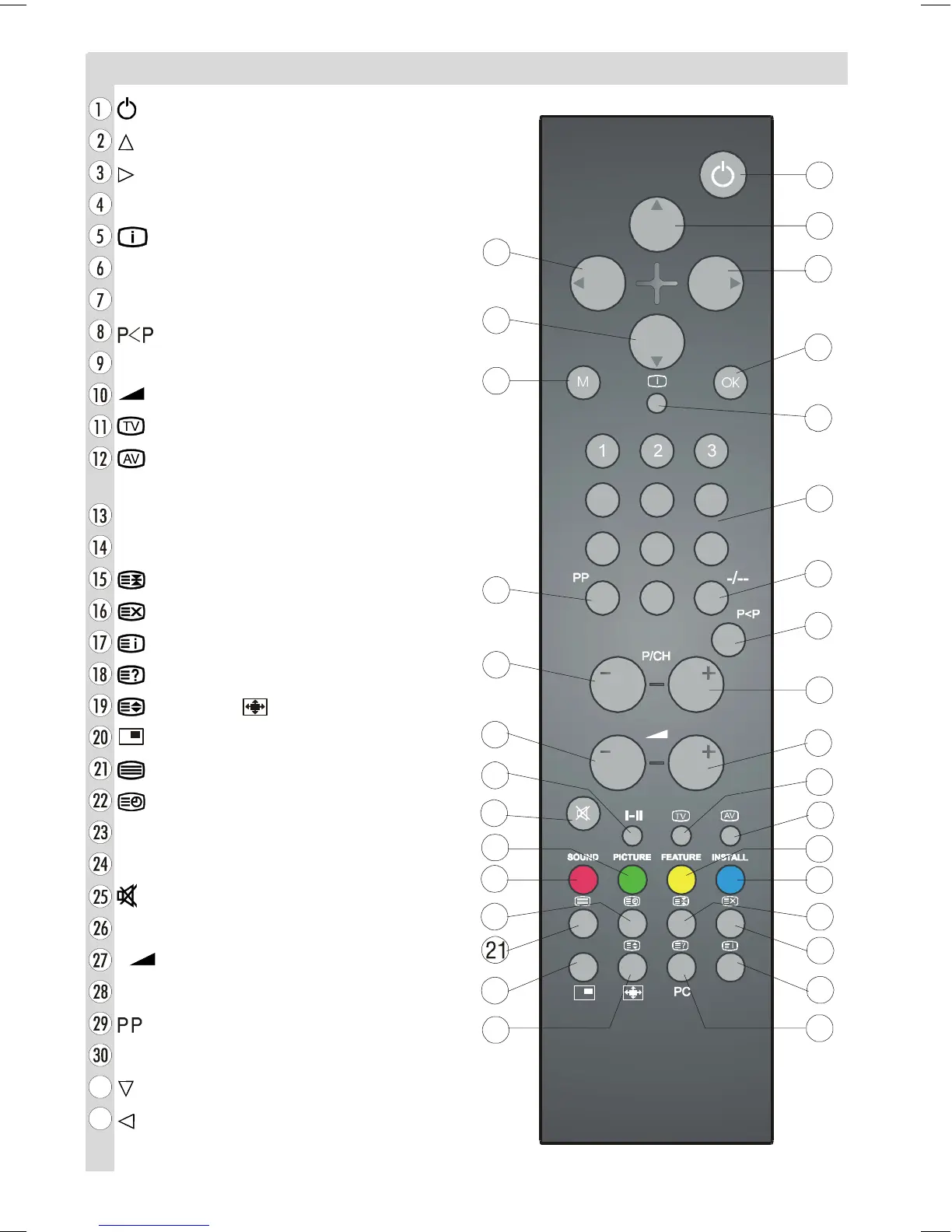
Remote Control Buttons
= Stand By
= Cursor Up
= Cursor Right
OK = Store
= Info (Program Menu)
0 - 9 = Direct Program
-/-- = Double Digit
=Previous Programme
P/CH + = Programme Up
+ = Volume +
= TV / Quit Menu
= External Source
(AV-1, AV-2, AV-3, S-VIDEO, PC)
Yellow (FEATURE) = Feature Menu
Blue (INSTALL) = Installation Menu
= Hold
= Update
= Index Page
= Reveal, PC = Switch from TV to PC
= Expand, = Aspect ratio
= PIP on / PIP off
= Teletext
= Time
Red (SOUND) = Sound Menu
Green (PICTURE) = Picture Menu
= Mute
I-II = Mono/Stereo - Dual I-II
- = Volume -
- P/CH = Programme Down
= Personal Preference
M = Menu
= Cursor Down
= Cursor Left
0
2.
ENG-2200-1547UK-22 INCH TFT IB.p65 03.03.2004, 17:592



 To Next Page