- 10 -
Press the P+ button to select the next
programme.
Programme Selecting (direct access):
Press digit buttons on the remote control
handset to select programmes between 0
and 9. The TV will switch to the selected
programme after a short delay.
For a two digit programme number enter the
second digit after pressing the first digit
within 2 seconds.
Menu System
Your TV has been designed with a menu
system to provide easy manipulation of a
multifunction system.
Press the button to enter the menu.
Press
_
/
`
button to select a menu title and
then
a
/
b
button to select a menu item and
/
or OK button to enter the menu item.
Press the button to exit the menu.
Press the button to return to the previous
menu.
Picture menu
By pressing
/
button, select the first icon.
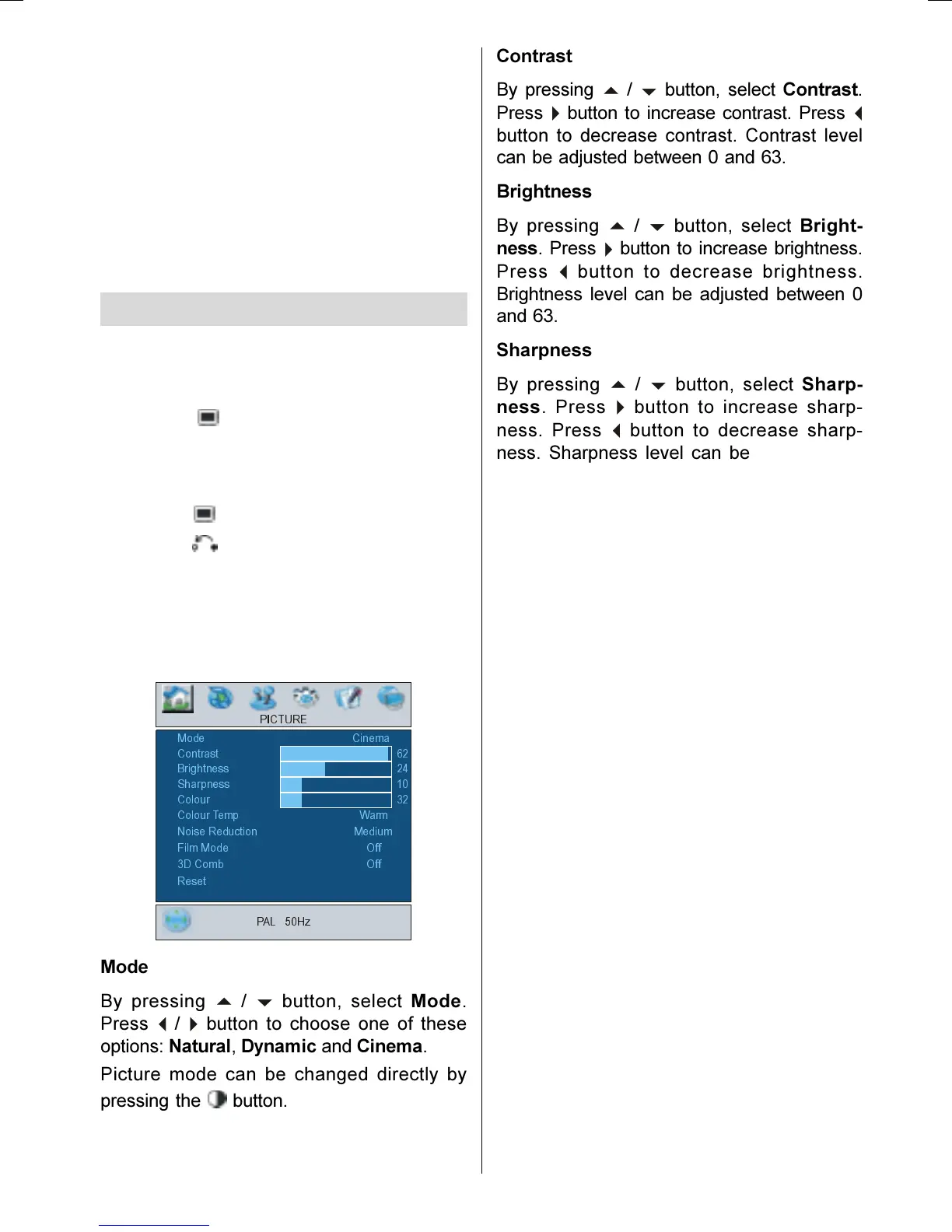
Picture menu appears on the screen.
0RGH&LQHPD
3,&785(
&RQWUDVW
3$/+]
%ULJKWQHVV
6KDUSQHVV
&RORXU
&RORXU7HPS:DUP
1RLVH5HGXFWLRQ0HGLXP
5HVHW
)LOP 0RGH
2II
'&RPE2II
Mode
By pressing
a
/
b
button, select Mode.
Press
/
button to choose one of these
options: Natural, Dynamic and Cinema.
Picture mode can be changed directly by
pressing the button.
Contrast
By pressing
/
b
button, select Contrast.
Press
button to increase contrast. Press
_
button to decrease contrast. Contrast level
can be adjusted between 0 and 63.
Brightness
By pressing
a
/
b
button, select Bright-
ness. Press
`
button to increase brightness.
Press
button to decrease brightness.
Brightness level can be adjusted between 0
and 63.
Sharpness
By pressing
/
b
button, select Sharp-
ness. Press
button to increase sharp-
ness. Press
button to decrease sharp-
ness. Sharpness level can be adjusted be-
tween 0 and 31.
Colour
By pressing
a
/
b
button, select Colour.
Press
button to increase colour. Press
_
button to decrease colour. Colour level can
be adjusted between 0 and 99.
Hue
This item is displayed in picture menu when
the TV receives an NTSC signal. By press-
ing
/
b
button, select hue. Press
button
to increase hue. Press
_
button to decrease
hue. Hue level can be adjusted between -31
and 31.
Colour Temp
By pressing
/
b
button, select Colour
Temp. Press
_
/
button to choose one of
these options: Cool, Normal and Warm.
Noise Reduction
This item is used to reduce the image noise
and improve the picture quality at weak sig-
nals.
By pressing
/
b
button, select Noise Re-
duction. Press
_
/
`
button to set Noise re-
duction level to Off, Low, Medium or High.
01-ENG-26705W-CLE967 UK-HITACHI 26 INCH TFT-TRIDENT-(LG)-50078117.p65 06.12.2005, 14:5710


 To Next Page
 Loading...