- 11 -
Film Mode
Films are recorded at a different number of
frames per second to normal television
programmes.
By pressing
a
/
b
button, select Film Mode.
Press
_
/
button to set this feature On or
Off. Turn this feature on when you are watch-
ing films to see the fast motion scenes
clearly.
3D Comb
3D Comb is used to improve colour transi-
tions and colour quality of pictures.
By pressing
a
/
b
button, select 3D Comb.
Press
_
/
button to set this feature On or
Off.
Reset
By pressing
/
b
button, select Reset.
Press
_
/
or OK button to reset the picture
modes to factory default settings.
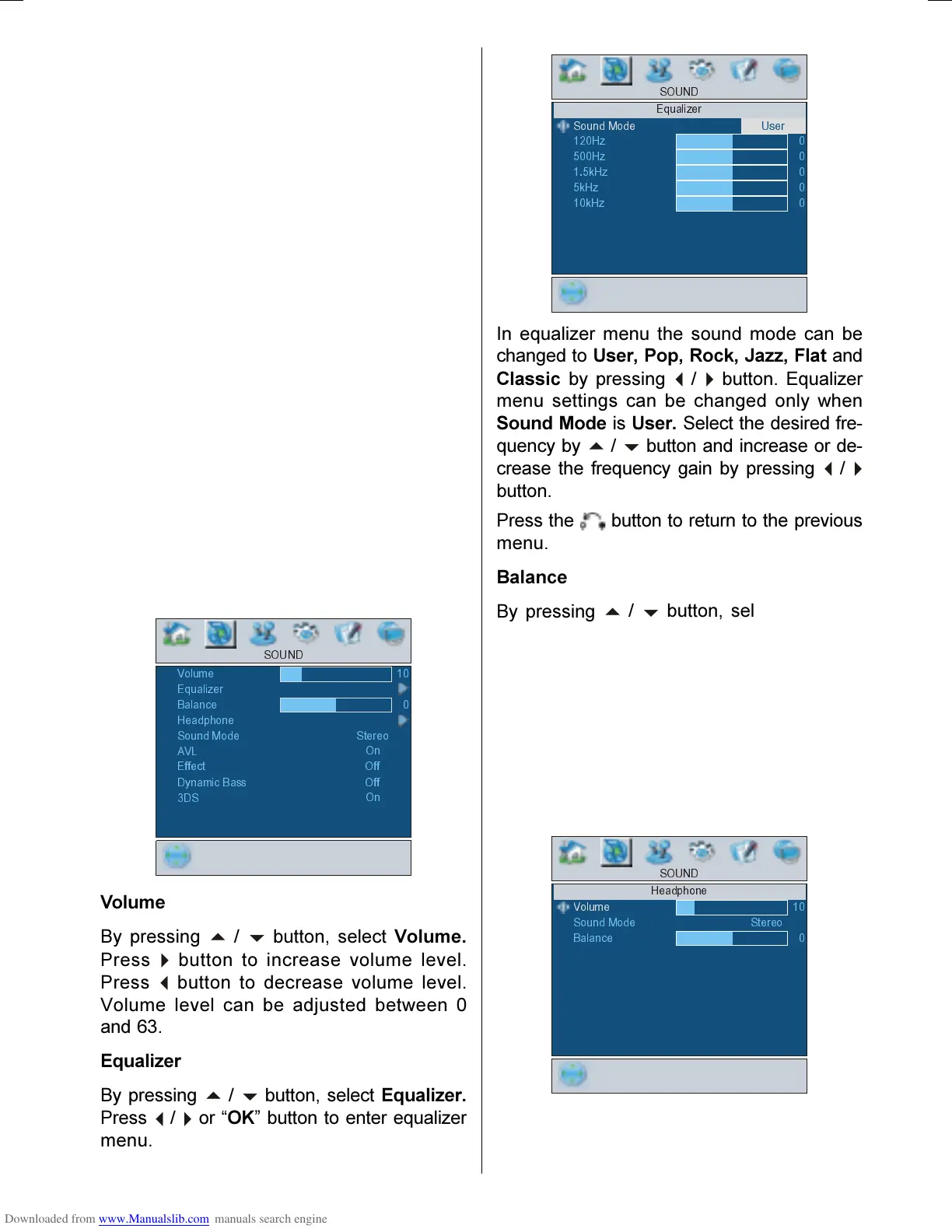
Sound menu
By pressing
/
button, select the second
icon. Sound menu appears on the screen.
9ROXPH
6281'
(TXDOL]HU
%DODQFH
+HDGSKRQH
6RXQG0RGH
6WHUHR
$9/
(IIHFW
'\QDPLF%DVV
2Q
2II
'6
2II
2Q
Volume
By pressing
/
b
button, select Volume.
Press
button to increase volume level.
Press
button to decrease volume level.
Volume level can be adjusted between 0
and 63.
Equalizer
By pressing
/
b
button, select Equalizer.
Press
/
`
or OK button to enter equalizer
menu.
6281'
(TXDOL]HU
6RXQG0RGH
8VHU
+]
+]
N+]
N+]
N+]
In equalizer menu the sound mode can be
changed to User, Pop, Rock, Jazz, Flat and
Classic by pressing
_
/
`
button. Equalizer
menu settings can be changed only when
Sound Mode is User. Select the desired fre-
quency by
/
b
button and increase or de-
crease the frequency gain by pressing
_
/
`
button.
Press the button to return to the previous
menu.
Balance
By pressing
a
/
b
button, select Balance.
Press
`
button to increase balance to the
right. Press
button to increase balance to
the left. Balance level can be adjusted be-
tween -31 and 31.
Headphone
By pressing
a
/
b
button, select Head-
phone. Press
_
/
`
or OK button to enter
headphone menu.
6281'
+HDGSKRQH
9ROXPH
6RXQG0RGH
%DODQFH
6WHUHR
01-ENG-26705W-CLE967 UK-HITACHI 26 INCH TFT-TRIDENT-(LG)-50078117.p65 06.12.2005, 14:5711


 To Next Page
 Loading...