English - 9 -
For any help concerning set up and use of your TV please call the Customer Helpline: 0845 604 0105
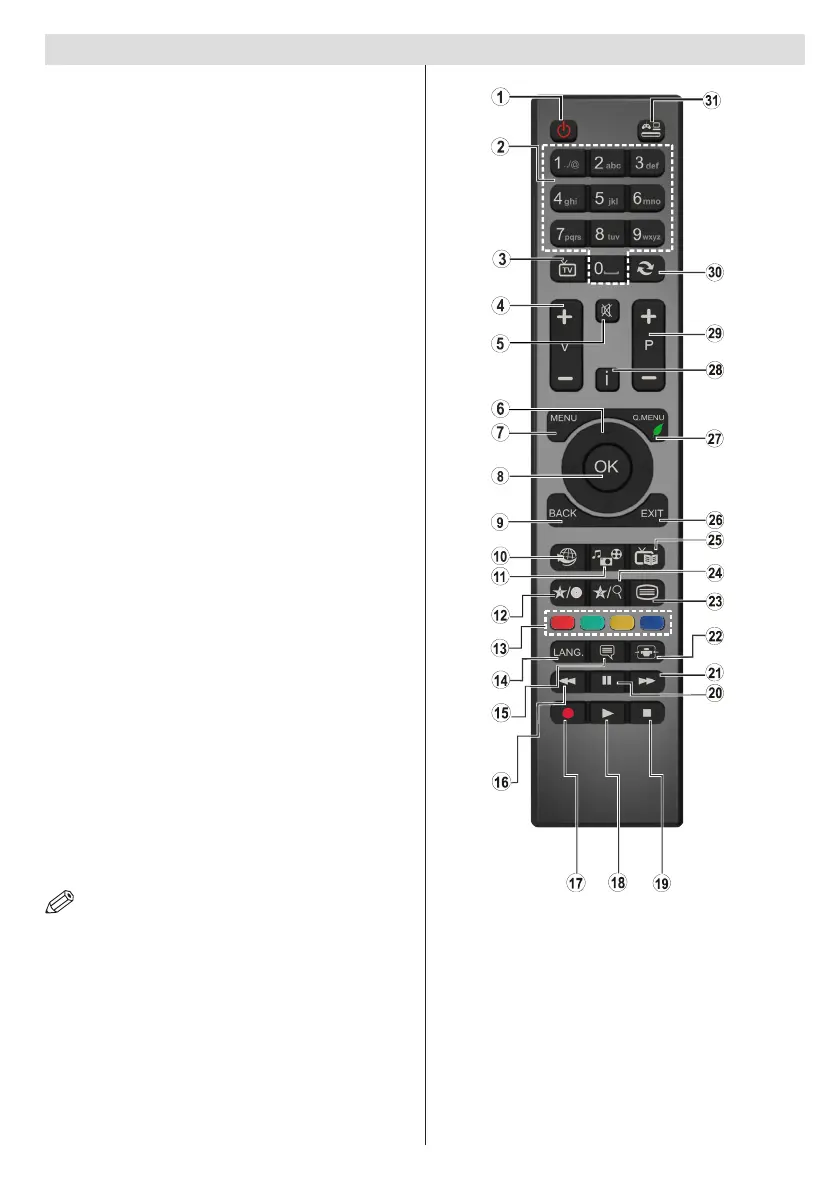
Viewing remote control - TV
NOTE: The Remote Control range is approximately 7m
/ 23ft.
Using My button 1 (*)
This button’s main function is to run Youtube link.
However, if you want to change this function, you
can press MY BUTTON 1 for ve seconds when
on a desired source, channel or link, until the “MY
BUTTON IS SET” message is displayed on the
screen. This conrms that the selected MY BUTTON
is now associated with the selected function. Note that
if you perform rst time installation, MY BUTTON 1
will return to its default function
Using My Button 2 (**)
Press MY BUTTON 2 for ve seconds when on a
desired source, channel or link, until the “MY BUTTON
IS SET” message is displayed on the screen. This
confirms that the selected MY BUTTON is now
associated with the selected function.
1. Standby
2. Numeric buttons
3. TV-AV / Channel List / DVB-T
4. Volume up/down
5. Mute
6. Navigation buttons
7. Menu on/off
8. OK / Channel List
9. Return/Back
10. Internet portal
11. Media Browser
12. My button 1 (*)
13. Coloured Buttons
14. Mono-Stereo Dual I-II / Audio-Subtitle Language
15. Subtitle on-off / Subtitle (in Media Browser
mode)
16. Rewind (in Media Browser mode)
17. No Function
18. Play (in Media Browser mode)
19. Stop (in Media Browser mode)
20. Pause (in Media Browser mode)
21. Fast Forward (in Media Browser mode)
22. Image size
23. Teletext
24. My button 2 / Channel network type (**)
25. Electronic Programme Guide
26. Exit
27. Quick menu
28. Info
29. Programme Up-Down
30. Previous programme
31. AV / Source selection


 To Next Page