No. Indication Function Remarks
4 MARKER IN
(option)
The marker function is activated by
means of contact signal input.
The marker function is started
when the short-circuit signal of
more than one second is input.
5 RECORDER
(option)
Analog output for recorder
1. The florescence intensity value at
each point of time
2. Stored spectral data
The florescence intensity value
data is output.
6 PROCESSOR
(option)
Analog output for data processor
(integrator)
1. The florescence intensity value at
each point of time
2. Stored spectral data
The florescence intensity value
data is output.
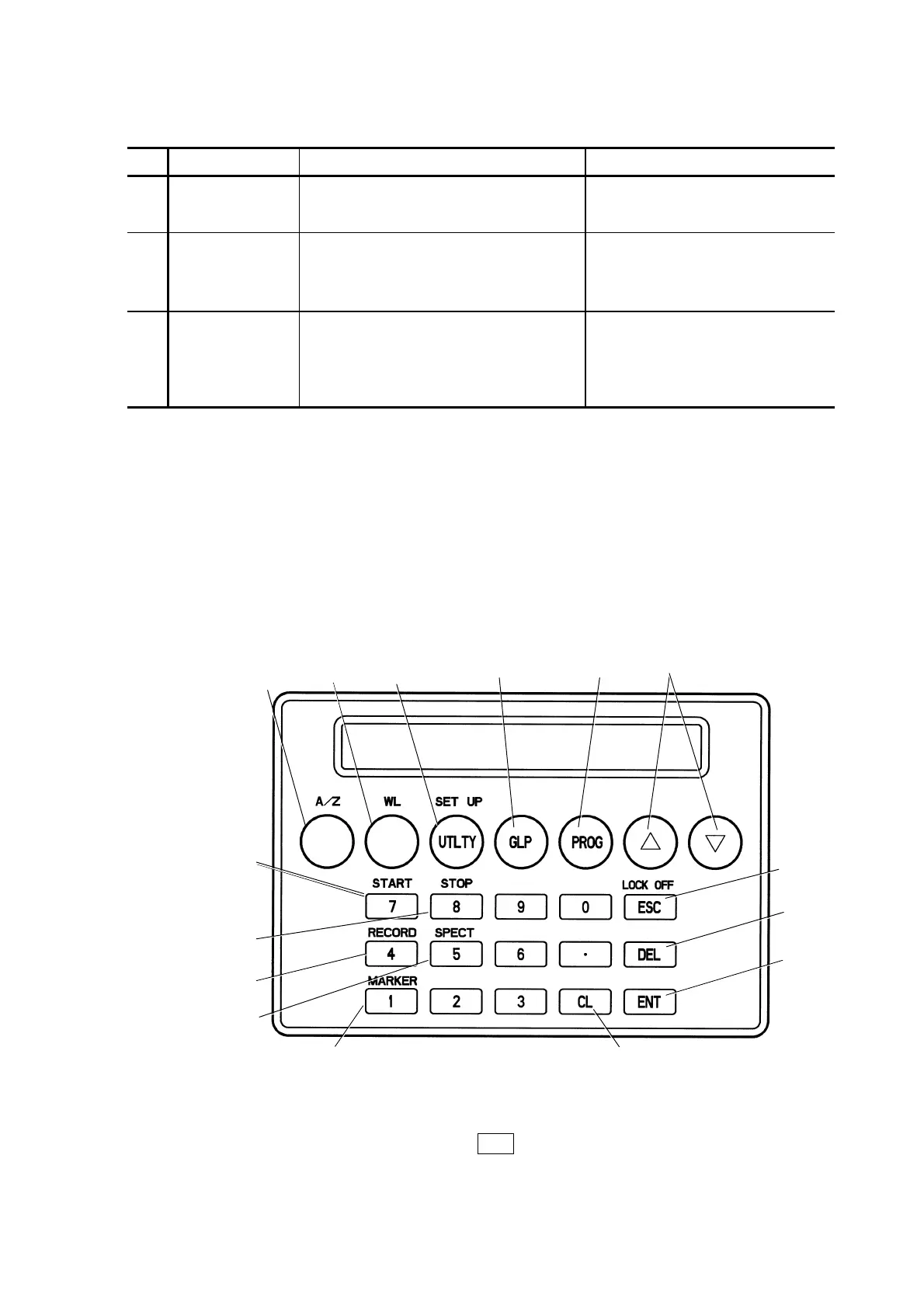
2.2 Name and Function of Each Part on UI Pad (Option)
A UI pad will be used when a chromato data station or a GUI
controller (option) won’t be used for an instrument controlling.
The UI pad will be invalid when the chromato data station or GUI
controller (option) is connected.
Description is given for each key on the optional UI pad control
panel.
(14)
(6)
(12)
(13)
(9)
(10)
(5)(4)(3)(2)
(1)
(7)
(8)
(11)
(15)
Fig. 2-2 Keyboard on the UI Pad
NOTE: Press the ESC key to return to the initial state when you
made incorrect operation.
2 - 3





 To Next Page