EasyManua.ls Logo

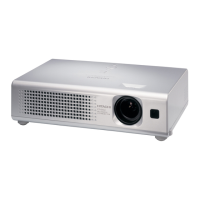
Hitachi CPX5 - User Manual

Hitachi CPX5
81 pages
Print Icon
To Next Page IconTo Next Page
Loading...
1
Projector
CPX1/CPX5
User's Manual (detailed)
Operating Guide
Thank you for purchasing this projector.
WARNING Ź%HIRUHXVLQJWKLVSURGXFWSOHDVHUHDGDOOPDQXDOVIRUWKLV
SURGXFW%HVXUHWRUHDG³6DIHW\*XLGH´¿UVW$IWHUUHDGLQJWKHPVWRUHWKHPLQ
DVDIHSODFHIRUIXWXUHUHIHUHQFH
$ERXWWKLVPDQXDO
9DULRXVV\PEROVDUHXVHGLQWKLVPDQXDO7KHPHDQLQJVRIWKHVHV\PEROVDUH
GHVFULEHGEHORZ
WARNING 7KLVV\PEROLQGLFDWHVLQIRUPDWLRQWKDWLILJQRUHGFRXOGSRVVLEO\
UHVXOWLQSHUVRQDOLQMXU\RUHYHQGHDWKGXHWRLQFRUUHFWKDQGOLQJ
CAUTION 7KLVV\PEROLQGLFDWHVLQIRUPDWLRQWKDWLILJQRUHGFRXOGSRVVLEO\
UHVXOWLQSHUVRQDOLQMXU\RUSK\VLFDOGDPDJHGXHWRLQFRUUHFW
KDQGOLQJ
3OHDVHUHIHUWRWKHSDJHVZULWWHQIROORZLQJWKLVV\PERO
NOTE7KHLQIRUPDWLRQLQWKLVPDQXDOLVVXEMHFWWRFKDQJHZLWKRXWQRWLFH
7KHPDQXIDFWXUHUDVVXPHVQRUHVSRQVLELOLW\IRUDQ\HUURUVWKDWPD\DSSHDULQWKLVPDQXDO
7KHUHSURGXFWLRQWUDQVIHURUFRS\RIDOORUDQ\SDUWRIWKLVGRFXPHQWLVQRWSHUPLWWHG
ZLWKRXWH[SUHVVZULWWHQFRQVHQW
Trademark acknowledgment
0DFLVUHJLVWHUHGWUDGHPDUNVRI$SSOH&RPSXWHU,QF
9(6$DQG69*$DUHWUDGHPDUNVRIWKH9LGHR(OHFWURQLFV6WDQGDUG$VVRFLDWLRQ
:LQGRZVLVDUHJLVWHUHGWUDGHPDUNRI0LFURVRIW&RUSRUDWLRQ
$OORWKHUWUDGHPDUNVDUHWKHSURSHUWLHVRIWKHLUUHVSHFWLYHRZQHUV

Other manuals for Hitachi CPX5

Questions and Answers

  • K
    Kimberly HallAug 9, 2025
    What to do if the lamp does not light on my Hitachi CPX5?
    • H
      hroweAug 9, 2025
      If the lamp on your Hitachi Projector doesn't light and there's a possibility the interior has become heated, turn the power off and allow the projector to cool down for at least 30 minutes. Afterward, check for any blockage of the air passage, inspect the air filter for dirt, and ensure the peripheral temperature isn't above 40°C before turning the power back on.
  • M
    Michael SmithAug 14, 2025
    What to do if my Hitachi CPX5 displays a filter reminder message?
    • D
      David GarciaAug 14, 2025
      If your Hitachi Projector displays a filter reminder message, immediately turn the power off and clean or change the air filter. After cleaning or changing the air filter, be sure to reset the filter timer.
  • D
    Donald BrownAug 19, 2025
    Why does my Hitachi CPX5 Projector say 'CHECK THE AIR FLOW'?
    • R
      Rachel MartinSep 12, 2025
      The 'CHECK THE AIR FLOW' message on your Hitachi Projector indicates that the internal temperature is rising. Turn the power off and let the projector cool down for at least 30 minutes. Then, check for any blockage of the air passage, ensure the air filter isn't dirty, and verify that the surrounding temperature is not exceeding 40°C. After confirming these, turn the power back on.
  • J
    Jason ThomasAug 25, 2025
    What to do if my Hitachi CPX5 Projector cooling fan is not operating?
    • B
      Brandi PageAug 25, 2025
      If the cooling fan on your Hitachi Projector is not operating, turn the power off and allow the projector to cool down for a minimum of 30 minutes. Following this, check to ensure that there is no blockage of the air passage, that the air filter is not dirty, and that the surrounding temperature does not exceed 40°C before you turn the power on again.
  • M
    Mark CollinsAug 28, 2025
    How to fix 'NO INPUT IS DETECTED' on Hitachi CPX5?
    • E
      elizabeth09Aug 29, 2025
      If your Hitachi Projector displays 'NO INPUT IS DETECTED', the issue is likely due to a missing input signal. Please check the signal input connection and verify the status of the signal source.
  • U
    udillonSep 2, 2025
    Why does my Hitachi Projector say 'SYNC IS OUT OF RANGE'?
    • J
      Justin IrwinSep 2, 2025
      The 'SYNC IS OUT OF RANGE' message on your Hitachi Projector indicates that the horizontal or vertical frequency of the input signal is not within the specified range. Please check the projector's specifications or the signal source specifications to ensure they are compatible.

Hitachi CPX5 Specifications

General IconGeneral
BrandHitachi
ModelCPX5
CategoryProjector
LanguageEnglish

Related product manuals