EasyManua.ls Logo

Hitachi HCA-7500 - Volume Control (Level Attenuator); Muting Switch; Function Selector Switch; Tape Operation Switch

Hitachi HCA-7500
11 pages
Print Icon
To Next Page IconTo Next Page
To Previous Page IconTo Previous Page
Loading...
@)
Volume
control
(LEVEL
ATTENUATOR)
Use
this
to
adjust
the
sound
volume.
It is
con-
figured
as
a
32-contact
attenuator,
and
the
‘0’
position
indicates
the
maximum
output
power.
Attenuation
can
be
provided
in
1
dB
steps
between
O
and
10dB,
in
2dB
steps
between
10
and
22dB,
in
3dB
steps
between
22
and
46
dB,
and
in
4dB
steps
between
46
and
70d8.
The
attenuator
system
guarantees
accurate
sound
volume
adjustments.
@
MUTING
switch
This
switch
is
set
to
ON
when
depressed,
and
an
attenuation
of
20dB
is
provided.
Use
this
switch
when
lowering
the
sound
volume
tempo-
rarily
or
when
finely
adjusting
the
level
to
listen
to
the
sound
at
a
low
volume.
Note:
High-output
signals
will
be
applied
to
the
speakers
when
the
MUTING
switch
is
set
to
OFF,
and
they
may
be
damaged.
Therefore,
always
check
the
position
of
the
volume
control,
or
set
the
control
to
its
minimum
position
(%)
if
you
are
not
sure
of
the
strength
of
the
sound,
before
setting
the
MUTING
switch
to
OFF.
(9
FUNCTION
switch
This
selects
the
program
source.
PHONO-1
...
For
hearing
a
record
on
the
turntable
connected
to
the
PHONO
1
input
terminals
1%.
PHONO-2
...
For
hearing
a
record
on
the
turntable
connected
to
the
PHONO
2
input
terminals
18.
TUNER
....
For
listening
to
a
broadcast
on
a
tuner
connected
to
the
TUNER
input
terminals
79.
AUX
......
For
listening
to
a
program
source
On
a
component
con-
nected
to
the
AUX
input
ter-
minals
2.
4)
TAPE
switch
(See
page
5
for
further
details)
Select
the
switch
positions
as
outlined
below
when
playing
back
a
tape,
when
monitoring
the
recording
state
during
tape
recording,
and
when
dubbing
tapes.
SOURCE
...
For
recording
a
sound
source
selected
by
the
FUNCTION
switch.
TAPE
1.
....
For
monitoring
the
playback
or
recording
of
a
tape
in
tape
deck
1
which
is
connected
to
the
TAPE
1
terminals.
TAPE
2
....
For
monitoring
the
playback
or
recording
of
a
tape
in
tape
deck
2
which
is
connected
to
the
TAPE
2
terminals.
The
following
two
positions
are
used
for
tape
dubbing.
COPY
12...
For
playing
back
a
tape
in
tape
deck
1
which
is
connected
to
the
TAPE
1
terminals
and
re-
cording
the
contents
of
that
tape
onto
a
tape
in
tape
deck
2
which
is
connected
to
the
TAPE
2
terminals
(this
pro-
cess
is
called
dubbing).
At
position
1
the
reproduced
sound
of
the
tape
in
tape
deck
1
can
be
heard,
and
at
position
2
it
is
possible
to
monitor
the
recording
state
of
the
tape
in
tape
deck
2.
COPY
2
D1...
For
playing
back
a
tape
in
tape
deck
2
which
is
connected
to
the
TAPE
2
terminals
and
re-
cording
the
contents
of
that
tape
onto
a
tape
in
tape
deck
1
which
is
connected
to
the
TAPE
1
terminals
(this
process
is
called
dubbing).
At
position
2
the
reproduced
sound
of
the
tape
in
tape
deck
2
can
be
heard,
and
at
position
1
it
is
possible
to
monitor
the
recording
state
of
the
tape
in
tape
deck
1.
42
TREBLE
control
Operate
this
control
after
setting
the
TONE
switch
44
to
ON.
Turning
this
control
to
the
right
from
"0
position
increases
the
treble
and
conversely,
turning
it
to
the
left
decreases
the
treble.
The
treble
can
be
adjusted
+10
dB
at
10
kHz
when
the
TURNOVER
switch
(TREBLE)
4
is
set
t0
3
kHz,
and
£10
dB
at
20
kHz
when
the
same
switch
is
set
to
the
6
kHz
position.
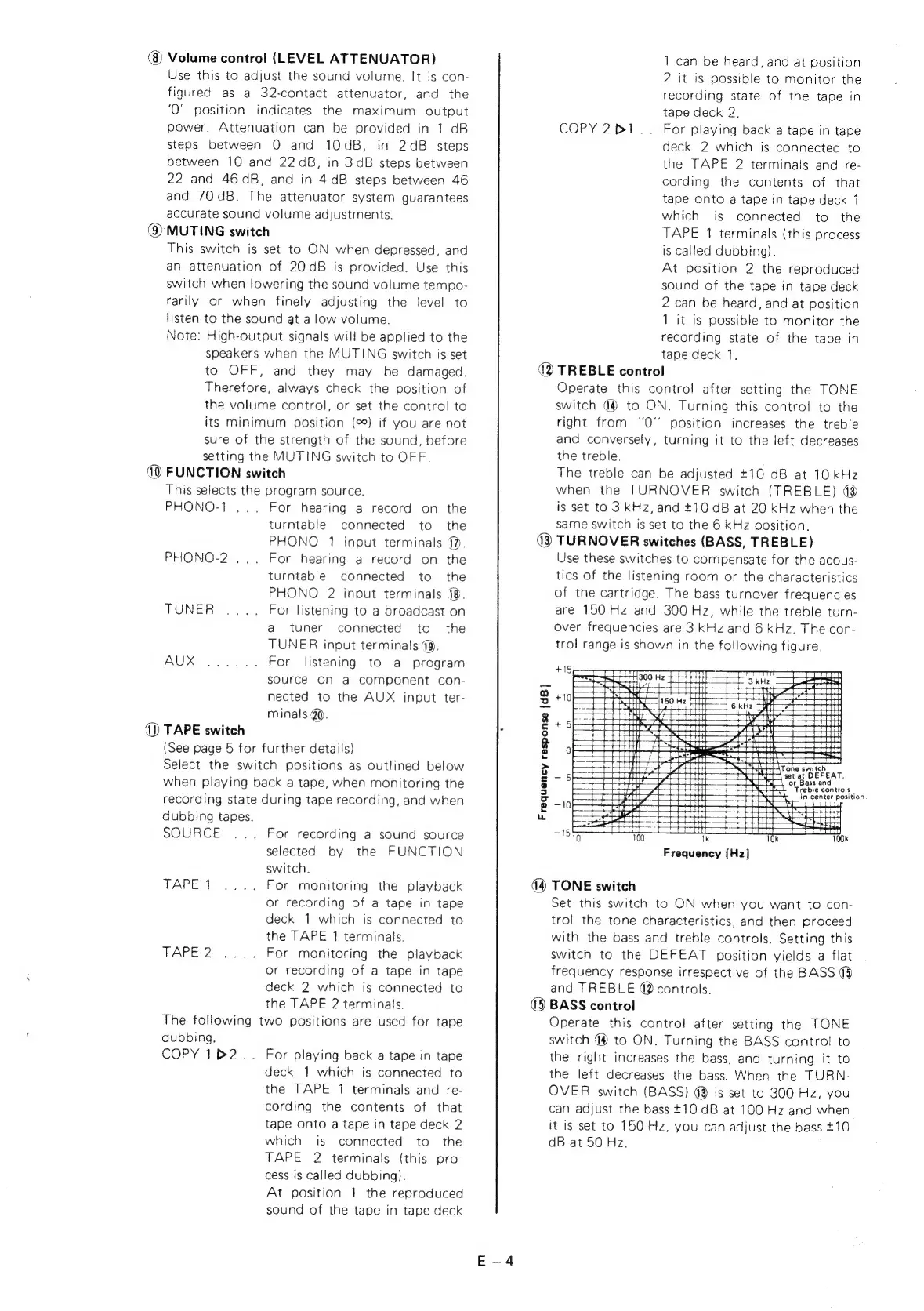
(3
TURNOVER
switches
(BASS,
TREBLE)
Use
these
switches
to
compensate
for
the
acous-
tics
of
the
listening
room
or
the
characteristics
of
the
cartridge.
The
bass
turnover
frequencies
are
150
Hz
and
300
Hz,
while
the
treble
turn-
over
frequencies
are
3
kHz
and
6
kHz.
The
con-
trol
range
is
shown
in
the
following
figure.
aCe.
ay
ot
H
ip
aueaee!
Ah
-
aC
i
ane
wen
A
\
or
Bass
and
Treble
controls
in
center
position
\
Frequency
response
{dB]
Frequency
[Hz]
(4
TONE
switch
Set
this
switch
to
ON
when
you
want
to
con-
trol
the
tone
characteristics,
and
then
proceed
with
the
bass
and
treble
controls.
Setting
this
switch
to
the
DEFEAT
position
yields
a
flat
frequency
response
irrespective
of
the
BASS
@
and
TREBLE
42
controls.
(5)
BASS
control
Operate
this
control
after
setting
the
TONE
switch
4
to
ON.
Turning
the
BASS
contro!
to
the
right
increases
the
bass,
and
turning
it
to
the
left
decreases
the
bass.
When
the
TURN-
OVER
switch
(BASS)
@
is
set
to
300
Hz,
you
can
adjust
the
bass
+10
dB
at
100
Hz
and
when
it
is
set
to
150
Hz,
you
can
adjust
the
bass
+10
dB
at
50
Hz.