- 8 -
REMOTE CONTROL
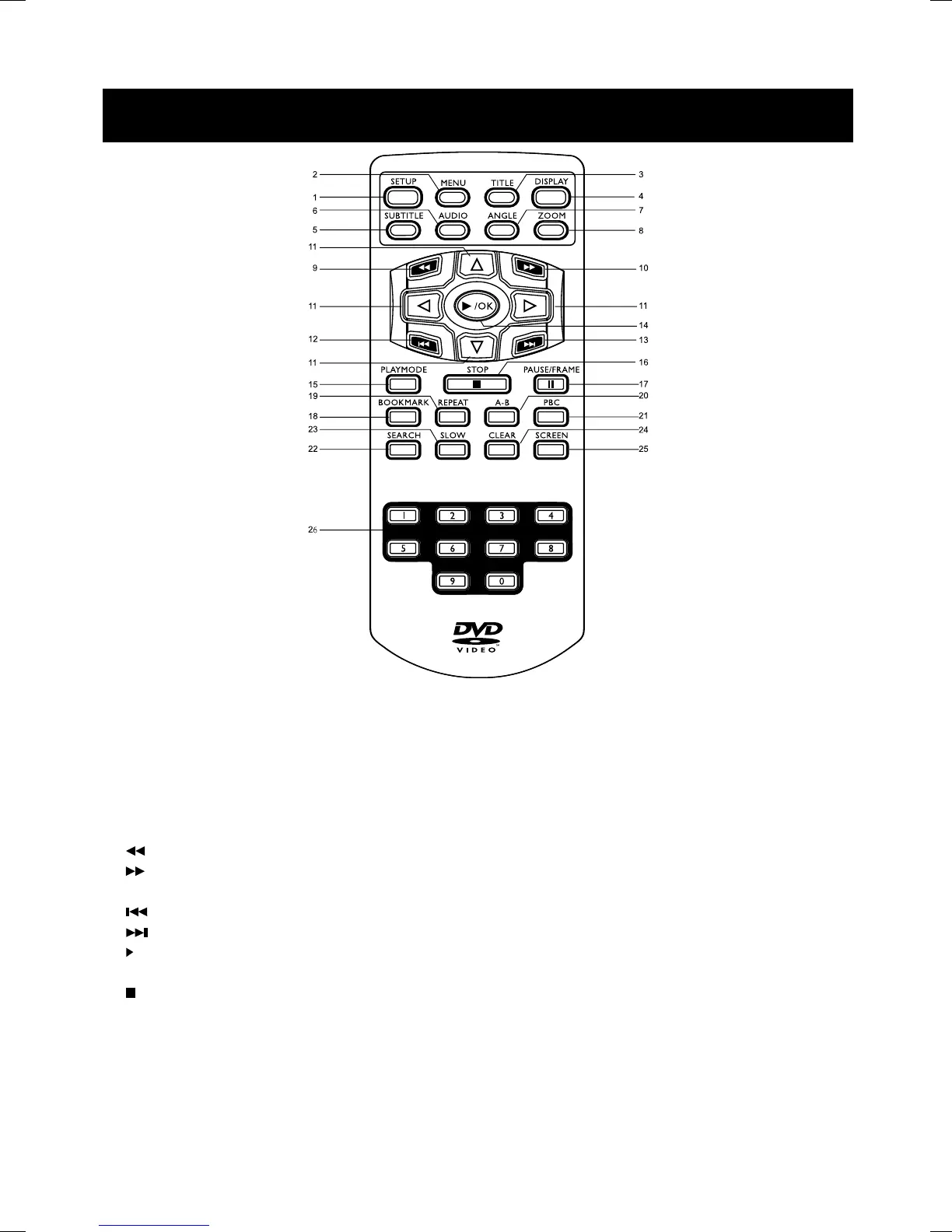
1. Setup – Accesses the DVD player setup menu.
2. Menu – In DVD mode, press for menu setup for DVD title ( if available ).
3. Title – Press to go to the title menu at DVD mode.
4. Display – Press for detailed information on the disc playing.
5. Subtitle – When a DVD is playing, press to select a subtitle language or to turn subtitle off.
6. Audio – Press to select various audio languages ( if available ).
7. Angle – Press to change angle selection in DVD mode ( if available ).
8. Zoom – Press to select the zoom ratio.
9.
Reverse – Press to search backward.
10.
Forward – Press to search forward.
11. Navigation Keys – Use the arrow buttons to move through the on-screen menu and info display.
12.
Skip - – Skip to previous chapter, track, title.
13.
Skip + – Skip to next chapter, track, title.
14.
/ OK – Press to select the highlighted items. Press to start playback.
15. Playmode – Press to enter Random or Program mode.
16.
Stop – Press to stop playback.
17.Pause / Frame – Press to pause playback for VCD / DVD disc;
To show the picture frame by frame by pressing Pause/Frame key again.


 To Next Page