EasyManua.ls Logo

Hitachi RAS-5142CH - Page 7

Hitachi RAS-5142CH
48 pages
Print Icon
To Next Page IconTo Next Page
To Previous Page IconTo Previous Page
Loading...
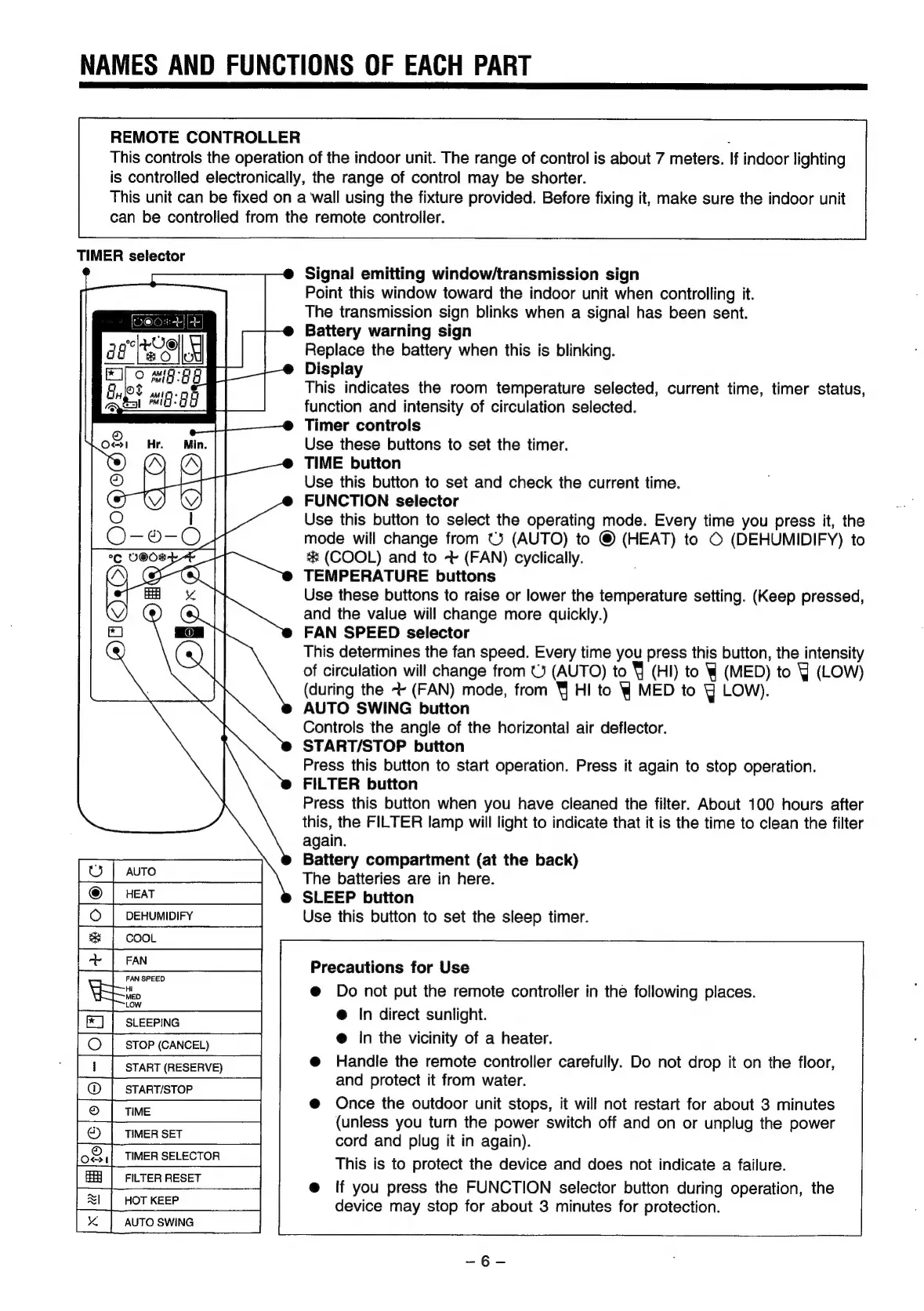
NAMES
AND
FUNCTIONS
OF
EACH
PART
REMOTE
CONTROLLER
:
This
controls
the
operation
of
the
indoor
unit.
The
range
of
control
is
about
7
meters.
If
indoor
lighting
is
controlled
electronically,
the
range
of
control
may
be
shorter.
This
unit
can
be
fixed
on
a
wall
using
the
fixture
provided.
Before
fixing
it,
make
sure
the
indoor
unit
can
be
controlled
from
the
remote
controller.
TIMER
selector
Signal
emitting
window/transmission
sign
Point
this
window
toward
the
indoor
unit
when
controlling
it.
The
transmission
sign
blinks
when
a
signal
has
been
sent.
Battery
warning
sign
Replace
the
battery
when
this
is
blinking.
Display
This
indicates
the
room
temperature
selected,
current
time,
timer
status,
function
and
intensity
of
circulation
selected.
Timer
controls
Use
these
buttons
to
set
the
timer.
TIME
button
Use
this
button
to
set
and
check
the
current
time.
FUNCTION
selector
Use
this
button
to
select
the
operating
mode.
Every
time
you
press
it,
the
mode
will
change
from
©)
(AUTO)
to
©
(HEAT)
to
©
(DEHUMIDIFY)
to
**
(COOL)
and
to
~
(FAN)
cyclically.
TEMPERATURE
buttons
Use
these
buttons
to
raise
or
lower
the
temperature
setting.
(Keep
pressed,
and
the
value
will
change
more
quickly.)
FAN
SPEED
selector
This
determines
the fan
speed.
Every
time
you
press
this
button,
the
intensity
of
circulation
will
change
from
(3
(AUTO)
to
4
(HI)
to
W
(MED)
to
Y
(LOW)
(during
the
+
(FAN)
mode,
from
¥
HI
to
WY
MED
to
Yj
LOW).
AUTO
SWING
button
Controls
the
angle
of
the
horizontal
air
deflector.
START/STOP
button
Press
this
button
to
start
operation.
Press
it
again
to
stop
operation.
FILTER
button
Press
this
button
when
you
have
cleaned
the
filter.
About
100
hours
after
this,
the
FILTER
lamp
will
light
to
indicate
that
it
is
the
time
to
clean
the
filter
again.
Battery
compartment
(at
the
back)
The
batteries
are
in
here.
SLEEP
button
Use
this
button
to
set
the
sleep
timer.
ag
Eo
Precautions
for
Use
@
Do
not
put
the
remote
controller
in
the
following
places.
@
In
direct
sunlight.
@
In
the
vicinity
of
a
heater.
Handle
the
remote
controller
carefully.
Do
not
drop
it
on
the
floor,
and
protect
it
from
water.
Once
the
outdoor
unit
stops,
it
will
not
restart
for
about
3 minutes
(unless
you
turn
the
power
switch
off
and
on
or
unplug
the
power
cord
and
plug
it
in
again).
This
is
to
protect
the
device
and
does
not
indicate
a
failure.
If
you
press
the
FUNCTION
selector
button
during
operation,
the
device
may
stop
for
about
3
minutes
for
protection.
|
HOT
KEEP
AUTO
SWING