EasyManua.ls Logo

Hitachi RAS-5142CH - Page 8

Hitachi RAS-5142CH
48 pages
Print Icon
To Next Page IconTo Next Page
To Previous Page IconTo Previous Page
Loading...
AUTOMATIC
OPERATION
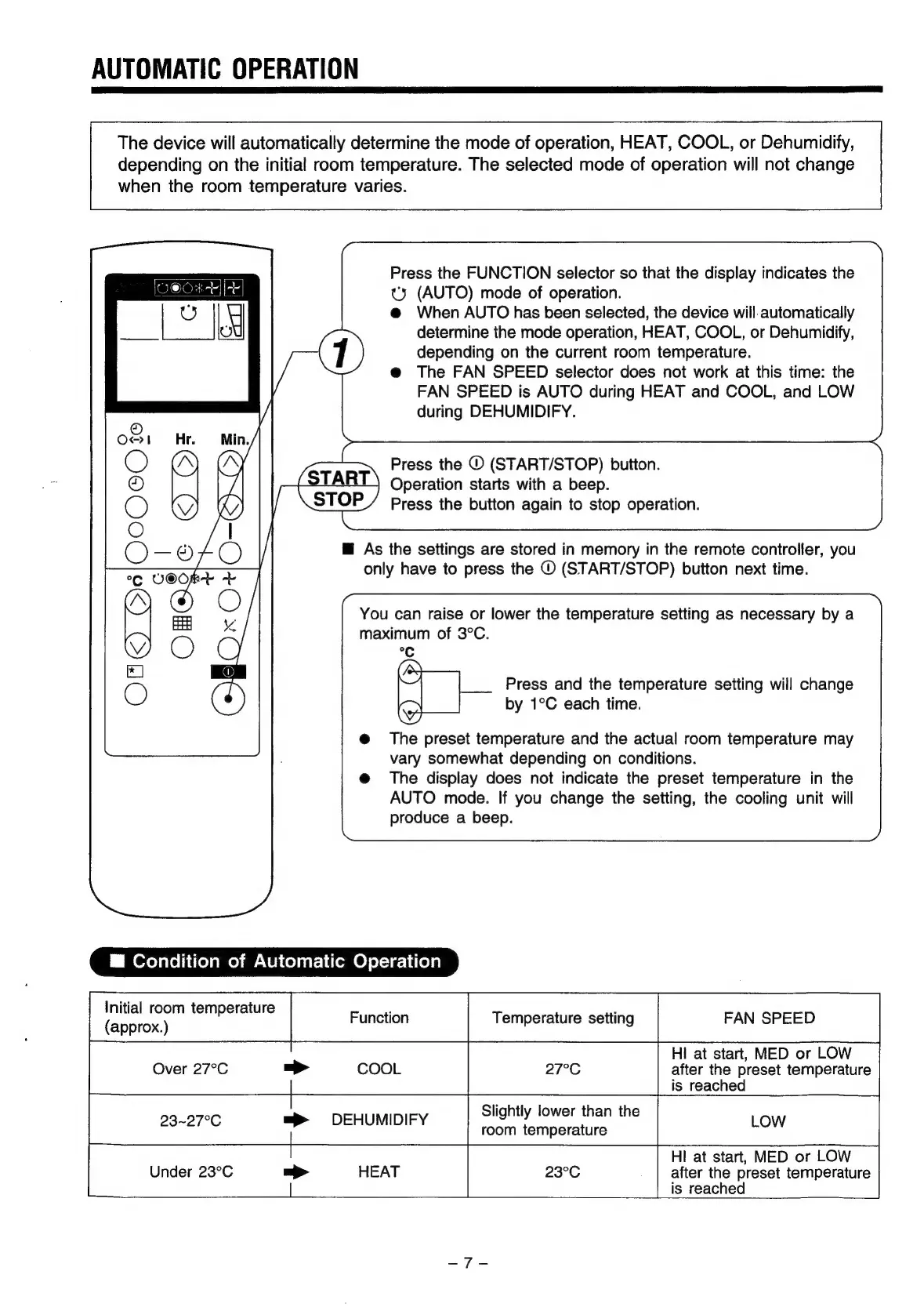
The
device
will
automatically
determine
the
mode
of
operation,
HEAT,
COOL,
or
Dehumidify,
depending
on
the
initial
room
temperature.
The
selected
mode
of
operation
will
not
change
when
the
room
temperature
varies.
Press
the
FUNCTION
selector
so
that
the
display
indicates
the
ty
(AUTO)
mode
of
operation.
@
When
AUTO
has
been
selected,
the
device
will.
automatically
determine
the
mode
operation,
HEAT,
COOL,
or
Dehumidify,
depending
on
the
current
room
temperature.
@
The
FAN
SPEED
selector
does
not
work
at
this
time:
the
FAN
SPEED
is
AUTO
during
HEAT
and
COOL,
and
LOW
during
DEHUMIDIFY.
Press
the
©
(START/STOP)
button.
START
Operation
starts
with
a
beep.
STOP
/
Press
the
button
again
to
stop
operation.
@
As
the
settings
are
stored
in
memory
in
the
remote
controller,
you
only
have
to
press
the
©
(START/STOP)
button
next
time.
You
can
raise
or
lower
the
temperature
setting
as
necessary
by
a
maximum
of
3°C.
°C
Press
and
the
temperature
setting
will
change
by
1°C
each
time.
@
The
preset
temperature
and
the
actual
room
temperature
may
vary
somewhat
depending
on
conditions.
@
The
display
does
not
indicate
the
preset
temperature
in
the
AUTO
mode.
If
you
change
the
setting,
the
cooling
unit
will
produce
a
beep.
Oey
alolidiolamolmr-Velveliit-l
deme)
er-le-lice)
a
Initial
room
temperature
. :
(approx.)
Temperature
setting
FAN
SPEED
HI
at
start,
MED
or
LOW
Over
27°C
=>
COOL
27°C
after
the
preset
temperature
is
reached
2
Slightly
lower
than
the
mp
HI
at
start,
MED
or
LOW
after
the
preset
temperature
is
reached
Under
23°C
HEAT