EasyManua.ls Logo

Hitachi RAS-5142CH - Page 9

Hitachi RAS-5142CH
48 pages
Print Icon
To Next Page IconTo Next Page
To Previous Page IconTo Previous Page
Loading...
HEATING
OPERATION
Use
the
device
for
heating
when
the
outdoor
temperature
is
under
21°C.
When
it
is
warm
(over
21°C),
the
heating
function
may
not
work
in
order
to
protect
the
device.
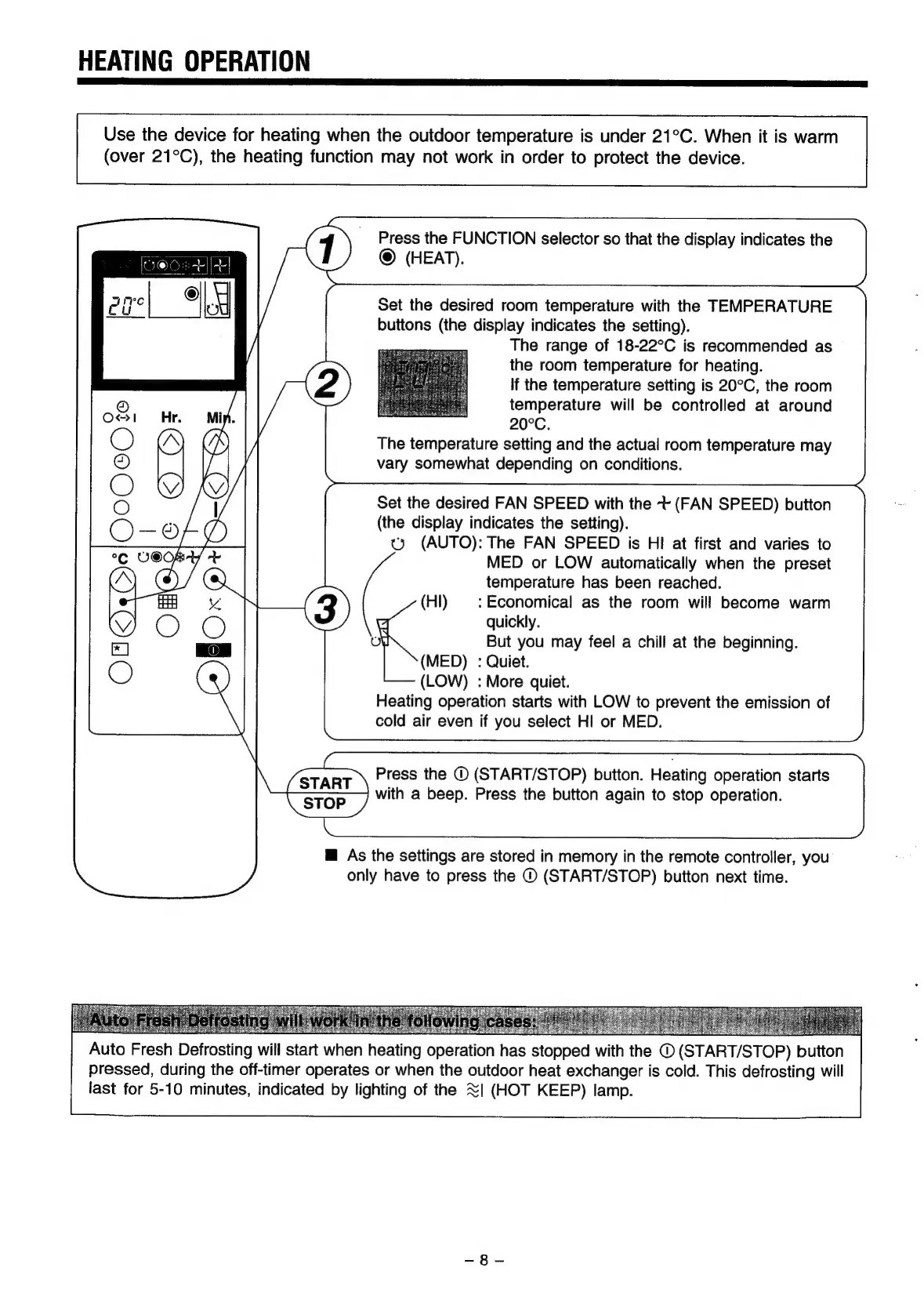
Press
the
FUNCTION
selector
so
that
the
display
indicates
the
@
(HEAT).
Set
the
desired
room
temperature
with
the
TEMPERATURE
buttons
(the
display
indicates
the
setting).
The
range
of
18-22°C
is
recommended
as
the
room
temperature
for
heating.
If
the
temperature
setting
is
20°C,
the
room
temperature
will
be
controlled
at
around
20°C.
The
temperature
setting
and
the
actual
room
temperature
may
vary
somewhat
depending
on
conditions.
Set
the
desired
FAN
SPEED
with
the
t+
(FAN
SPEED)
button
(the
display
indicates
the
setting).
ty
(AUTO):
The
FAN
SPEED
is
HI
at
first
and
varies
to
MED
or
LOW
automatically
when
the
preset
temperature
has
been
reached.
(Hl)
|:
Economical
as
the
room
will
become
warm
quickly.
But
you
may
feel
a
chill
at
the
beginning.
(MED)
:
Quiet.
(LOW)
:
More
quiet.
Heating
operation
starts
with
LOW
to
prevent
the
emission
of
cold
air
even
if
you
select
HI
or
MED.
Press
the
©
(START/STOP)
button.
Heating
operation
starts
with
a
beep.
Press
the
button
again
to
stop
operation.
@
As
the
settings
are
stored
in
memory
in
the
remote
controller,
you
only
have
to
press
the
©
(START/STOP)
button
next
time.
od
EME
UR
Nah
seers
Auto
Fresh
Defrosting
will
start
when
heating
operation
has
stopped
with
the
©
(START/STOP)
button
pressed,
during
the
off-timer
operates
or
when
the
outdoor
heat
exchanger
is
cold.
This
defrosting
will
last
for
5-10
minutes,
indicated
by
lighting
of
the
<|
(HOT
KEEP)
lamp.