EasyManua.ls Logo

Hitachi RAS-80YHA - User Manual

Hitachi RAS-80YHA
26 pages
Print Icon
To Next Page IconTo Next Page
Loading...
– 1 –
SPLIT TYPE
INDOOR UNIT/OUTDOOR UNIT
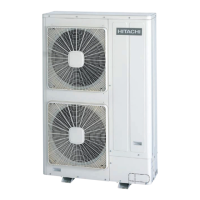
OUTDOOR UNIT
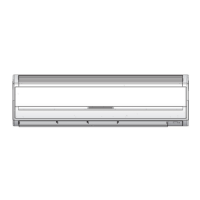
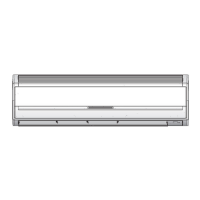
INDOOR UNIT
RAC-80YHA
RAS-80YHA
MODEL
RAS-80YHA/RAC-80YHA
Instruction manual Page 1~22
To obtain the best performance and ensure years of trouble free use, please read this instruction
manual completely.
Question and Answer IconNeed help?

Do you have a question about the Hitachi RAS-80YHA and is the answer not in the manual?

Summary

Hitachi Air Conditioner Units

Model Identification

Identifies the specific model of the Hitachi air conditioner unit.

Instruction Manual Introduction

Provides an introduction to the instruction manual and its purpose.

Safety Precautions

Installation Safety Guidelines

Outlines essential safety measures during unit installation.

Shifting and Maintenance Safety

Details safety procedures for moving and maintaining the unit.

Operation Safety Rules

Lists critical safety instructions for operating the unit.

Names and Functions of Each Part

Indoor Unit Components

Details the various parts and functions of the indoor air conditioning unit.

Outdoor Unit Components

Details the various parts and functions of the outdoor air conditioning unit.

Model Name and Dimensions

Provides specifications including model numbers and physical dimensions.

Operation Indicators

Indoor Unit Indicator Lights

Explains the meaning of indicator lamps on the indoor unit.

Names and Functions of Each Part

Remote Controller Functions

Describes the buttons and operational functions of the remote controller.

Various Functions

Auto Restart Control Feature

Explains the automatic restart function after power interruption.

Automatic Operation Mode

Details how the unit automatically selects operation modes based on room temperature.

Automatic Operation Conditions

Lists the conditions and settings for automatic operation modes.

Heating Operation Guide

Dehumidifying Operation Guide

Dehumidifying Function Details

Explains how the dehumidifying mode works and its operational parameters.

Cooling Operation Guide

Fan Operation Guide

Automatic Fan Speed Control

Details the automatic adjustment of fan speed during operation.

Timer Setting Procedures

Setting the Off-Timer

Guide to setting the timer for the unit to turn off automatically.

Setting the On-Timer

Guide to setting the timer for the unit to turn on automatically.

Setting the On;Off-Timer

Guide to setting timers for both unit turn-on and turn-off.

Cancelling Timer Reservations

Instructions on how to cancel a previously set timer reservation.

Sleep Timer Setup

Cancelling Sleep Timer Reservation

Instructions on how to cancel a set sleep timer.

Air Deflector Adjustment

Horizontal Deflector Control

How to adjust the upward and downward air direction.

Vertical Deflector Modes

How to adjust the left and right air direction using swing modes.

Remote Controller Battery Replacement

Optimal Operation Practices

Suitable Room Temperature Guidelines

Recommendations for maintaining optimal room temperatures for health and energy efficiency.

Using Curtains or Blinds

Advice on using window coverings to reduce heat entry.

Ventilation Best Practices

Guidance on proper room ventilation for fresh air intake.

Effective Timer Usage for Comfort

How to use timers to maintain comfortable room temperatures throughout the day.

Air Filter Cleaning Schedule

Reminder for regular cleaning of the air filter to maintain efficiency.

Temperature Adjustments for Vulnerable Groups

Special attention needed for babies, children, and the elderly.

User Information and Troubleshooting

Room Heat Sources and Performance

How internal heat sources can affect air conditioner performance.

Long-Term Storage and Lightning Safety

Procedures for non-operation periods and safety during thunderstorms.

UV-LED Indicator Functionality

Explanation of the UV-LED indicator and its normal operation.

Electrical Interference Avoidance

Tips to prevent interference from nearby electrical products.

Attaching Air Cleansing and Deodorizing Filters

Unit Maintenance

Air Filter Cleaning and Replacement

Detailed procedure for cleaning and maintaining the air filters.

Cleaning Procedures

Minus Ion Stick Attachment

Guide to attaching the minus ion stick to the filter frame.

Washable Front Panel Cleaning

Instructions for safely cleaning the removable front panel.

Seasonal Maintenance

Long Off-Period Preparation

Steps for preparing the unit for extended periods of non-operation.

Regular Inspection Checklist

After-Sales Service and Warranty

Service Inquiry Checklist

Points to check before requesting service or reporting issues.

Summary

Hitachi Air Conditioner Units

Model Identification

Identifies the specific model of the Hitachi air conditioner unit.

Instruction Manual Introduction

Provides an introduction to the instruction manual and its purpose.

Safety Precautions

Installation Safety Guidelines

Outlines essential safety measures during unit installation.

Shifting and Maintenance Safety

Details safety procedures for moving and maintaining the unit.

Operation Safety Rules

Lists critical safety instructions for operating the unit.

Names and Functions of Each Part

Indoor Unit Components

Details the various parts and functions of the indoor air conditioning unit.

Outdoor Unit Components

Details the various parts and functions of the outdoor air conditioning unit.

Model Name and Dimensions

Provides specifications including model numbers and physical dimensions.

Operation Indicators

Indoor Unit Indicator Lights

Explains the meaning of indicator lamps on the indoor unit.

Names and Functions of Each Part

Remote Controller Functions

Describes the buttons and operational functions of the remote controller.

Various Functions

Auto Restart Control Feature

Explains the automatic restart function after power interruption.

Automatic Operation Mode

Details how the unit automatically selects operation modes based on room temperature.

Automatic Operation Conditions

Lists the conditions and settings for automatic operation modes.

Heating Operation Guide

Dehumidifying Operation Guide

Dehumidifying Function Details

Explains how the dehumidifying mode works and its operational parameters.

Cooling Operation Guide

Fan Operation Guide

Automatic Fan Speed Control

Details the automatic adjustment of fan speed during operation.

Timer Setting Procedures

Setting the Off-Timer

Guide to setting the timer for the unit to turn off automatically.

Setting the On-Timer

Guide to setting the timer for the unit to turn on automatically.

Setting the On;Off-Timer

Guide to setting timers for both unit turn-on and turn-off.

Cancelling Timer Reservations

Instructions on how to cancel a previously set timer reservation.

Sleep Timer Setup

Cancelling Sleep Timer Reservation

Instructions on how to cancel a set sleep timer.

Air Deflector Adjustment

Horizontal Deflector Control

How to adjust the upward and downward air direction.

Vertical Deflector Modes

How to adjust the left and right air direction using swing modes.

Remote Controller Battery Replacement

Optimal Operation Practices

Suitable Room Temperature Guidelines

Recommendations for maintaining optimal room temperatures for health and energy efficiency.

Using Curtains or Blinds

Advice on using window coverings to reduce heat entry.

Ventilation Best Practices

Guidance on proper room ventilation for fresh air intake.

Effective Timer Usage for Comfort

How to use timers to maintain comfortable room temperatures throughout the day.

Air Filter Cleaning Schedule

Reminder for regular cleaning of the air filter to maintain efficiency.

Temperature Adjustments for Vulnerable Groups

Special attention needed for babies, children, and the elderly.

User Information and Troubleshooting

Room Heat Sources and Performance

How internal heat sources can affect air conditioner performance.

Long-Term Storage and Lightning Safety

Procedures for non-operation periods and safety during thunderstorms.

UV-LED Indicator Functionality

Explanation of the UV-LED indicator and its normal operation.

Electrical Interference Avoidance

Tips to prevent interference from nearby electrical products.

Attaching Air Cleansing and Deodorizing Filters

Unit Maintenance

Air Filter Cleaning and Replacement

Detailed procedure for cleaning and maintaining the air filters.

Cleaning Procedures

Minus Ion Stick Attachment

Guide to attaching the minus ion stick to the filter frame.

Washable Front Panel Cleaning

Instructions for safely cleaning the removable front panel.

Seasonal Maintenance

Long Off-Period Preparation

Steps for preparing the unit for extended periods of non-operation.

Regular Inspection Checklist

After-Sales Service and Warranty

Service Inquiry Checklist

Points to check before requesting service or reporting issues.

Overview

This document describes the Hitachi Split Type Indoor Unit/Outdoor Unit, model RAS-80YHA/RAC-80YHA, an air conditioning system designed for optimal performance and user convenience.

Function Description

The Hitachi Split Type air conditioner provides cooling, heating, dehumidifying, and fan-only operations. It features an indoor unit and an outdoor unit, controlled by a remote controller. The system is designed to maintain a comfortable room temperature and air quality.

Indoor Unit/Outdoor Unit Overview:

The indoor unit, with dimensions of 1150mm (width) x 333mm (height) x 245mm (depth), is responsible for air intake and outlet within the room. It houses an air filter to prevent dust, a front panel for air intake, and indicators for operating conditions. Horizontal and vertical deflectors manage air direction. The outdoor unit, measuring 925mm (width) x 875mm (height) x 315mm (depth), handles the air inlet (back, left side) and blows out warm air.

Operation Indicators:

The indoor unit features several indicators:

  • TIMER LAMP: Lights when the timer is active.
  • OPERATION LAMP: Lights during operation. It flashes during preheating (2-3 minutes after startup) and defrosting (5-10 minutes, approximately once an hour when frost forms on the outdoor unit's heat exchanger).
  • FILTER LAMP: Lights after approximately 200 hours of operation to indicate that the air filter needs cleaning. It turns off when the "AUTO SWING" button is pressed in "STANDBY MODE."

Temporary Switch:

A temporary switch allows basic operation (start/stop) if the remote controller is unavailable. Pressing it once starts the unit in the previously set operation mode. If the power is turned off and then on again, using the temporary switch will initiate automatic mode.

Remote Controller:

The remote controller operates the indoor unit from up to 7 meters away. It features a display showing selected room temperature, current time, timer status, function, and circulation intensity. Key buttons include:

  • Signal emitting window/transmission sign: Blinks when a signal is sent.
  • START/STOP button: Starts and stops operation.
  • FAN SPEED selector: Adjusts fan speed (AUTO, LOW, MED, HI) in FAN mode.
  • AUTO SWING button: Controls the horizontal air deflector angle.
  • TEMPERATURE buttons: Adjusts temperature settings up or down.
  • SLEEP button: Sets the sleep timer.
  • TIME button: Sets and checks time and date.
  • RESET buttons: Resets settings.
  • FUNCTION selector: Cycles through operating modes (AUTO, HEAT, DEHUMIDIFY, COOL, FAN).
  • PARALLEL SWING button: Controls vertical air deflectors to parallel.
  • SYMMETRY SWING button: Controls vertical air deflectors to symmetry.
  • TIMER control: Sets ON-TIMER, OFF-TIMER, and ON/OFF-TIMER.
  • RESERVE button: Confirms timer settings.
  • CANCEL button: Cancels timer reservations.

Important Technical Specifications

  • Model: RAS-80YHA/RAC-80YHA
  • Indoor Unit Dimensions (WxHxD): 1150mm x 333mm x 245mm
  • Outdoor Unit Dimensions (WxHxD): 925mm x 875mm x 315mm
  • Operating Temperature Ranges:
    • Cooling: Outdoor 21-43°C, Indoor Dry bulb 21-32°C, Wet bulb 15-23°C
    • Heating: Outdoor 1-21°C, Indoor Dry bulb 20-27°C, Wet bulb 2-19°C
  • UV LED: Emits ultra violet light. Avoid direct eye exposure.
  • Auto Restart Control: Restarts with previous settings after power failure. Not available with Timer or Sleep Timer.
  • Power Consumption (OFF mode): Approximately 8W when power from mains remains ON.

Usage Features

Automatic Operation:

The unit automatically selects HEAT, COOL, or DEHUMIDIFY based on room temperature.

  • Over 27°C: COOL mode, 27°C preset, HI fan speed at start, then MED/LOW.
  • 23-27°C: DEHUMIDIFY mode, slightly lower than room temperature, LOW fan speed.
  • Under 23°C: HEAT mode, 23°C preset, HI fan speed at start, then MED/LOW. Users can manually adjust the mode if the automatic selection is not satisfactory.

Heating Operation:

Recommended for outdoor temperatures under 21°C.

  1. Select (HEAT) mode.
  2. Set FAN SPEED (AUTO, HI, MED, LOW). AUTO adjusts fan speed based on temperature. HI provides quick warming but may feel chilly initially.
  3. Set desired room temperature (recommended 18-22°C).
  4. Press START/STOP.

Dehumidifying Operation:

Recommended for room temperatures over 16°C.

  1. Select (DEHUMIDIFY) mode. Fan speed is automatically set to LOW.
  2. Set desired room temperature (recommended 20-26°C).
  3. Press START/STOP. The unit dehumidifies to the preset level. If room temperature is lower than the setting, it dehumidifies at a slightly lower temperature and stops when the room temperature falls below the setting.

Cooling Operation:

Recommended for outdoor temperatures 21-43°C.

  1. Select *(COOL) mode.
  2. Set FAN SPEED (AUTO, HI, MED, LOW). AUTO adjusts fan speed based on temperature.
  3. Set desired room temperature (recommended 25-28°C).
  4. Press START/STOP. Cooling starts only if the temperature setting is below the current room temperature.

Fan Operation:

Used as an air circulator or to dry the indoor unit.

  1. Select + (FAN) mode.
  2. Set FAN SPEED.
  3. Press START/STOP. In AUTO fan speed mode during cooling/heating, fan speed adjusts based on the difference between room and set temperatures.

Timer Settings (OFF-Timer, ON-Timer, ON/OFF-Timer):

  1. Set current time, day, and month using the TIME button.
  2. Select desired timer type (OFF-TIMER, ON-TIMER, or ON/OFF-TIMER).
  3. Set the turn-off/turn-on time using the TIMER control button.
  4. Press RESERVE to confirm. To cancel, press the CANCEL button. Only one timer can be set at a time.

Sleep Timer:

Controls fan speed and room temperature automatically for comfort and health.

  1. Ensure current time is set.
  2. Press the SLEEP button.
  3. Select sleep duration (1-7 hours).
  4. The display shows the turn-off time. The sleep timer overrides other timers if set afterwards. It is effective only once per setting.

Adjusting Air Deflector:

  • Horizontal Air Deflector: Use the "AUTO SWING" button to swing the deflector up and down continuously or set it to a desired angle.
  • Vertical Air Deflectors: Use the "PARALLEL SWING" button to swing deflectors left and right to parallel, or the "SYMMETRY SWING" button to swing them left and right to symmetry. Avoid prolonged swinging in cooling mode to prevent condensation.

Remote Controller Battery Exchange:

  1. Remove the back cover.
  2. Replace old batteries with new ones, ensuring correct polarity. Do not mix old and new batteries or different types. Remove batteries if not using the remote for 2-3 months.

Ideal Ways of Operation:

  • Maintain suitable room temperature (avoid freezing temperatures).
  • Use curtains or blinds to reduce heat entry/loss.
  • Ventilate the room occasionally.
  • Utilize the timer functions for energy efficiency and comfort.
  • Adjust temperature and airflow for babies, children, and the elderly.

Maintenance Features

General Maintenance:

Cleaning and maintenance should only be performed by qualified service personnel. Always stop operation and switch off the power supply before maintenance.

Air Filter Cleaning:

Clean the air filter every 2 weeks or sooner if dusty.

  1. Open the front panel.
  2. Gently lift and remove the air cleansing and deodorizing filter from the air filter frame.
  3. Vacuum dust from both filters. If very dusty, rinse with running tap water and gently brush with a soft bristle brush.
  4. Allow filters to dry in shade.
  5. Re-insert the air cleansing and deodorizing filter into the frame, ensuring "FRONT" faces forward.
  6. Attach the filters and close the front panel.
  • Do not wash with hot water (>40°C) or expose to direct sun.
  • Do not use detergent on the air cleansing and deodorizing filter.
  • Air cleansing & deodorizing filters are not washable and should be replaced annually (Type number: SPX-CFH13).
  • Do not operate the air conditioner without filters.

Washable Front Panel Cleaning:

  1. Remove the front panel by pushing the right arm inward and pulling it out.
  2. Wash with clean water and a soft sponge. Use neutral detergent if needed, then rinse thoroughly.
  3. Wipe dry with a soft cloth.
  4. Re-attach the front panel by inserting the projections into the flanges and securing them into the holes.
  • Do not splash water directly on the unit body.
  • Do not use hot water (>40°C), benzine, gasoline, acid, thinner, or a brush, as these can damage plastic surfaces and coating.

Minus Ion Stick Attachment:

Attach the minus ion stick to the lower hooks of the filter frame, pushing up the upper hooks on the left side of the front cover.

Maintenance at Beginning of Long Off Period:

Run the unit in (COOL) mode at 32°C with HI fan speed for about half a day on a fine day to dry the unit. Then, switch off the power plug.

Regular Inspection:

Qualified service personnel should check the following points every half-yearly or yearly:

  • Earth line connection.
  • Mounting frame condition (rust, stability).
  • Power line plug connection (firmness).

Troubleshooting (Before Calling Service):

  • Unit does not operate: Check fuse, voltage, and circuit breaker.
  • Unit does not cool/heat well: Check if air filter is clean, outdoor unit is obstructed, doors/windows are open, heat sources are present, or set temperature is suitable.
  • Notes on normal phenomena: Slight flowing noise of refrigerant, slight rubbing noise from fan casing, and odors from smoke/foodstuffs/cosmetics are normal. Clean air filter and evaporator regularly to reduce odors.

If issues persist, contact your sales agent with model, production number, installation date, and fault description. Ensure power supply is connected at the rated voltage to prevent damage or reduced capacity.

Hitachi RAS-80YHA Specifications

General IconGeneral
BrandHitachi
ModelRAS-80YHA
CategoryAir Conditioner
LanguageEnglish

Related product manuals