– 15 –
ENGLISH
AIR FLOW LOUVERS ADJUSTMENTS
1
2
Adjustment of the conditioned air to the left and right.
Hold the second vertical air de ector of each set of vertical
air de ectors from right as shown in the gure and adjust the
conditioned air to the left and right.
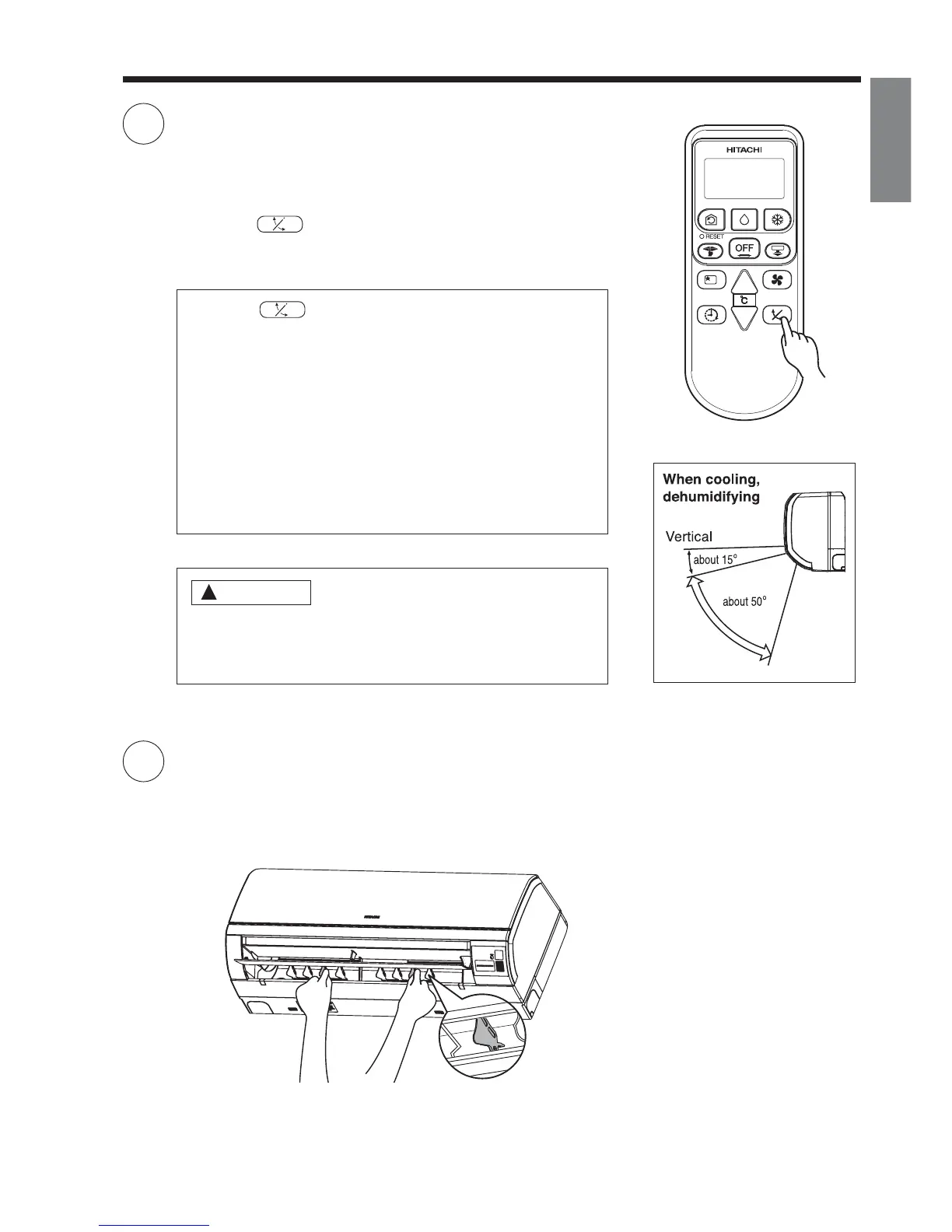
● If the “ (AUTO SWING)” button is pressed once,
the horizontal air de ector swings up and down. If the
button is pressed again, the de ector stops in its current
position. Several seconds (about 6 seconds) may be
required before the de ector starts to move.
● Use the horizontal air de ector within the adjusting range
shown on the right.
● When the operation is stopped, the horizontal air de ector
moves and stops at the position where the air outlet
closes.
!
CAUTION
● In “Cooling” operation, do not keep the horizontal air
de ector swinging for a long time. Some dew may form
on the horizontal air de ector and dew may drop.
Adjustment of the conditioned air in the upward and downward
directions.
The horizontal air de ector is automatically set to the proper
angle suitable for each operation. The de ector can be swung
up and down continuously and also set to the desired angle
using the “ (AUTO SWING)” button.



 To Next Page