– 9 –
ENGLISH
CIRCULATION OPERATION
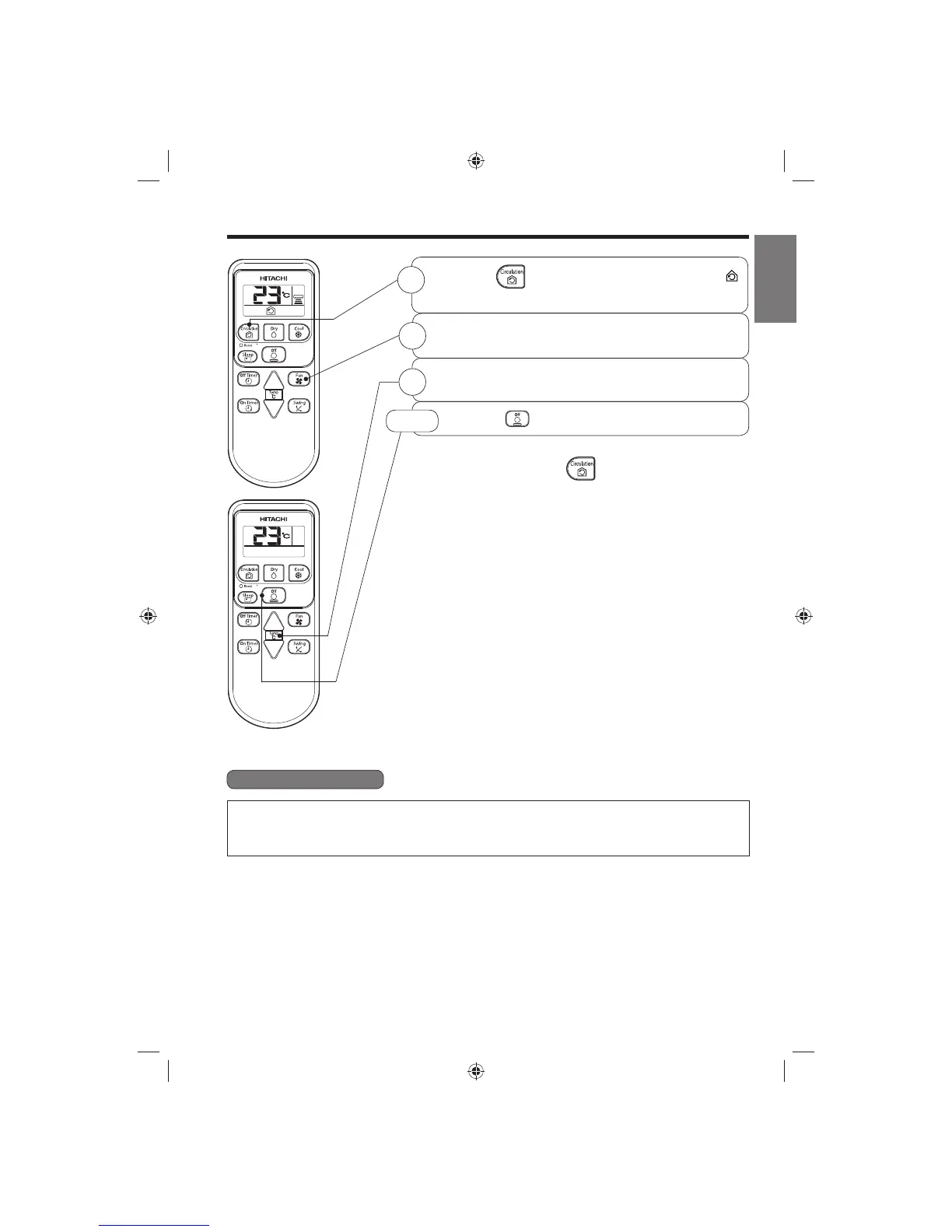
Press the button so that the display indicates
(CIRCULATE). Circulating operation starts with a beep.
Press the FAN SPEED button and select the desired FAN
SPEED (the display indicates your choice).
Press the temperature control button to set to the desired
temperature.
■ As the settings are stored in memory in the remote controller,
you only have to press the
(CIRCULATION) button next
time.
1
3
Press the (STOP) button to stop operation.
STOP
■ Circulation Function
● During circulation operation, compressor will not be running and there is no cooling operation with only
indoor fan running.
● When the setting temperature is higher than room temperature, indoor fan will stop running.
2
(EN2) RAS-X18CD (6-12) 9(EN2) RAS-X18CD (6-12) 9 5/8/14 2:06 PM5/8/14 2:06 PM



 To Next Page