EasyManua.ls Logo

Hitachi V-151F - Waveform Observation Techniques

Hitachi V-151F
27 pages
Print Icon
To Next Page IconTo Next Page
To Previous Page IconTo Previous Page
Loading...
selection
(lO)
Select
the
sweep
mode
by
the
MODE
selector
.
When
no
input
signal
is
applied
or
the
trigger
level
is
not
correct,
set
the
selector
to
NORM
to
remove
waveforms
on
the
screen.
The
triggered
sweep
circuit
of
this
instrument
stops
functioning
if
a
trigger
pulse
is
not
produced
as
a
sweep
starting
pulse.
It
is,
therefore,
necessary
to
select
this
sweep
ac
cording
to
purpose
desired.
Generally,
for
waveforms
which
have
a
frequency
of
20Hz
or
more
and
are
not
complex,
use
AUTO
triggering.
At
AUTO
triggering,
the
sweep
circuit
is
auto
matically
placed
in
the
free-run
state
when
the
aforememtioned
trigger
pulse
is
not
produced
and
a
horizontal
trace
is
displayed
irrespective
of
sweep
time
set
by
the
knob
@
.
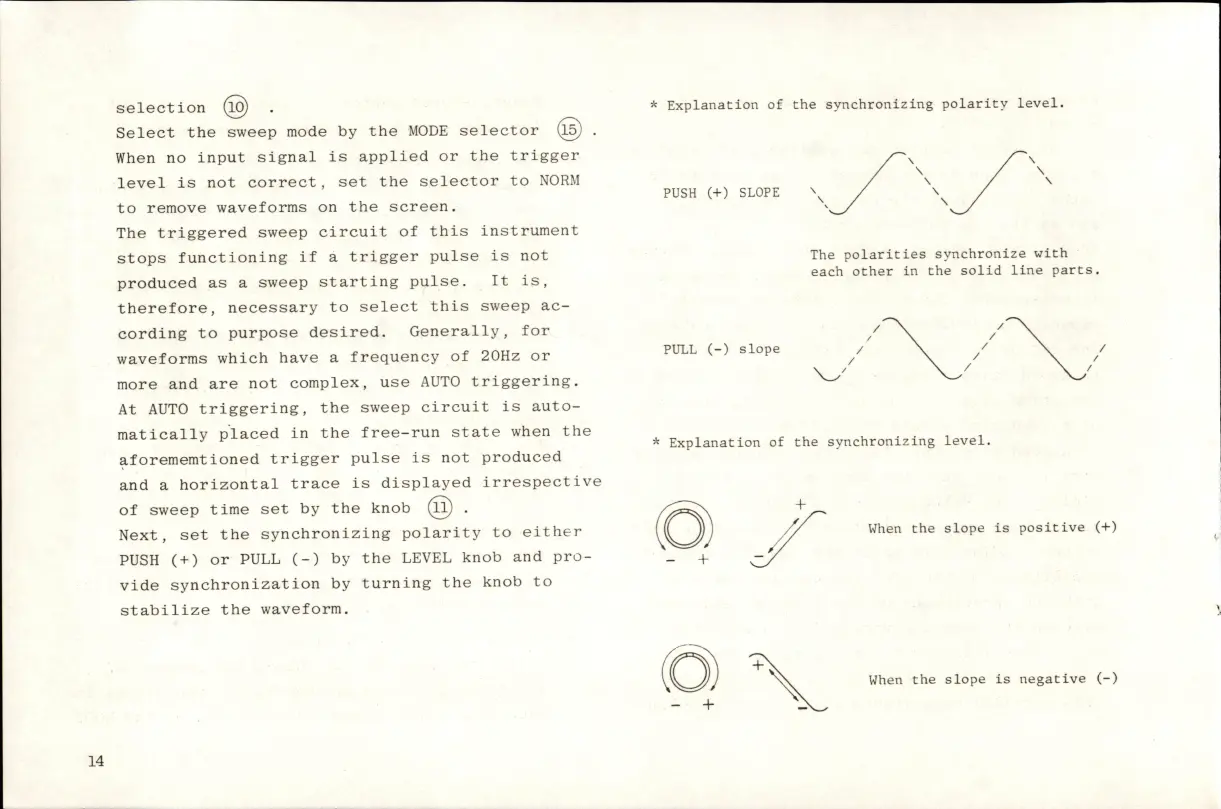
Next,
set
the
synchronizing
polarity
to
either
PUSH
(+)
or
PULL
(-)
by
the
LEVEL
knob
and
pro
vide
synchronization
by
turning
the
knob
to
stabilize
the
waveform.
*
Explanation
of
the
synchronizing
polarity
level.
PUSH
(+)
SLOPE
^
The
polarities
synchronize
with
each
other
in
the
solid
line
parts.
PULL
(-)
slope
*
Explanation
of
the
synchronizing
level.
-
+
When
the
slope
is
positive
(+)
When
the
slope
is
negative
(-)
14

Related product manuals