EasyManua.ls Logo

Hitachi V-211 - Page 16

Hitachi V-211
44 pages
Print Icon
To Next Page IconTo Next Page
To Previous Page IconTo Previous Page
Loading...
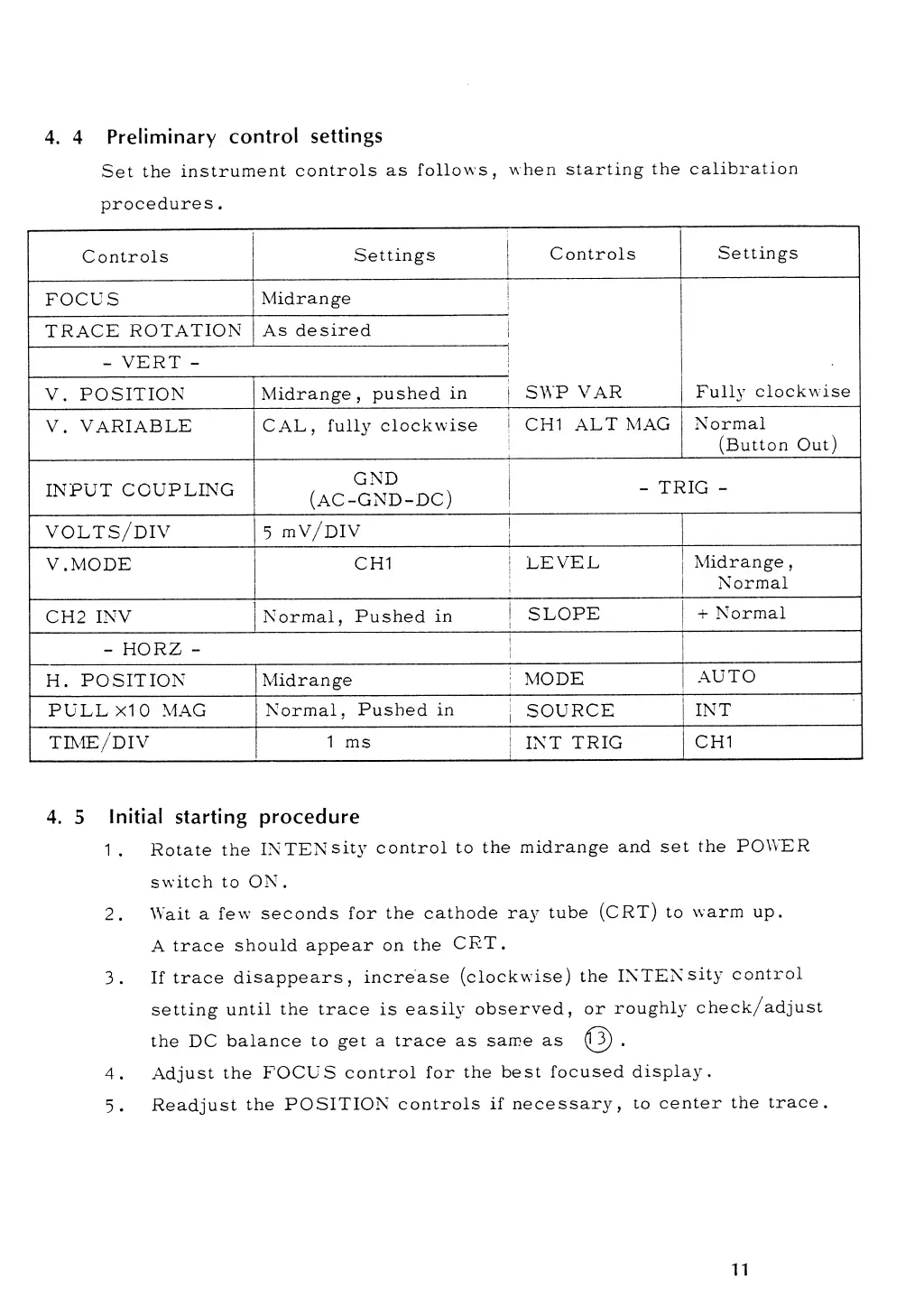
4. 4
Preliminary
control
settings
Set
the
instrument
controls
as
follows,
when
starting
the
calibration
procedures
.
Controls
Settings
Controls
Settings
FOCUS
Midrange
SWP
VAR
Fully
clockwise
TRACE
ROTATION
As
desired
-
VERT
-
V.
POSITION
Midrange
,
pushed
in
V.
VARIABLE
CAL,
fully
clockwise
CHI
ALT MAG
Normal
(Button Out)
INPUT
COUPLING
GND
(AC-GND-DC)
-
TRIG
-
volts/div
5
mV/DIV
V
.MODE
CHI
LEVEL
Midrange
,
Normal
CH2 INV
Normal,
Pushed
in
SLOPE
+
Normal
-
HORZ
-
H.
POSITION
Midrange
MODE
AUTO
PULL
XI
0
MAG
Normal,
Pushed
in
SOURCE
INT
TIME/D
IV
1
ms
INT
TRIG
CHI
4.
5
Initial
starting procedure
1
.
Rotate
the
IN TEN
sity control
to
the
midrange
and set
the
POWER
switch to
ON.
2.
Wait a
few seconds
for
the cathode
ray
tube
(CRT) to
warm
up.
A
trace
should
appear on
the
CRT
.
3.
If
trace
disappears,
increase
(clockwise)
the
INTENsity
control
setting
until the
trace
is
easily
observed,
or
roughly
check/adjust
the DC
balance to
get a trace as
same
as
(T5)
.
4.
Adjust
the
FOCUS
control for
the
best
focused
display.
5.
Readjust
the
POSITION
controls
if
necessary,
to
center
the
trace.
11