Recording from your VCR or IV
@Connecfions using AV cable (for VM-D965LA)
You bOP use this camcorder as o reco_de_, c,nd reoe,_d c,nd edlt v,<e,_'_ -" ,._,<7,_'_,,cw',_oi-_,_,y6c,-,_ ,_._,_K_'__" _.',- _r}_'_o_,,,.=,
'.¢(JeO Cv,e%,'_c'eor C f;z progtc_;P%
'P]a) ingdad< _ eu:_ ReceKlkl_ on heLir F_" or_
_eages 50_o5i.
N(Jd < e_,,vl_ Jse slrla[] butten e[ [_te
CAbf/O_:_/\;IDEO svkch '_ hiie yet s]ide the
swtch to \"]!)}-O.
3 Insert a bhnk tape in the camcorder and the
recorded tape into the VCR.
[[eId down the S[az_iStop bu_ten tel at {e_,s 1
secend [o s(t ti](}carncet tel te t]<' _ecerdh_g
_ause mode.
5 Play ba<k videe materia_ en file {ta} back video
equipment er ei the TV program to be recorded.
PresSsthe Start/St> f) buffo_ ]Costarl record n _.
7 After dubbing is firfished, p_es,_ the Stop button
to stop recerdir_g
Note Ano',og ilnoge: will appec_ ony to
vewfi °,der: It w! €el oppuar on the LeD seloc,a
Note: tf rite VCR is connected It> a _-eevsion end
1he VCR/BJ selector isse! o VCR, you car,. monibr
the tope being dubbed.
Note: Reduce the volume of 1he comcorder as
ow as possible duri@g dubblRg, Otherwise the
® Connections using LUNK (DV) cabJe
payed beck pictures cou!d be distorted,
Note: %r more smoot s Vreceded p}etures, _ is
recommended thor yeu do NO '.'q}x rn<lgos
ebb<ted r t_e Hid/standard 8m'.n forfpQ _and
DiOi*cfi ,_ormat on or_e the same fade.
Note: P}ay beck the iope o pleybock VCR in
_e standard speed mode: Vodeble speed
pay or] _ e VCR, stcR as fast forward oT sow
moron prey, wll c_suse distor*:,on n the inage
it, at is ben@ recorded c'n €he cameorde<
_f your VCR or TV has only one audio output jack
(monaural):
if an S-vdeo cable (sold separately) is used, dearer
nodes can be recorded.
tf your VCR or TV has am S (91) video jack, it is rec-
ommended hat vol.i use a sep;u'ate]; sotd S video
cable, instead e{ the v_Ueu_ [:Jug (',ideo) of AV
table, to connect the _qI video jack and th£ S iS1)
video jack o yeur \/CR or TV.
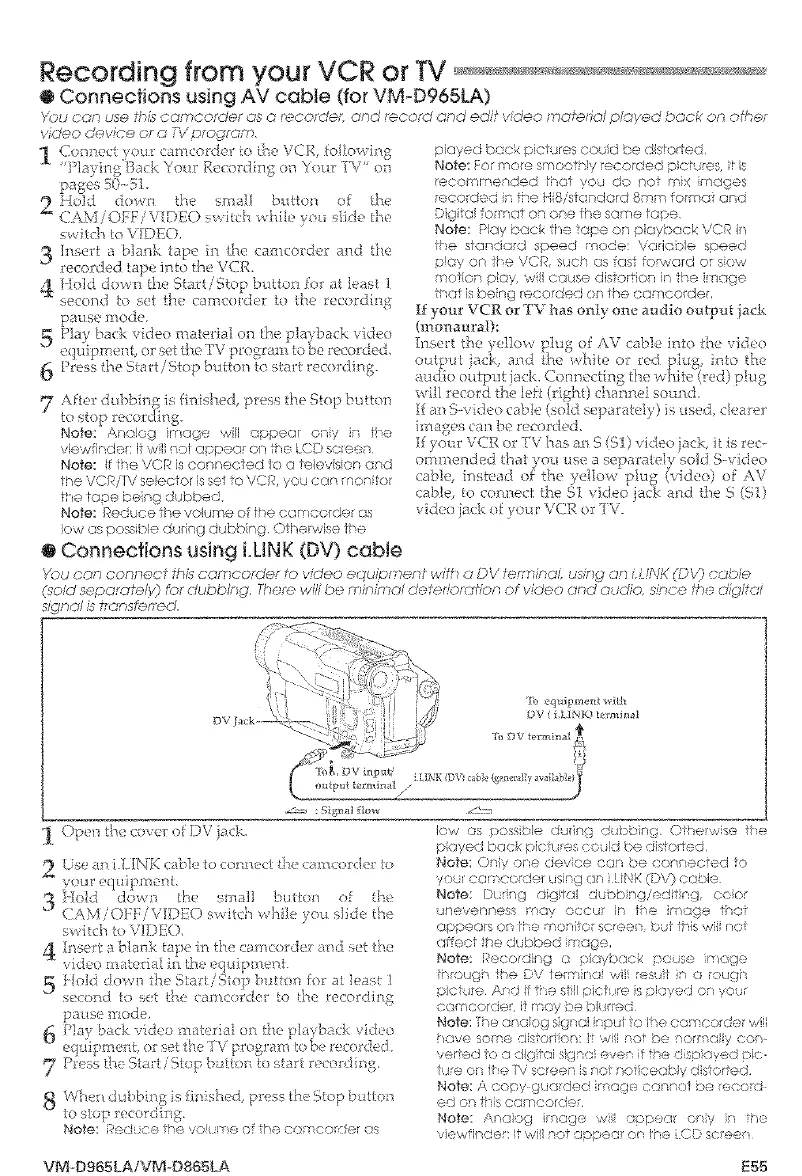
Vou con _onn_.ol th£ cameo, oe to video ..quipment with _ DV ier;, _,.a, usthg on LL NK OPV) cc_bie
Q_o/d sepat otefv} for dubbing. There will be minimal deterlorcfiion ")f video and audio, s_n<:e .) _ o glt ,,
mgn<'# is transferred,
[i) eqaipme_t vlth
DV (LL]NK) t*_rminal
l<)P{nt°ec<_<: ' )Vick-
<._[ If LLIN [<-(i[]e o Ct l]!}e]{[I__.;. rH )lde e
})t_r _,qiipme ti.
3 Hold clot*.n the ss]s]l bul(:/a of te
CAM iON:iVKT)}'O st,'iteh t'dq]e _.'nu s] de/he
, ] ....
sv tch to V]DI(),
4 Mse¢_biankLap_inth< camcerd_ra dsett_e
idee £ite_ [a! {l_ [}}<!eq ciip ]i]e_.[.
5 }fold do'¢,n the StarLiStoi;_btW,en fer a ]east ]
se< )lldto '-1,.t3_ <a uerc e[ _o ,_lerec<udl Ifz
pause mode.
6 }>]a} back ,,[duo n i:edal orl h_, }I_ybad ,,idea
eq _q'_ment, or s_t th( iV )rozram !e be/ecerded,
7 Press ihe S_rt/'Stop button to;tart racer :ling,
Vvo._rl uubbmg ,, tin'shed, press the S'OR i utten
to sop recordh"%
Notes " _..... '- ........i_e(i2 £}__ v Jfi ¢!@Of he C(]KieeK]ef GS
low as possble during dubbing OTherwse tie
pbyed back F:ict _res tepid be rile;totted
Note: Dry ore devoe car be cenrtocfed o
y>u eameoqrer us}ng on ! i,}K ([}V) Or.rOle
Notes DHng dgial d;nbiso/editisg, coo_'
uneve!_ness _*ay occur R th m]ge thor
appears on the mentor sereor;, but hs #', f_()t
(;£OCT ire dubbed mope,
_',_ete: Recording o Nayback p<Lse im.'ge
Pr(}U{_ the DV ie_r_ nai wil rest b a _cuoh
pci re Andi i estli picf reisei]yedo yo,r
eamcordeL [1;r]oy _e b]iJr<@<!
Note: [he anaog sigal ioul io lhe e mcerder wi'
_ave some dis o rior'c !,_',,,',/illre + be nor(_@ y con_
v<-sr!ed k', a dg_ai si/_na ev_:.r f !_e Nkspoyed pie
Je or ire P'/screen s not notksegb y d s ored
Note: A copy %oded image e_nn:)i be eeo_d
edo_th cemco_de,
Note; Ar,<Joti_ ire<p wi y,tl.ear oniy _ ]he
/iewflp<.leri t w! not aopeo_ en !he .CD sc'een
VM-Dg65LAIVM-DS$5LA E55



 To Next Page