8
EN
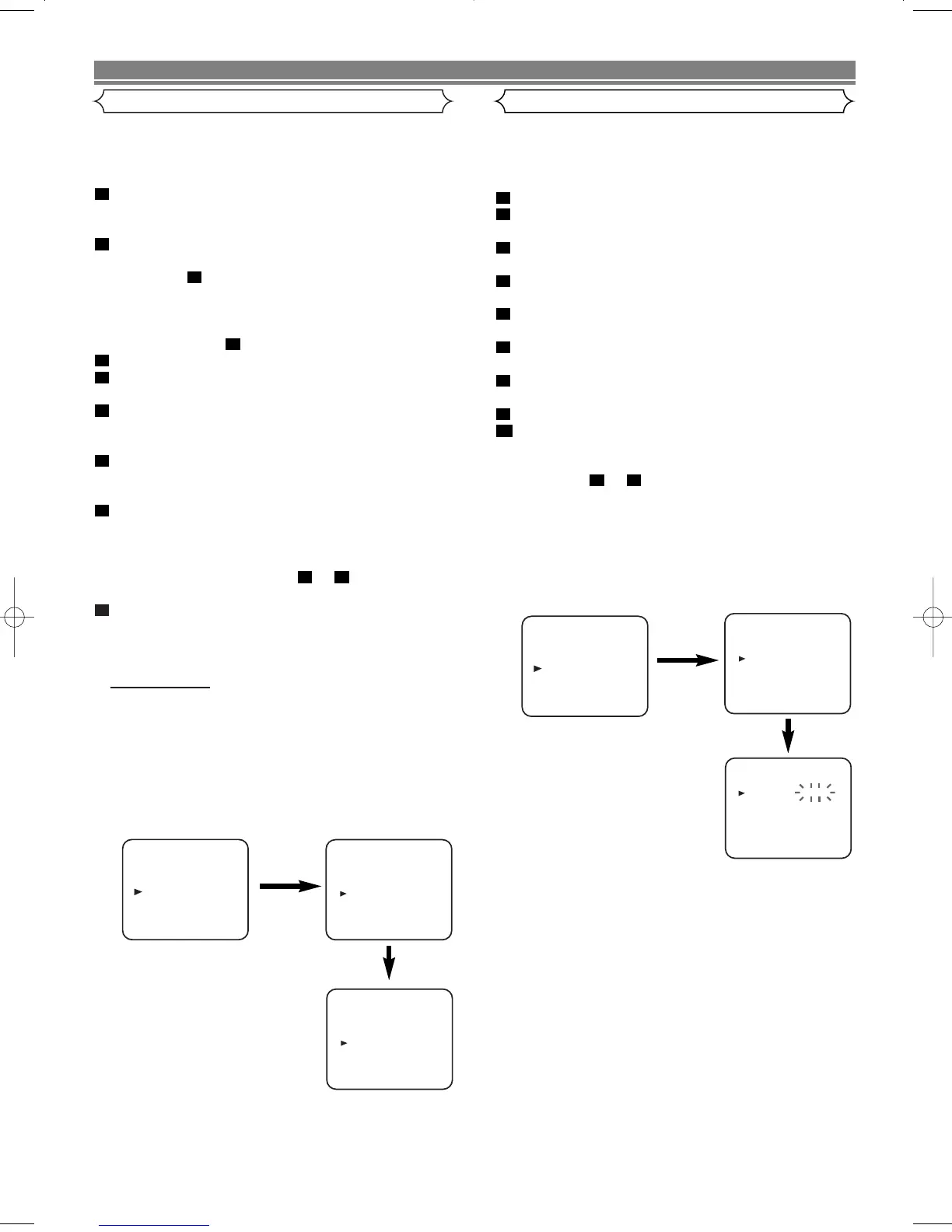
Video Channel Setting
Skip This Section When Connected By SCART.
Video channel setting will be necessary, if your VCR is con-
nected to the TV via the coaxial cable.
• Use the remote control for this procedure.
Insert a pre-recorded tape into the VCR.
The VCR will turn on and start playback automatically.
If playback does not start, press PLAY/
oo
.
Select and adjust your TV to channel 35.
• If the playback picture appears on the TV screen, contin-
ue with step .
• If channel 35 is employed for broadcasting, or interfer-
ence lines appear on the picture, the RF converter must
be set to a different channel between CH22 and CH69.
Continue with step .
Press and hold MENU.
Press PLAY/
oo
or STOP/
LL
repeatedly to select to “INI-
TIAL”. Then, press F.FWD/B.
Press PLAY/
oo
or STOP/
LL
repeatedly to select to “RF
OUT”. Then, press F.FWD/B. The RF OUT CH menu will
appear.
Press PLAY/
oo
or STOP/
LL
to select a channel which is
not used for broadcasts between channel 22 and chan-
nel 69 in your area, then press F.FWD/B.
Press MENU to exit.
Set the TV channel to the RF OUT CHANNEL which
was selected on the VCR. Press PLAY/
oo
.A picture
from the VCR will appear on the TV screen. If a picture
does not appear, repeat steps to using a different
channel which is not used for broadcasts.
Press STOP/
LL
to stop the tape.
NOTES:
• You may also access the RF OUT CH menu by pressing
and holding MENU on the remote control for 3 seconds
during power off until the RF OUT CH menu appears.
• If your VCR and TV are connected using a SCART cable
there is no need to have the RF converter operating so it
can be switched off and avoid the possibility of interfer-
ence. To switch off the RF converter follow the instruc-
tions for Video Channel Setting to step 6 then select
channel 22 first and then press STOP/
LL
so that “– –”
appears next to “RF OUT CH” on the TV screen.and final-
ly press MENU to finish.
8
73
7
6
5
4
3
3
8
2
1
This VCR incorporates a 24-hour clock. The clock must be
set for the Automatic Timer Recording function to operate
correctly.
• Use the remote control for this procedure.
Press MENU.
Press PLAY/
oo
or STOP/
LL
to select “INITIAL”, then press
F.FWD/B.
Press PLAY/
oo
or STOP/
LL
to select “CLOCK”, then press
F.FWD/B.
Press PLAY/
oo
or STOP/
LL
until the relevant year
appears, then press F.FWD/B.
Press PLAY/
oo
or STOP/
LL
until the relevant month
appears, then press F.FWD/B.
Press PLAY/
oo
or STOP/
LL
until the relevant day appears,
then press F.FWD/B.
Press PLAY/
oo
or STOP/
LL
until the relevant hour
appears, then press F.FWD/B.
Press PLAY/
oo
or STOP/
LL
until the relevant minute appears.
Press MENU to start the clock.
NOTES:
• Press REW/s to go one step back from the current step
during steps to .
• Although seconds are not displayed, they begin counting
from 00 when you exit by pressing MENU. Use this fea-
ture to synchronize the clock with the correct time.
• When unplugging the power-cord or if there is a power
failure for more than one minute, you may have to reset
the clock.
84
9
8
7
6
5
4
3
2
1
PRESET FOR USE



 To Next Page