13
Selecting the Input Phase Position
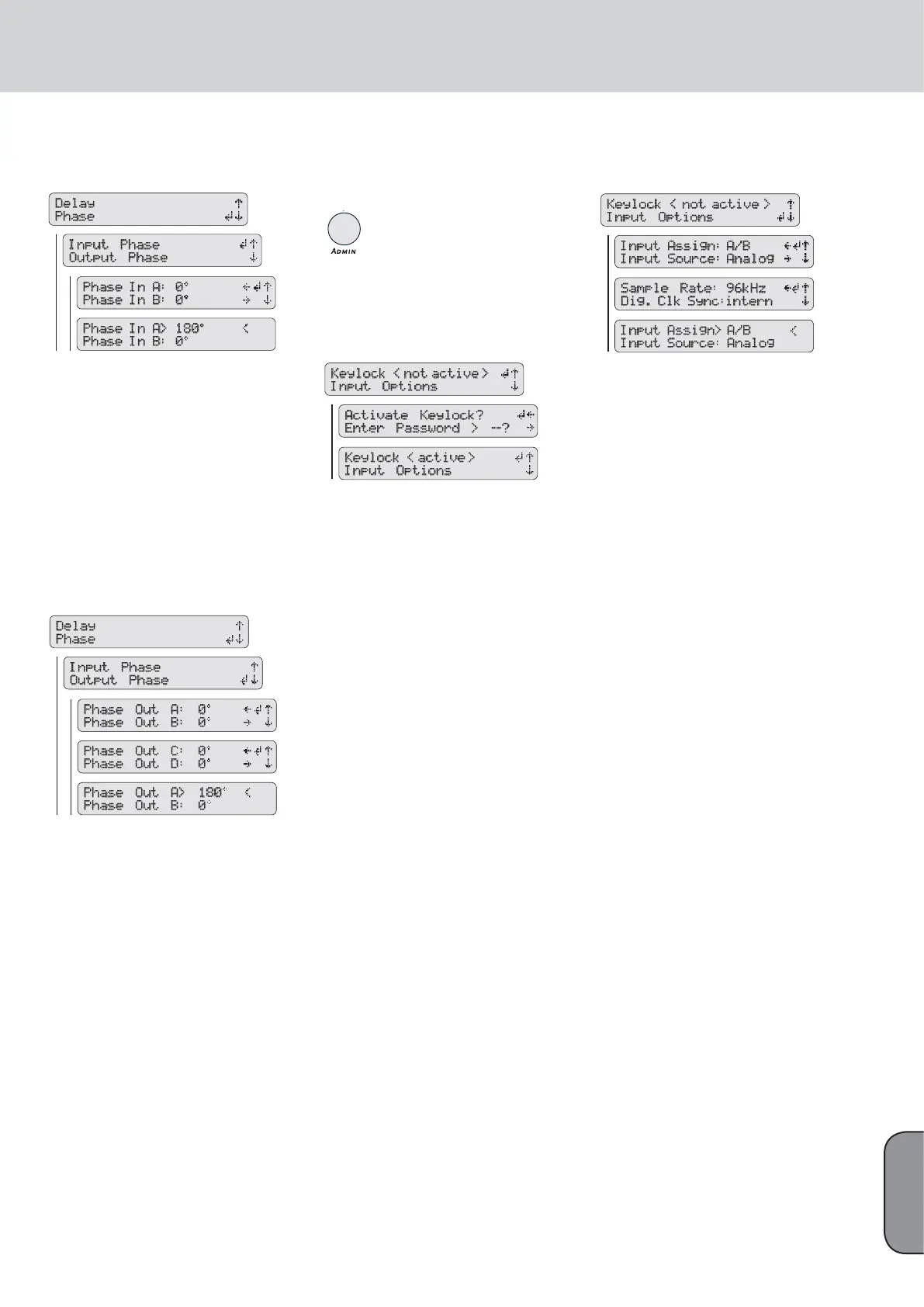
The FIRNET lets you set each input’s phase position
to 0° or 180° for incoming audio signals. To do this,
press the DELAY/PHASE key and then the
RS
keys to select the menu option Phase (press the
S
key once). Press the ENTER key and then the
RS
keys to select the menu option Input Phase, if not
already selected. After pressing the ENTER key, use
the
RS
keys to select an audio input (Input A or
Input B) and the
QP
keys to select the desired
phase position, 0° or 180°, for this input. Then
press the ENTER key to confi rm and assign this
phase position.
Selecting the Output Phase Position
The FIRNET also lets you set each output’s phase
position to 0° or 180° for outgoing audio signals. To
do this, press the DELAY/PHASE key and then the
RS
keys to select the menu option Phase (press
the
S
key once). Press the ENTER key and then the
RS
keys to select the menu option Output Phase
(press the
S
key once). After pressing the ENTER
key, use the arrow up and down keys to select an
audio output (Output A to Output D) and the
QP
keys to select the desired phase position, 0° or
180°, for this output. Then press the ENTER key to
confi rm and assign this phase position.
7.4.5. Admin - Adjusting the
Remaining Parameters
7.4.5.1 Key Lock – Preventing
Unauthorized Access
Locking Keys
You can lock the FIRNET controller’s keys to prevent
unauthorized access and unintentional editing. To
lock keys, press the ADMIN key to access the Admin
menu. Use the
RS
keys to select the menu option
Keylock (if not already selected) and press the EN-
TER key. The LCD now reads Activate Keylock? and
prompts you to enter a password. Use the
QP
keys to select a two-digit number from 00 to 99 as
a password and press the ENTER key to lock keys.
Memorize or note down the password. Unlocking
keys without a password requires a connected PC
and LIPAN remote-control software.
Unlocking Keys
To unlock keys, press the ADMIN key to access
the Admin menu. Keylock is the only menu option
available, so simply press the ENTER key to con-
fi rm. The LCD now reads Deactivate Keylock? and
prompts you to enter a password. Use the
QP
keys to select the two-digit number from 00 to 99
that you used as the password when you locked
keys. Then press the ENTER key to unlock keys.
7.4.5.2 Input Options
Input Assign
• Selecting Separate or Linked Audio Circuits for
Inputs A-B
Access the Admin menu by pressing the ADMIN
key. Use the arrow keys to select the input menu
option Input Options and confi rm your selection
with ENTER. Select A/B or Link for the menu option
Input Assign and confi rm your selection by pressing
the ENTER key.
Input Source
• Selecting an Analog or Digital Input
Access the Admin menu by pressing the ADMIN
key. Use the arrow up and down keys to select the
menu option Input Options (press the arrow down
key once) and press the ENTER key. Now use the
arrow up and down keys to select the submenu op-
tion Input Source (press the arrow down key once)
and the left and right arrow keys to select an analog
(Analog) or digital (AES/EBU) input. Then press the
ENTER key to assign the selected input.
Sampling Rate - Digital Clock Source
• Adjusting the Digital AES/EBU Input’s
Sampling Rate
When addressing the FIRNET via the digital input,
you can chose between two sampling rates, 48 kHz
or 96 kHz, for the digital audio signal. The FIRNET
always works with an internal sampling rate of 96
kHz. If you patch in a digital audio signal with a
48-kHz sampling rate, the FIRNET converts it to
96 kHz.
To adjust the digital AES/EBU input‘s sampling
rate, fi rst press the ADMIN key to access the Admin
menu. Use the
RS
keys to select the menu option
Input Options (press the
S
key once) and press
the ENTER key. Now use the
RS
keys to select
the submenu option Sample Rate (press
RS
twice) and the
QP
keys to set the digital AES/EBU
input‘s sampling rate to 48 kHz or 96 kHz. Then
press the ENTER key to assign the selected samp-
ling rate to the digital AES/EBU input.
English


 To Next Page