FIRNET Controller 1.0
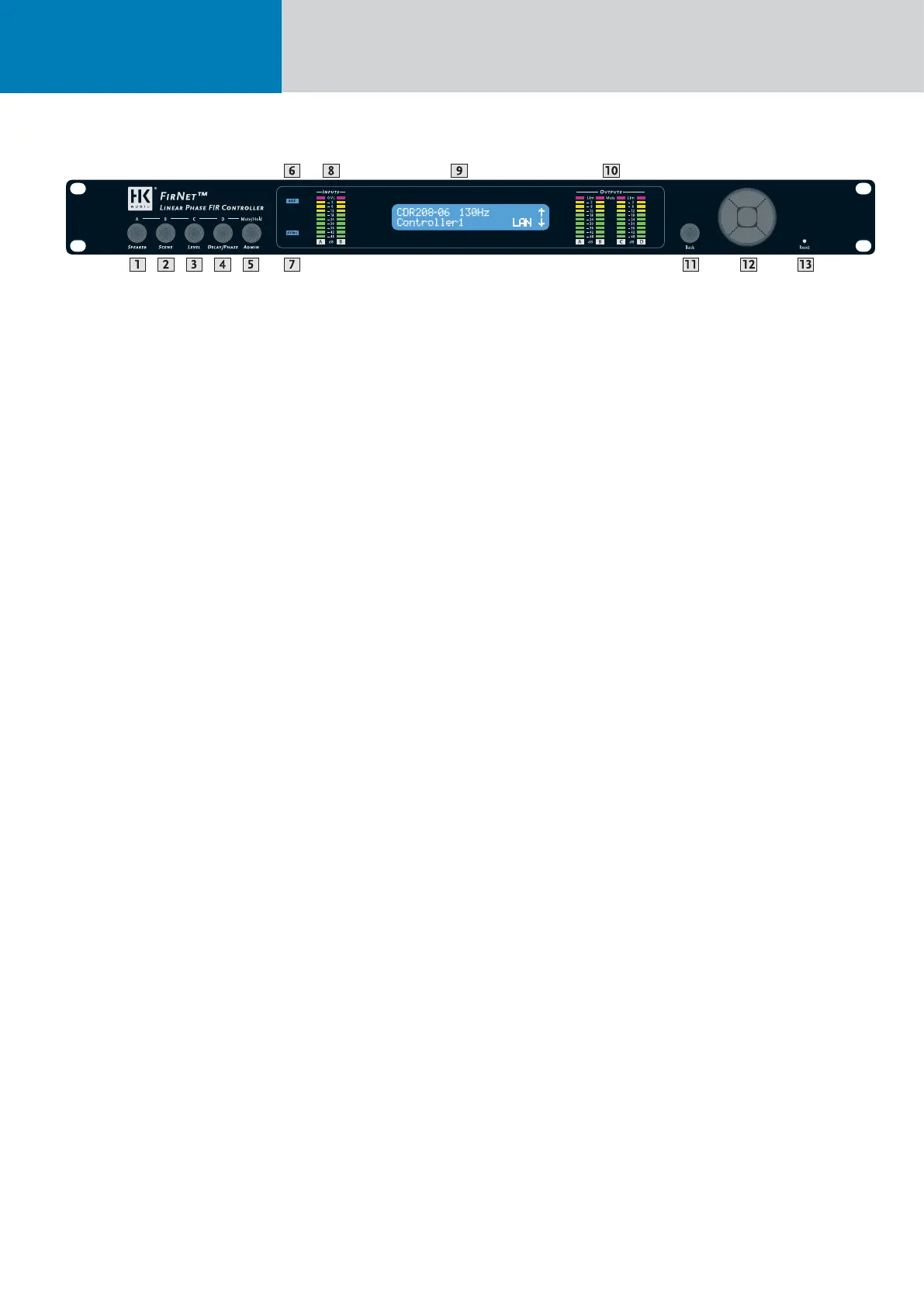
1 SPEAKER Key
• Selects a speaker-specifi c fi lter set from the FIR-
NET speaker series database
2 SCENE Key
• Loads scenes setups from the FIRNET database
and stores them to the database
3 LEVEL Key
• Adjusts input and output levels in the range of -60
dB to 12 dB
• Increment = 0.1 dB in the range of 12 dB to -12 dB
• Increment = 0.5 dB below -12 dB
4 DELAY/PHASE Key
• Adjusts delay time up to 500 ms for the FIRNET
controller’s inputs
• Adjusts delay time up to 25 ms for the FIRNET
controller’s outputs
• Inverts the phase position of the audio signal rout-
ed to the FIRNET controller’s inputs and outputs
5 ADMIN Key
• Locks keys to prevent unauthorized or unintentio-
nal handling
• Selects the audio signal input and associated
options
• Adjusts peak analog input and output levels to
match FIRNET to upstream or downstream audio
devices
• Edits the IP address, controller name, and display
contrast
• Serves to select the delay unit of measure
(ms, m, ft, samples) and enter the surrounding
temperature to calculate the speed of sound
6 AES IN LED Display
• Lights up blue when the FIRNET controller’s
digital AES/EBU IN signal input is selected
• Extinguished when the FIRNET’s analog signal
inputs are selected
7 EXT SYNC LED Display
• This LED lights up blue when an external AES/EBU
signal is enabled for the FIRNET’s synchronization
option and the device receives an incoming signal.
• Extinguished when the controller’s internal syn-
chronization is selected
8 INPUT LED Displays (10 LEDs, green/yellow/red)
• Green segment: Audio input level in the range of
-48 to -12 dB at full scale
• Yellow segment: Audio input level in the range of
-12 to 0 dB at full scale
• Red segment: Audio input level is overdriving the
AD converter
Note: An overdriven AD converter generates
distortion that the FIRNET’s limiter cannot sup-
press. If the red LED lights up, set the FIRNET’s
input gain to a higher value (see the section Setting
Peak AD Level in the Adjusting Parameters chapter)
or reduce the source audio device’s output level!
Be sure to heed the gain level recommendations for
connected amps, particularly when operating an
FP10000Q power amp.
9 LCD
• 2 x 24 characters
• Shows in normal operating mode the controller
name, the selected fi lter, and the existence of a
network link
• Shows options and editable parameters when you
access a menu
10 OUTPUT LED Displays
(10 LEDs, green/yellow/red)
• Green segment: Audio input level in the range of
-48 to -12 dB below the limiter value
• Yellow segment: Audio input level in the range of
-12 to 0 dB at below the limiter value
• Red segment: Limiter is attenuating the audio
input level. The given output is muted (LED lights
up continuously)
11 Back Key
• Returns to the next higher menu level
• Exits edit windows without assigning adjusted
values
12 Navigation Keys
• Navigates to the next or previous menu option
• Selects and changes parameters in the edit
windows
• Top key: Arrow up while scrolling in the menus
• Bottom key: Arrow down while scrolling in the
menus
• Right key to the right to adjust (lower numerical
values)
• Left key to adjust parameter values (lower nume-
rical values)
• Enter key to confi rm the adjusted value
13 Reset Key
Reboots the FIRNET controller, ensuring all settings
are retained (restart). The FIRNET Controller
reboots after ten seconds.
5 Front - Control Readouts and Displays:


 To Next Page