EN
8
®
Flying
• Set a fl ight timer for 5 minutes
• Always make deliberate and steady control
stick movements for smooth control of your
aircraft.
If you feel you are losing control,
release the right (steering) stick to
allow the aircraft to slowly return to
level fl ight.
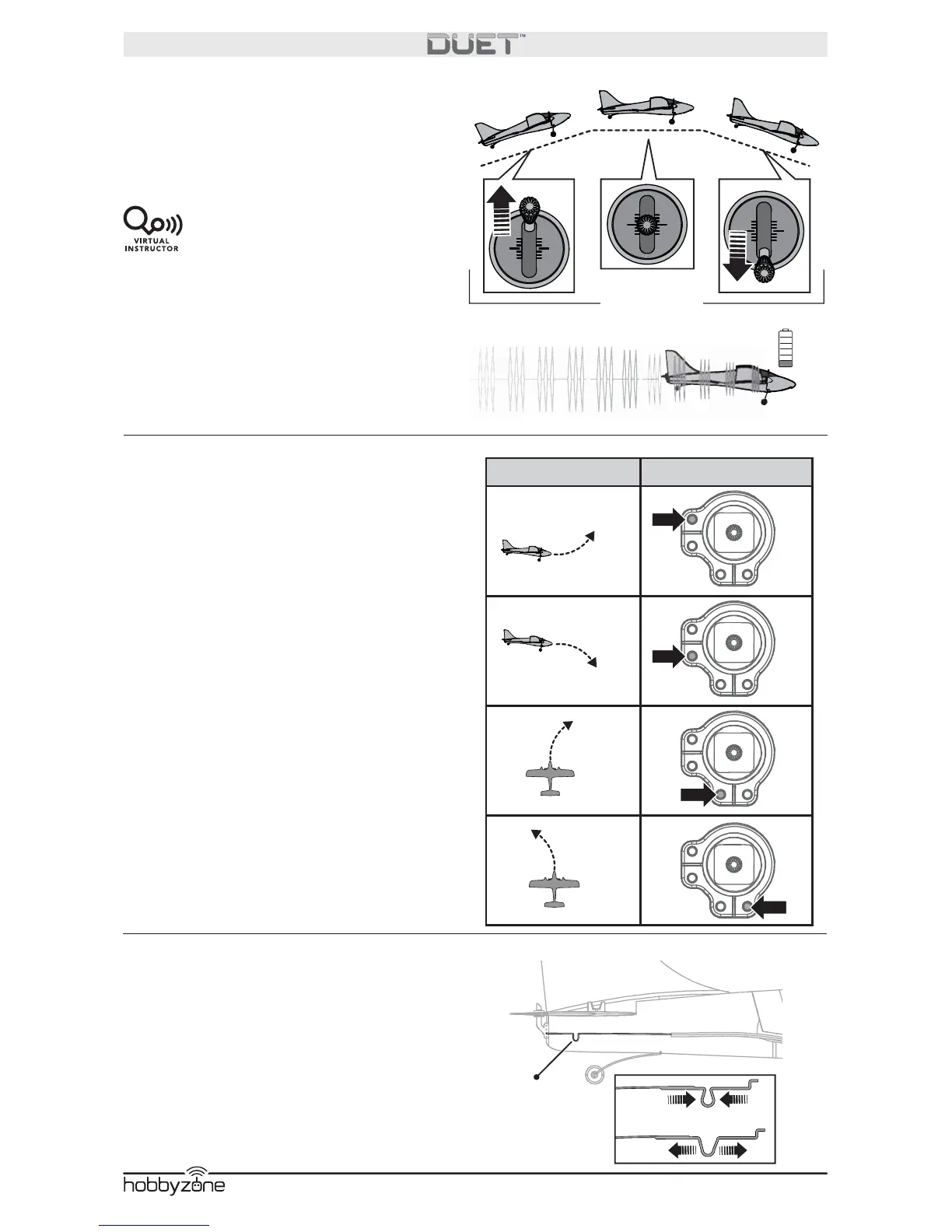
• When you notice that the aircraft no longer
climbs while under full power or the motors
begin to pulse, immediately land the aircraft
and recharge the battery.
Adjusting Trim in Flight
Familiarize yourself with your transmitter’s
controls and the aircraft’s response before
fl ying by performing the recommended Control
Direction Test. Press the trim buttons on your
transmitter to adjust how the aircraft fl ies.
If the aircraft’s nose drifts while the steering
stick is at neutral (centered) and the throttle is at
50%, press the trim buttons:
• Upper button to stop up drift
• Lower button to stop down drift
• Left button to stop right drift
• Right button to stop left drift
If you press a trim button until no beep sounds
and the aircraft does not fl y straight and level,
land and manually adjust the trim as described
below.
Manually Adjusting Trim
Press the trim buttons to return to center (3
beeps will sound), then use a pair of pliers to
carefully bend the metal connector (A):
• Narrow if the aircraft’s nose drifts up.
• Widen if the aircraft’s nose drifts down.
Short test fl ights and small bends may be
needed.
™
Throttle stick
A
Direction of Drift Button to Correct


 To Next Page