The Hoco Y9 Smart Sports Watch is a versatile wearable designed to enhance your daily life and fitness journey. This smart sports watch combines a sleek design with a comprehensive suite of features, making it an ideal companion for both active individuals and those seeking to stay connected and monitor their well-being.
Function Description
The Hoco Y9 offers a wide array of functions, categorized into communication, health monitoring, sports tracking, and smart utilities.
Communication Features:
- Bluetooth Calling: The watch supports Bluetooth 3.0+5.0 connectivity, allowing you to make and receive calls directly from your wrist. Simply enter the number on the dialpad to initiate calls.
- Call Records: Keep track of your call history, including incoming, outgoing, and missed calls, directly on the watch after connecting via Bluetooth.
- Contact Person: Access your contacts from your paired smartphone, making it easy to dial frequently used numbers.
- Message Push: Receive notifications for incoming calls, SMS messages, and alerts from various applications on your smartphone. The watch can store up to 15 messages, automatically overwriting older ones once the limit is reached.
- Find Phone: If you misplace your phone, the watch can help you locate it by triggering an alert on your smartphone.
Health Monitoring Features:
- 24-hour Dynamic Heart Rate Monitoring: The Hoco Y9 continuously monitors your heart rate throughout the day, providing real-time data. The companion APP allows for timing detection and displays daily heart rate trends.
- Sleep Monitoring: Track your sleep patterns, including the duration of deep sleep, light sleep, and wake times. The watch monitors your natural sleep and wake-up times, and the data is synchronized to the APP daily. Note that sleep data is not monitored during the day, with the default monitoring period being from 9:30 PM to 12:00 PM the next day.
- Blood Oxygen Monitoring: While not explicitly detailed in the provided materials, "Sync health data to APP: sleep, heart rate, blood oxygen" suggests the capability to monitor blood oxygen levels, which can be viewed in the APP.
- Sedentary Reminder: The watch can remind you to move after periods of inactivity, promoting a healthier lifestyle.
Sports Tracking Features:
- Multi-sports Mode (20 Sport Modes): The Hoco Y9 supports 20 different sport modes, allowing you to track various activities such as running, walking, cycling, and more.
- Workout Records: Detailed records of your workouts, including duration, distance, calories burned, and heart rate data, are stored on the watch and can be viewed in the APP.
- Pedometer: This feature tracks your steps, distance covered, and calories burned. The target value for steps can be set in the APP. The step counting mechanism relies on arm swing and gravity induction, updating every 10 steps.
- Stopwatch: A built-in stopwatch function for timing your activities.
- Timer: A countdown timer for various purposes.
Smart Utilities:
- Custom Watch Face & Cool Dynamic UI Display: Personalize your watch with a variety of built-in fixed dials, push new dials from the APP, or even create custom dials. The watch features a cool dynamic UI display for an engaging user experience.
- "Do Not Disturb" Mode: When activated, this mode prevents the watch from receiving information pushes and call reminders, ensuring uninterrupted focus. It also allows for brightness adjustment, access to settings, finding your phone, and turning off audio call mode.
- Alarm Clock: Set alarms to help you wake up or remind you of important tasks.
- Weather: After connecting to the APP and enabling location permissions, the watch displays real-time weather temperature and type.
- Music Control: Control music playback on your paired smartphone directly from the watch, including play, pause, skip, and volume adjustments.
- Find Phone: A convenient feature to locate your smartphone if it's misplaced.
- Settings: Access various watch settings to customize your experience.
- Data Synchronization: Exercise data, health data (sleep, heart rate, blood oxygen), message pushes, time, and language updates are synchronized between the watch and the APP.
Usage Features
The Hoco Y9 is designed for intuitive and user-friendly operation.
Connectivity and Setup:
- APP Download: To connect the watch to your mobile phone, you need to download and install the "FitCloudPro" APP. This can be done by searching for "FitCloudPro" in the App Store or Google Play, or by scanning a QR code provided in the watch's settings.
- Bluetooth Connection: Before connecting, ensure your phone's Bluetooth is on and the watch is not connected to another device. Keep the device within 10 meters for optimal connection. If connection issues arise, try restarting your phone's Bluetooth, closing and restarting the APP, or restarting the watch itself. The prerequisite for reconnecting is that the device has not been manually unbound.
- Bluetooth Unbinding: For Android phones, simply click the unbind button in the APP. For Apple phones, you'll also need to unbind the device from the system's Bluetooth settings.
- Data Synchronization: Data synchronization occurs automatically when the device is connected to the APP. You can also manually synchronize data by pulling down the data list on the home page and data interface of the APP.
Watch Operation:
- Dial Switch: The watch offers 12 fixed dials, dial push, and custom dials. Dials can be switched by long-pressing the screen on the dial interface or manually through the watch's settings.
- Control Panel: Access various quick settings and functions, including "Do Not Disturb" mode, brightness adjustment, settings, find phone, and audio call mode.
- Workout Data: To view exercise data after a workout, simply click on the exercise page on the watch.
Important Usage Notes:
- Data Storage: The device can store data independently for up to 7 days, meaning you don't need to carry your phone during exercise. Data will be uploaded to the APP once reconnected.
- Accuracy of Step Counting: Ensure your height and weight data are accurately filled in the APP, and wear the device correctly for precise step and calorie counting.
- Heart Rate Measurement Accuracy: For accurate heart rate readings, ensure full contact between the watch's sensor and your wrist. Keep your body still during measurement. For individuals with darker skin or more arm hair, enable "Enhanced Measurement" in the APP settings.
- Sleep Monitoring: The watch needs to be worn normally for accurate sleep monitoring. Errors may occur if worn too late or when falling asleep.
- Notification Reminders: To receive notifications, ensure the APP is running in the background, background running permissions are enabled, notification reminders are turned on in the APP, and message notifications are enabled in your phone's system settings.
- Bluetooth On/Off: Functions like step counting, sleep monitoring, heart rate monitoring, alarm clock, and sedentary reminders do not require Bluetooth to be constantly on. Data will sync when you open the APP after exercise. However, functions like call reminders, APP notifications, and finding your phone/device require Bluetooth to be continuously on.
Maintenance Features
While the manual doesn't explicitly detail maintenance, several points imply aspects of care and troubleshooting.
- IP68 Waterproof: The Hoco Y9 is IP68 waterproof, indicating resistance to dust and immersion in water. This allows for use during activities like handwashing or in light rain, but it's generally advisable to avoid prolonged submersion or hot water.
- Troubleshooting Connection Issues: The manual provides detailed steps for resolving issues like the device not being found, Bluetooth connection failures, and repeated disconnections. These steps often involve checking phone settings, restarting Bluetooth, or restarting the APP/watch.
- Factory Settings Reset: As a last resort for persistent issues, the option to restore factory settings is available, which can help resolve software-related problems.
- Watch Film: The mention of "Watch film: hoco. Smart film cutting machine can be used for film cutting" suggests that screen protectors are available and can be applied to protect the display, contributing to the watch's longevity.
By understanding these functions, usage guidelines, and implied maintenance aspects, users can maximize their experience with the Hoco Y9 Smart Sports Watch.

 Need help?
 General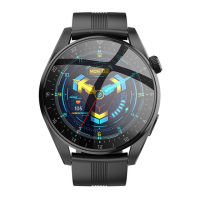

 To Next Page