11
Adres producenta/ Adresse des Herstellers/ Manufacturer’s Address/ Адрес производителя
GTV Poland Sp. z o.o. Sp. k., ul. Przejazdowa 21, 05-800 Pruszków
• BUTTON RELATIVE
Press this button to set the meter to relative mode.
displays as an indicator. To exit relative mode, press the button again,
will disappear.
• Hz / DUTY BUTTON
Press this button to select the Hz measurement or the number of CYCLES at Hz.
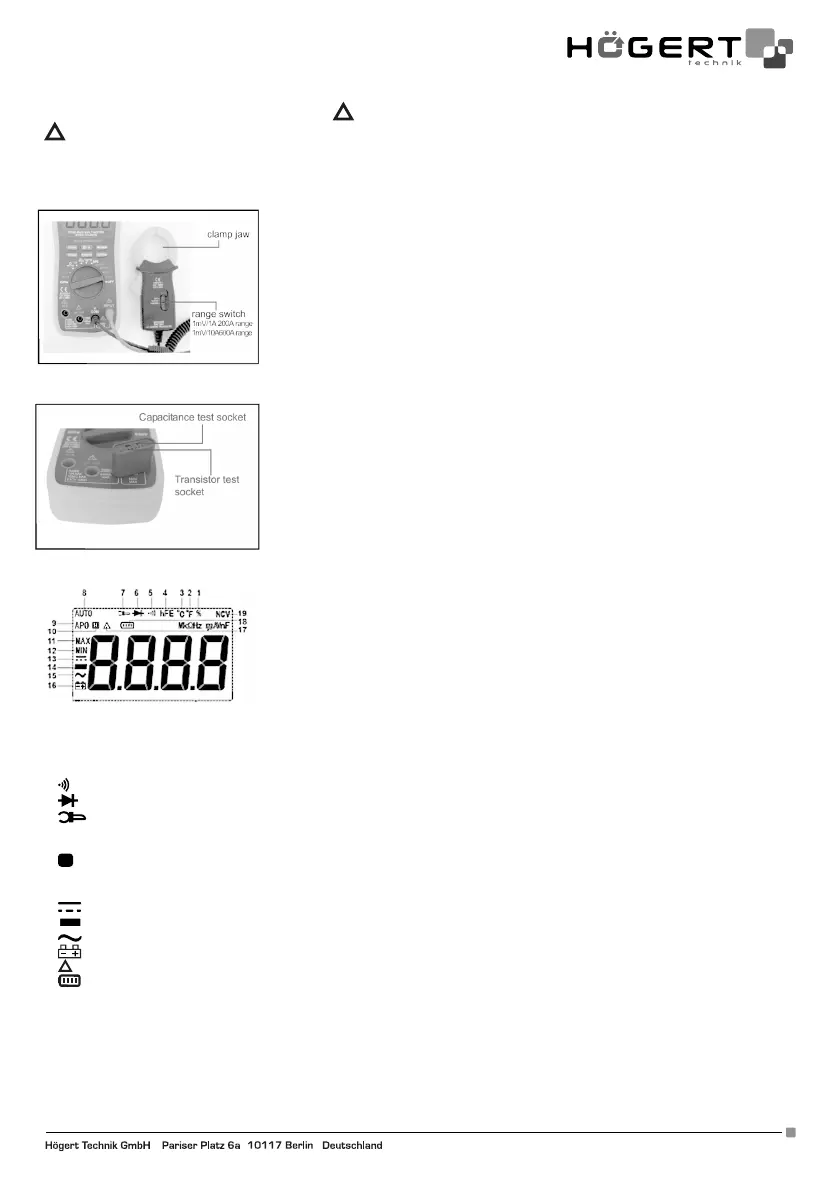
42. HOW TO MEASURE 200 A / 600 A AC
43. HOW TO CONNECT THE ADAPTER
44. LCD DISPLAY
1. % Choice of work cycle
2. ˚F Temperature measurement on the Fahrenheit scale
3. ˚C Temperature measurement on the Celsius scale
4. hFE HFE transistor test
5.
Continuity test
6.
Diode test
7.
External meter was connected
8. AUTO Automatic range selection
9. APO Auto Power Off mode
10.
H
Data hold
11. MAX Maximum measurement reading
12. MIN Minimum measurement reading
13.
Direct current DC
14.
Negative signal
15.
Alternating current AC
16.
Low battery
17.
Relative mode is active
18.
Battery test
19. NCV Non-contact voltage measurement
Accuracy is guaranteed for 1 year 23 ° C ± 5 ° C less than 80% RH


 To Next Page