Default configuration
The encoder comes default preconfigured
with:
- Pulses: 4096 ppr
- Output: HTL
- Direction: Clockwise (CW)
- Reference signal position (Z): 0º
- Reference signal width (Índex, Z, 0): 90º
During Power-On programming (encoder powered-up), the PR90 should NEVER be
programmed with the machine in operation.
At the time of programming information can be lost until programming has finished, and this
could cause unexpected behaviour in the machine connected to the encoder.
17
www.encoderhohner.com +34 972 160 017 info@encoderhohner.com
1
1
2 3
USER MANUAL
PR90 / PR90H
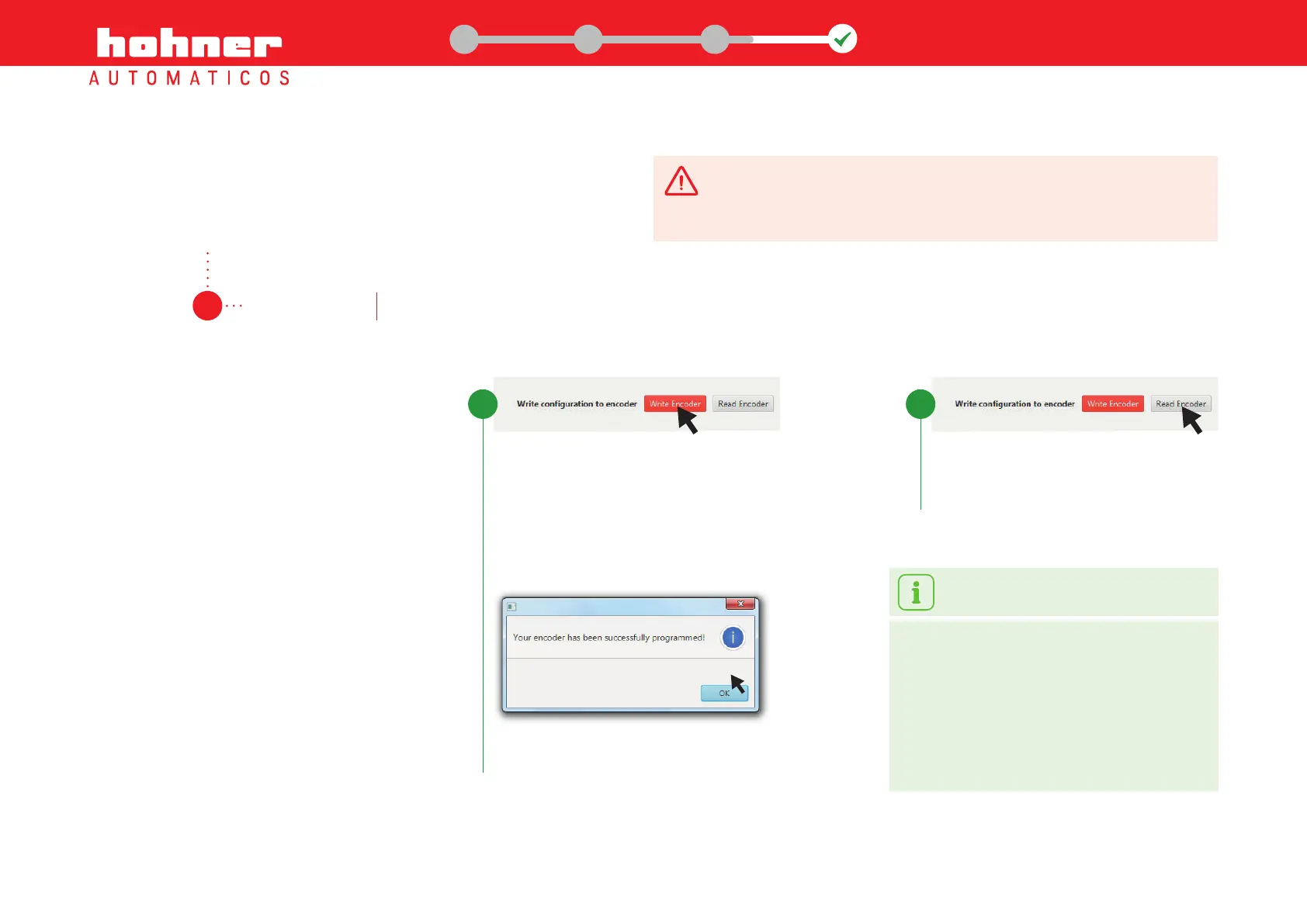
Record the configuration to the encoder
Once these options have been selected, click
on "Write Encoder" in the bottom task-bar of
the programming screen. A message window
appears, confirming that the recording process
has finished correctly.
Write
Encoder
Record configurable parameters selected to the encoder.
4.1
data record
Step 4: Program the encoder
Verify the configuration to the encoder
We can verify that the data has been recorded
correctly by clicking on "Read Encoder" in the
bottom task-bar in the programming screen.
Read
Encoder


 To Next Page