EN-18
M & R Mode Settings
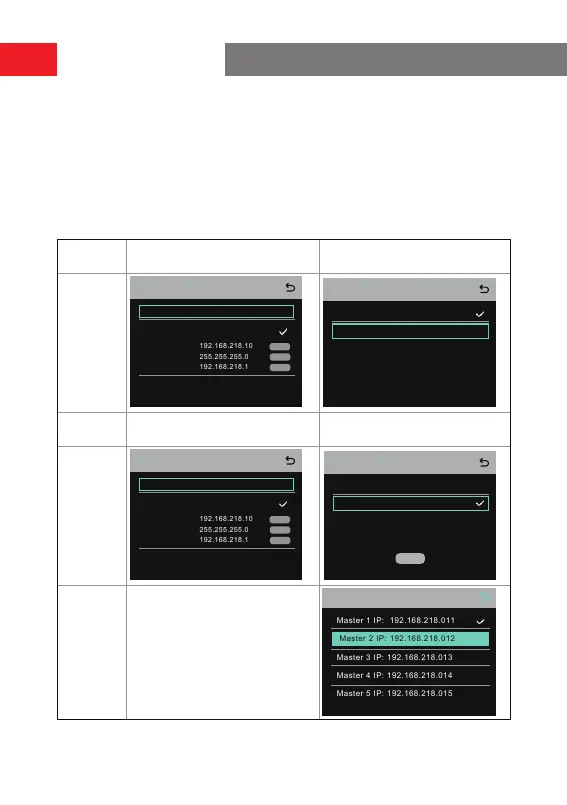
After connecting two hubs using a network cable, select
M & R
on the hubs to set
the hub mode. On one hub, select
Master Device.
On the other hub, select
Remote
Device
>
Scan
and then select the IP address of the corresponding master hub.
Note that the function of obtaining the IP address automatically under
Network
>
Wired Network Setting
needs to be turned OFF on both two hubs.
Hub Display
Hub ①
Select
Network
>
Wired Network
Setting
>
OFF
.
Select
M & R
>
Master Device.
Network
Settings
admin
12345678
User Name:
Password:
Modify
Wired Network Setting
ON
OFF
Gateway:
Modify
Modify
Master And Remote
Remote Device
Master Device
Hub ②
Select
Network
>
Wired Network
Setting
>
OFF
.
Select
M & R
>
Remote Device
>
Scan.
Network
Settings
admin
12345678
User Name:
Password:
Modify
Wired Network Setting
ON
OFF
Gateway:
Modify
Modify
Master And Remote
Remote Device
Master Device
Scan
After
Scan
is selected, the IP
addresses of master devices will
be displayed. Then, select the
desired IP address using the
arrow buttons and press the
Menu/Conrmation button to
conrm the IP address.
Master 1 IP: 192.168.218.011
Master 3 IP: 192.168.218.013
Master 4 IP: 192.168.218.014
Master 5 IP: 192.168.218.015
Master 2 IP: 192.168.218.012
Master-Remote Device
Operation Guide


 To Next Page