EN-17
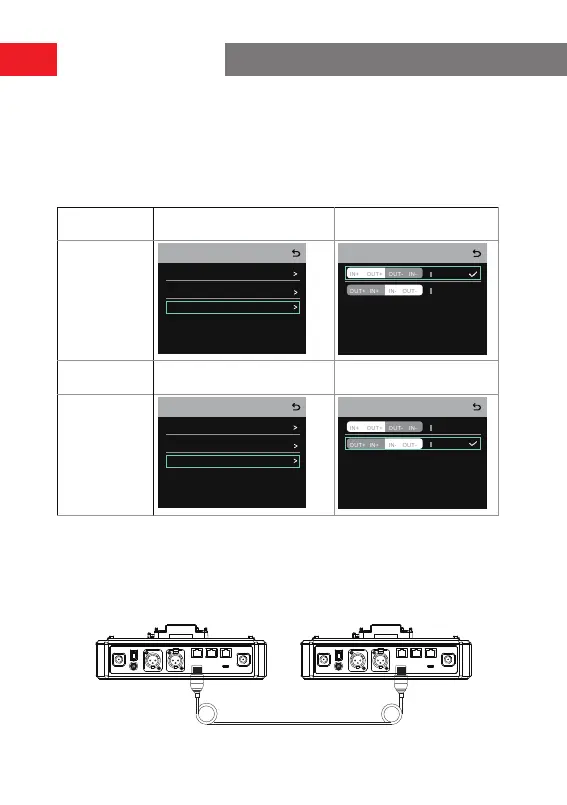
4-Wire Settings
After connecting two hubs using a network cable, select
4 Wire
>
Line Sequence
Switching
on the hubs, and then select
Standard
on one hub and
Cross
on the
other hub.
Hub Display
Hub ①
Select
4 Wire
>
Line Sequence
Switching
.
Select
Standard.
4-Wire Settings
Input Gain
Output Gain
4 Wire Setting
Line Sequence Switching
Cross
3 4
5 6
3 4
5 6
Line sequence switching
Standard
Hub ②
Select
4 Wire
>
Line Sequence
Switching
.
Select
Cross
.
4-Wire Settings
Input Gain
Output Gain
4 Wire Setting
Line Sequence Switching
Cross
3 4
5 6
3 4
5 6
Line sequence switching
Standard
Two-System Cascaded Connection via the IP Network
Use a standard network cable to connect two hubs via the RJ45 inteace. Either of
the two RJ45 inteaces on the hub works. The length of the network cable is up to
300 meters.
Network cable of 300 meters
Network cable of 300 meters
Operation Guide



 To Next Page