Do you have a question about the Holo audio May and is the answer not in the manual?
Highlights the new generation DAC's linear compensation and anti-jitter technologies, SINAD, dynamic range, and connectivity.
Explains the function of the Power button and the four operational buttons (Mute, Display Mode/Menu, Over Sampling, Source) on the DAC's front panel.
Instructions on how to enter configuration mode via shutdown state and menu/power buttons.
Details I2S format, output polarity, and PLL function settings available in configuration mode.
Provides detailed pin assignments for I2S data, clock, and control signals using an HDMI connector.
The Holo Audio May is a state-of-the-art Digital Analog Converter (DAC) designed to deliver exceptional audio fidelity through its fully discrete resistor network, commonly known as R2R architecture. This device represents a new generation of audio technology, aiming to provide a pristine and accurate sound experience for discerning audiophiles.
At its core, the Holo Audio May DAC converts digital audio signals into analog signals, which can then be amplified and played through speakers or headphones. It supports a wide range of digital input formats, including various PCM and DSD sample rates, ensuring compatibility with a broad spectrum of digital audio sources. The DAC features dual mono architecture, meaning the left and right audio channels are independently powered by their own dedicated transformers within the Power Supply Unit (PSU) chassis. This design choice is crucial for achieving superior channel separation and a more precise soundstage, contributing to a more immersive listening experience.
A key innovation in the May DAC is its new generation of linear compensation technology. This technology addresses accuracy errors that typically arise from resistor tolerance in R2R DACs. By implementing this compensation, the device achieves an impressive tolerance accuracy of 0.00005% after compensation, which is a significant factor in its ability to reproduce audio with extreme precision.
The May DAC also incorporates proprietary anti-jitter technology. Jitter, which refers to timing errors in digital audio signals, can degrade sound quality. The May's anti-jitter solution provides full-amplitude jitter reduction without introducing undesirable effects such as increased noise floor. This ensures that the audio signal remains clean and free from timing inaccuracies.
Furthermore, the device utilizes advanced PLL+FIFO (Phase-Locked Loop + First-In, First-Out) technology, which offers a 0.1Hz Third-Order low-pass ability to inhibit jitter. A high-performance femtosecond VCXO (Voltage-Controlled Crystal Oscillator) serves as the PLL clock source, further enhancing timing accuracy. This robust jitter suppression allows the DAC to maintain stable lock even with highly jittered input signals, making it remarkably immune to front-end jitter.
The USB interface of the May DAC is equipped with proprietary ultra-low latency firmware. This custom firmware facilitates highly reliable data transmission and contributes to ideal USB eye pattern measurements, offering 2-4 times higher performance compared to standard official firmware. This optimized USB performance is critical for maintaining signal integrity when connecting to computers or other digital sources.
For I2S connectivity, the May DAC provides two independent HDMI-I2S input interfaces. Each I2S input features a four-way independent circuit, a design choice that minimizes interference and jitter in the I2S clock signals, distinguishing it from standard LVDS chip implementations. The flexibility of these I2S inputs is further enhanced by the ability to configure specific pinout configurations for each group, ensuring compatibility with most HDMI-I2S digital devices available on the market.
The DAC offers different oversampling modes, including NOS (Non-Oversampling), OS (Oversampling), OS PCM (Oversampling to PCM), and OS DSD (Oversampling to DSD). NOS mode directly converts the original data, avoiding potential time-domain distortions like ringing effects that can occur with oversampling. The May DAC is specifically designed to maintain excellent performance even in NOS mode. The oversampling modes allow users to choose between super-sampling PCM to a higher frequency PCM, oversampling DSD to a higher frequency DSD, or always oversampling to PCM or DSD for digital-to-analog conversion, depending on their preference and the characteristics of the input signal.
The Holo Audio May DAC is designed with user-friendly controls on its front panel and includes a remote control for convenient operation.
The front panel of the DAC (main chassis) features several buttons:
To enter Configuration Mode, the device must first be in the shutdown state (indicated by a red light). Users then press and hold both the menu button and the power button simultaneously. Once in menu mode, the menu button is used to select configuration items, and the left or right buttons (OVER SAMPLING / ← and SOURCE / →) are used to change the configuration settings.
Configuration mode options include:
The included remote control (RMT-1) provides additional convenience, offering buttons for Mute, Sampling Modes Settings, Display Mode Settings, Display Input Settings, and Analog Output Settings. It's important to note that while the remote is universal for Holo Audio products, the Volume +/- buttons are not applicable to the May DAC as it does not have a built-in pre-amplifier. These volume controls are intended for use with other Holo Audio branded products like pre-amps and head-amps.
The Holo Audio May DAC is designed for robust performance, but proper connection procedures are essential for its longevity and to prevent potential damage.
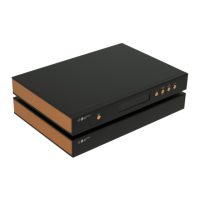
The two-chassis design, separating the main DAC unit from the power supply, not only enhances audio performance by isolating sensitive audio circuits from power supply noise but also simplifies maintenance if either unit requires service. The robust construction and high-quality components used in the May DAC are indicative of a device built for long-term reliability and consistent performance.
| Architecture | R2R |
|---|---|
| Outputs | RCA, XLR |
| Inputs | USB, Coaxial, Optical, AES/EBU |
| DSD Support | Native DSD512 |
| Power Supply | Linear Power Supply |
Loading...