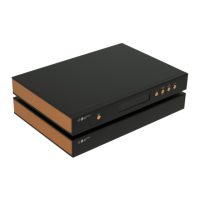
The Holo Audio Spring 2 is a Digital Analog Converter (DAC) that utilizes a new generation of fully discrete resistor network (R2R) DAC modules. This device is designed to provide high-fidelity audio conversion with several improvements over its predecessor.
Function Description
The primary function of the Holo Audio Spring 2 is to convert digital audio signals into analog audio signals. It supports a wide range of digital input formats and sample rates, making it versatile for various audio setups. The DAC features multiple input and output options, allowing for flexible integration into existing audio systems.
Important Technical Specifications
Digital Input:
The Spring 2 offers comprehensive digital input support:
- COAXIAL1, COAXIAL2, OPTICAL, AES:
- PCM: 44.1-192K (24bit)
- DSD: 64X (DOP)
- USB:
- PCM: 44.1K-1.536M (32bit)
- DSD: 64-512X (DOP)
- DSD: 64-1024X (Native)
- I2S:
- PCM: 44.1K-1.536M (32bit)
- DSD: 64-1024X
Analog Output:
The analog output performance is critical for sound quality:
- PCM 48K NOS:
- THD+N: 0.0006% @1K
- SNR: -124dB
- Voltage Output: 1.9Vrms (RCA), 3.8Vrms (XLR)
- DSD 128X:
- THD+N: 0.0008% @1K
- SNR: -118dB
- Voltage Output: 0.95Vrms (RCA), 1.9Vrms (XLR)
Physical Characteristics:
- Dimensions (WxLxH): 430x300x55mm / 16.93x11.81x2.17inch (excluding protruding parts)
- Weight: 8.5kg / 18.74lbs
Configurations:
- Power Input (configurable based on machine label):
- 220-230V 50/60Hz 2A
- 110-115V 50/60Hz 4A
- Power Consumption: 40W
Accessories (Included):
- Power Cable x1 (North America only)
- USB Cable x1
- Remote Control x1 (Not Included in Level 1 models)
Usage Features
Front Panel Controls:
The front panel features four buttons: MUTE, DISPLAY INTENSITY, OVER SAMPLING, and SOURCE.
- MUTE: In standby mode, the output stage circuit turns off, but power consumption remains constant to maintain thermal stability for optimal performance.
- DISPLAY INTENSITY: Adjusts the backlight brightness of the display, with an option to turn it off completely.
- OVER SAMPLING MODES:
- NOS (No Oversampling Mode): Directly converts original data, avoiding time domain distortion like ringing effects. The Spring 2 is designed to maintain good performance in NOS mode.
- OS (Over Sampling Mode): Super-samples PCM to a higher frequency PCM, oversamples DSD to a higher frequency DSD, and performs digital-to-analog conversion.
- OS PCM (Over Sampling/PCM Mode): Always oversamples to PCM for digital-analog conversion, regardless of whether the input is PCM or DSD.
- OS DSD (Over Sampling Direct Stream Digital Mode): Super-samples to DSD mode for digital-analog conversion, regardless of whether the input is PCM or DSD.
- SOURCE: Selects the digital input source from USB (ground isolation), RCA, BNC, AES, Optical, and HDMI interface I2S.
Rear Panel Connections:
The rear panel provides:
- Analog Signal Output: For connecting to amplifiers or preamplifiers.
- Digital Signal Input: Multiple options including COAXIAL1, COAXIAL2, OPTICAL, AES, USB, and I2S.
- AC Power Input: For connecting the power cable.
Remote Control (RMT-1):
The included remote control (for L2 and KTE models) offers convenient control over various functions:
- Sampling Mode: Changes the oversampling mode.
- Mute: Mutes the audio output.
- Display Brightness: Adjusts display intensity.
- Volume + / -: Increases or decreases volume (Note: Volume control does not apply to the Spring 2 DAC, but the remote can be used with other HoloAudio devices).
- Digital Input Setting: Selects the input source.
- Analog Output Settings: (Specific functions not detailed in the manual, but implied).
I2S Port:
The I2S port uses LVDS differential transmission mode with an HDMI physical interface, allowing the use of an HDMI cable. However, it transmits I2S electrical signals, not conventional HDMI audio/video signals. The manual provides a detailed pinout for I2S DATA, BCK, LRCK, MCLK, and GND for both PCM and DSD modes.
Driver Installation:
- Mac OS X (10.6.5 and above): Built-in driver, no installation needed. Does not support DSD Native mode.
- Linux: Built-in drivers, no installation needed.
- Windows (latest Win10): Requires installation of Holo Audio's provided driver for ASIO and DSD support. The installation process involves connecting the device, ignoring Windows' "driver installation failed" notification, and running the Holo Audio driver setup file. The wizard guides the user through installation, requiring closure of other applications and confirmation of installation prompts.
Common Software Settings (Windows):
After driver installation, the "Holo Audio USB Digital Interface Gen2" device appears in Windows' sound settings. Users need to set this device as the default playback device by right-clicking the sound icon in the systray, selecting "playback device," and then setting "Holo Audio USB Digital Interface Gen2" as default.
Improvements over Spring version 1
- DAC Modules: New generation fully discrete resistor network DAC modules with lower distortion for small signals and faster conversion speed.
- DSD/PCM Support: World's first DAC to truly support DSD1024 and PCM1.536M.
- USB Interface: Self-developed firmware with ultra-low latency, high reliability data transmission, and 2-4 times higher performance than official firmware.
- Clock: Femtosecond clock for improved timing accuracy.
- I2S Input Interface: Improved design with four independent receiving circuits to lower interference for the I2S clock signal and enhance overall sound quality.
- Power and Analog Reference Power: Improved power and analog reference power for the digital section, offering superior performance with higher than 110db PSRR and noise below 0.2uV within 100KHz.
- Remote Control: Aluminum CNC Machined Remote control (included with L2 and KTE models only).
- Display Screen: Improved display screen, imitating the original classic matrix display of Spring version 1, showing more information (three different points of information) at once.
Maintenance Features
The manual does not explicitly detail maintenance features beyond driver installation and software settings. However, the design choices, such as maintaining thermal stability in standby mode, suggest an emphasis on long-term performance and reliability. Regular software updates for drivers, if provided by Holo Audio, would be part of maintaining optimal performance.

 Need help?
 General

 To Next Page