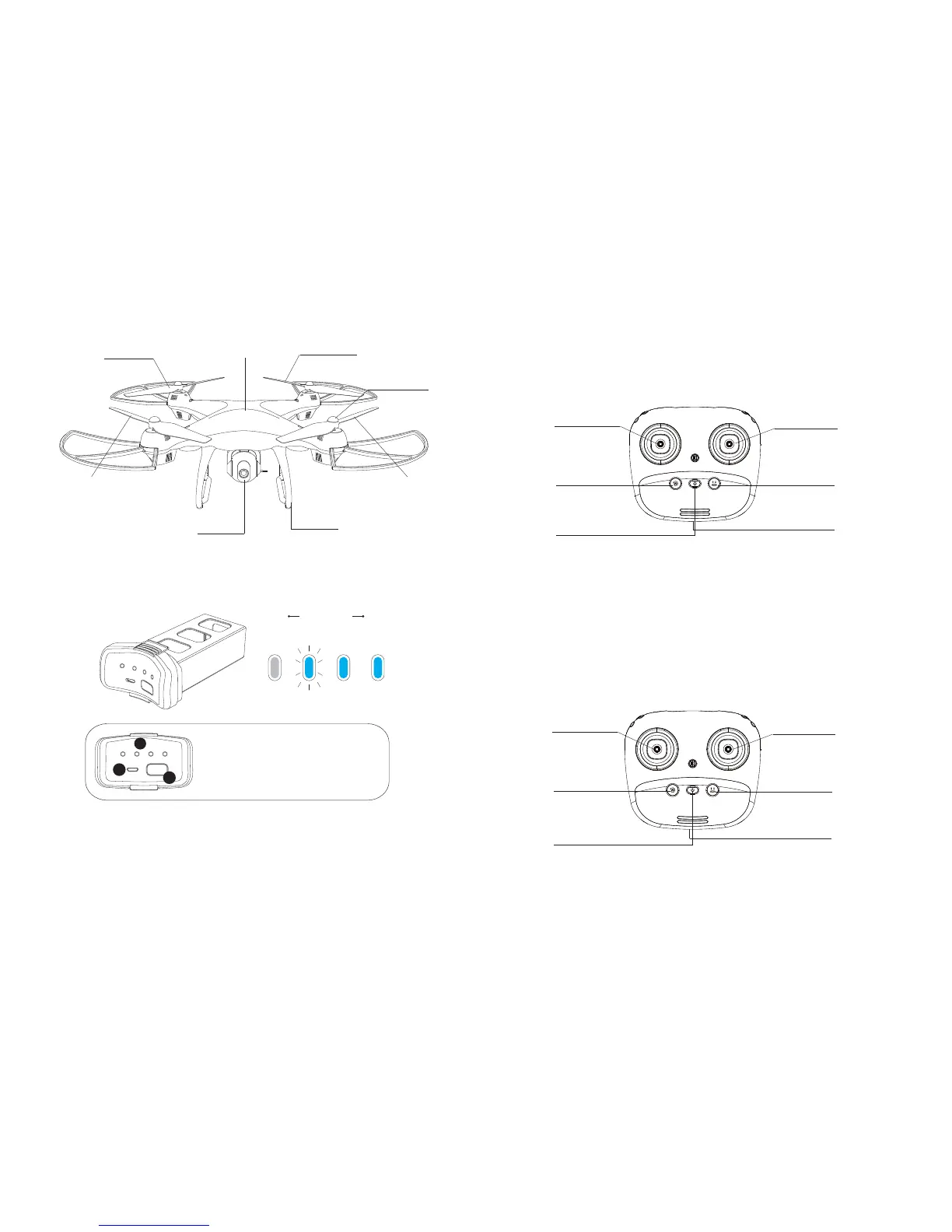
Drone’s Detail
Transmitter Functions
⑥ USB Charging Port.
⑥ USB Charging Port.
Ascend/Descend;
Turn Left/Right
Fly to Left/Right/
Forward/Backward
③ Return to Home
④ One Button Take-off/
One Button Landing
⑤ Power Button
① Forward/Backward;
Turn Left/Right
② Ascend/Descend;
Fly to Left/Right
③ Return to Home
④ One Button Take-off/
One Button Landing
⑤ Power Button
Mode 2:
Left hand throttle Mode 2 will be default setting.
①②
Propeller A
(Clockwise)
Propeller A
(Clockwise)
Propeller B
Propeller B
(Counter Clockwise)
(Counter Clockwise)
High Electricity Low
1
2
3
1. Battery Power Indicators
2. Micro USB Charging Port
3. Power Switch
Battery of Drone
Tip:
HD Camera
Landing Gear
Body Frame
Cap
Press the Power Switch shortly to turn on; hold the Power Switch for
2 seconds to turn off.
Once the battery is low, please fly the drone back as soon as possi-
ble. Otherwise, it may cause the drone loss.
10 11
Mode 1:
Turn on the transmitter while holding the “Follow Me” button to enter Mode
1.
(Don’t release the “Speed Switch” button until the transmitter is powered on.)


 To Next Page